

Stability AI Stable Diffusion 3.5
Stability AI · Image
Stable Diffusion 3.5 is an open-source image generation model family from Stability AI, and it works as a text-to-image model you can run yourself: you type a written prompt and get images you own and can use commercially. It's the kind of AI image generator you install rather than subscribe to. It ships in three sizes, from a lightweight version for consumer GPUs to an 8.1-billion-parameter base model for professional work. Unlike closed image tools, you can download the weights, run them on your own machine, and fine-tune the image model for a specific style or product. No subscription required.
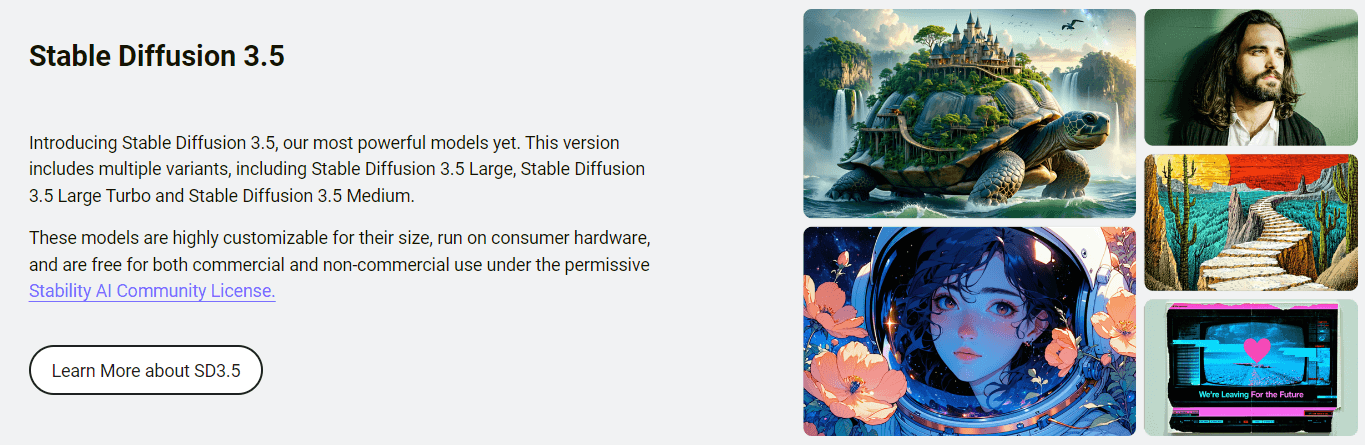
À propos de Stability AI Stable Diffusion 3.5
What Is Stable Diffusion 3.5
Stable Diffusion 3.5 is the image generation family Stability AI released in October 2024, and it's the successor to Stable Diffusion 3 Medium. The company has been open about that earlier release falling short of its own standards, and 3.5 is the rebuilt answer. What matters for you: the model weights are downloadable, the code is public, and most people can use the output without paying a license fee. That's rare.
The family covers three models so you don't have to pick between speed and quality. Stable Diffusion 3.5 Large has 8.1 billion parameters and targets professional images at 1 megapixel. Stable Diffusion 3.5 Large Turbo is a distilled version that gets a usable image out in 4 steps, which makes it noticeably faster. Stable Diffusion 3.5 Medium sits at 2.5 billion parameters and runs out of the box on everyday consumer hardware, generating images between 0.25 and 2 megapixels.
The catch is that this isn't a one-click web app for beginners. You need somewhere to run it, whether that's your own GPU, a hosted platform like Replicate or ComfyUI, or the paid Stability AI API. The models also lean toward diversity over consistency: the same prompt with different seeds can give you wildly different results, which is intentional. Ask for something vague and you'll get something vague back. Specific prompts get specific images.
So which of the three sizes should you actually grab? That depends entirely on your GPU.
Getting Started
Getting Stable Diffusion 3.5 running depends on which path you take. The self-hosted route is the most flexible and free for most users.
- Pick a model size. Grab Large for maximum quality, Medium or Large Turbo if your hardware is limited.
- Download the weights from Hugging Face (stabilityai on Hugging Face hosts all three) or pull the inference code from the Stability-AI/sd3.5 repository on GitHub.
- Load the model in a compatible interface. ComfyUI and similar tools handle the workflow wiring for you.
- Write your prompt, set resolution and seed, then generate. Medium needs around 9.9 GB of VRAM to reach full performance.
- Take the output and edit further in your usual editor. You own the images you make.
If you'd rather skip the setup, sign up for the Stability AI API or a hosted platform and call the model directly. That route costs money, but it saves you hours of configuration.
Informations sur le produit
Aperçu des tarifs, des plateformes compatibles et des performances de Stability AI Stable Diffusion 3.5.
Idéal pour
Les utilisateurs, tâches et cas d'usage où cet outil convient le mieux.
Utilisateurs
- Independent artists
- Developers building image features
- Hobbyists with a decent GPU
- Researchers and students
Tâches
- Generating marketing visuals
- Fine-tuning a custom style
- Prototyping before a shoot
- Building an app's image pipeline
Cas d'usage
- Running an image generator entirely offline
- Working on a laptop or desktop GPU rather than renting cloud compute every time.
- Shipping commercial content for a small studio where the $1M revenue ceiling isn't a concern.
Fonctionnalités clés
Three Model Sizes for Different Hardware
Stable Diffusion 3.5 comes in Large (8.1B parameters), Large Turbo (a distilled version built for 4-step generation), and Medium (2.5B parameters). Three separate models, three different jobs. The split lets you match the model to your hardware instead of forcing one size on everyone. Medium is the accessible entry point, while Large is the one aimed at professional, 1-megapixel output.
Customizability and Fine-Tuning
The models were built to be customized, not just used. Stability AI added Query-Key Normalization to the transformer blocks specifically to make training more stable, which simplifies fine-tuning and building derivative models. You can train a LoRA, adjust the base model, or build an app around a custom workflow, and the community license explicitly allows distributing and monetizing that work. Closed tools rarely let you do this.
Runs on Consumer Hardware
Medium needs only around 9.9 GB of VRAM, excluding the text encoders, to reach full performance. That puts it within reach of many consumer GPUs, which is unusual for a modern image model of this quality. If you've been holding off on local image generation because you assumed you'd need a data-center card, this is the model that changes the math. It really does run on a gaming rig.
Open License With Commercial Rights
The Stability AI Community License is free for research and personal use, and free for commercial use for anyone under $1M in annual revenue. You also keep ownership of the generated media. That combination is the main reason small studios and indie developers pick this over closed competitors. Read the terms before you ship.
Multiple Access Routes
You don't have to self-host. The same models are available through the Stability AI API, Replicate, Fireworks AI, DeepInfra, and ComfyUI. That means you can start with a hosted endpoint and migrate to self-hosting later, or mix both depending on the workload. No lock-in either way.
Improved Prompt Adherence
Stability AI describes 3.5 as top-tier on prompt adherence, the ability of the model to actually draw what you asked for rather than an approximation. For prompting-heavy work like detailed scenes or specific compositions, that's the difference between a few attempts and a frustrating afternoon. Vague prompts still misbehave. Fine-tuning tightens the gap.
Avantages et inconvénients
Avantages
- Free weights under a permissive license, so there's no per-image cost when you self-host.
- You own the images and can use them commercially if your revenue is under $1M.
- Three sizes mean you can trade speed for quality based on your GPU.
- Fine-tuning and LoRA training are supported, letting you build a custom style or product.
- Works across self-hosting, the official API, and third-party platforms, so you're not locked into one vendor.
Inconvénients
- Not a beginner tool. There's no simple web button unless you use a hosted platform.
- Output varies a lot between seeds by design, so vague prompts give inconsistent results and you'll spend time iterating.
- Running the full Large model locally demands serious GPU memory, which rules out many laptops.
- Above $1M in annual revenue, the free commercial license ends and you need an enterprise agreement, which means contacting Stability AI for a quote.
Questions fréquentes
It generates images from text prompts, and you can use it for everything from concept art and marketing visuals to building image features into an app. Because the weights are open, it also gets used as a base for fine-tuning and custom models, which makes it a workhorse for AI art generation at scale.
Contenus associés
Découvrez des outils, des compétences et des articles liés à Stability AI Stable Diffusion 3.5.
Alternatives à Stability AI Stable Diffusion 3.5

X Ray Interpreter
X-ray Interpreter · ImageX Ray Interpreter est un outil de radiologie par IA basé sur le web qui transforme les radiographies, les scanners, les IRM, les échographies et les images TEP en comptes rendus en langage clair. Vous téléchargez un examen, obtenez une interprétation préliminaire de la radiographie en quelques instants, puis posez des questions complémentaires si quelque chose mérite une explication. Il sert de second avis et d'aide à l'apprentissage, pas de diagnostic médical.

Aieasypic
AIEasyPic · ImageAIEasyPic est un générateur d'images par IA qui transforme de simples prompts texte en œuvres finies en quelques secondes. Vous pouvez aussi entraîner des modèles personnalisés sur vos propres photos, échanger des visages dans des images existantes et créer de courts clips vidéo à partir de texte, le tout depuis un navigateur. Il convient aux créateurs occasionnels qui veulent des visuels rapides et aux amateurs qui souhaitent bâtir un modèle personnel sans toucher à la moindre ligne de code.

Chargen
Chargen · ImageChargen est un générateur de personnages par IA et une boîte à outils de création d'univers conçue pour Donjons & Dragons et les autres jeux de rôle sur table. Il transforme une idée d'une ligne en un portrait de personnage peint, crée des PNJ, des monstres, des cartes et des rencontres dans la même session, et garde les détails de chaque créature à portée de main. Le volet art pour jeu de rôle sur table repose sur un système de crédits appelé Gold, tandis que les générateurs de texte restent gratuits pour tous.