

Everypixel
Everypixel Media Innovation Group · 이미지 · 코딩
Everypixel is an AI stock image search engine, and a stock image finder in the practical sense: one query across 50+ libraries. It pulls licensed and free photos, plus vectors and illustrations, from more than 50 stock sites into one search box. Instead of opening Pixabay, Shutterstock, and Adobe Stock one at a time, you type a keyword once and compare results and prices side by side. The same company sells separate tools for people on the other side of the trade: stock contributors who need to keyword and submit files, and developers who want its image recognition models through an API.
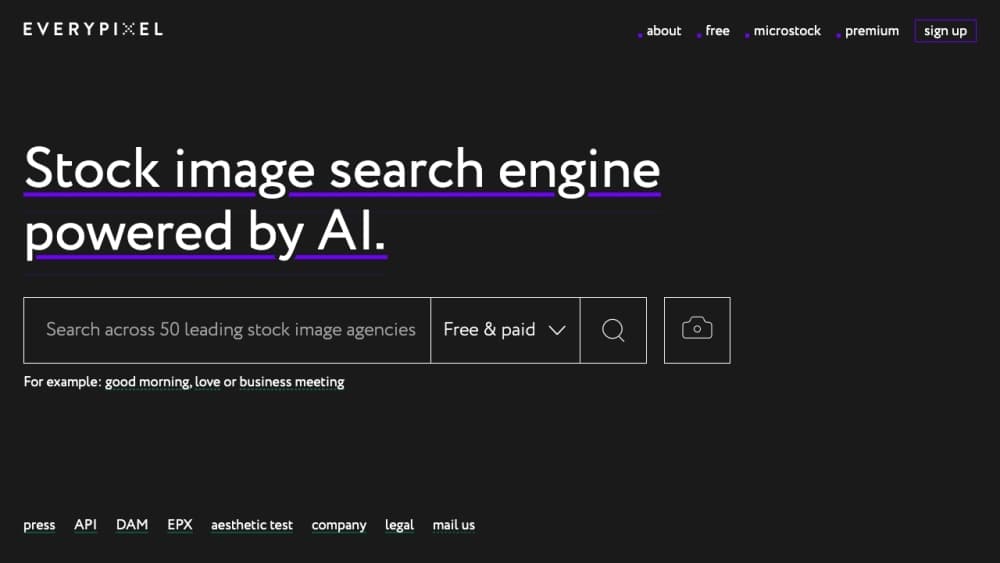
Everypixel 소개
What Is Everypixel
Everypixel is a stock photo search engine built by Everypixel Media Innovation Group, a company that started as a photo, video, and audio production studio back in 2005. The search tool was the group's answer to a specific complaint: the stock market has hundreds of millions of images, but no decent way to search across all of them. Their fix was to aggregate content from many agencies and run it through a neural network that scores photo quality, so dated or plastic-looking shots get pushed down in the results.
Why bundle all this instead of searching each site yourself? Because the same photo rarely costs the same everywhere. The price comparison for stock photos runs across all of them, and the AI filter cuts the junk before you see it. Filters cover color, orientation, image type, and license, and you can upload an image you already have to hunt for a similar one or a higher-resolution version. The catalog leans heavy on well-known names: Shutterstock, iStock, Adobe Stock, Depositphotos, and 123RF on the paid side, plus Unsplash, Pexels, Pixabay, and Vecteezy on the free side.
Two catches matter up front. First, Everypixel is a search engine, not a store. All rights stay with the copyright holders, and you still buy or download from the source site, so you're dealing with that agency's license terms. The search tool itself is free to use, but there's no single Everypixel subscription that unlocks everything. Its sister products, the Labs API and the DAM tool for contributors, are billed separately.
Getting Started
- Open everypixel.com and type a keyword like "business meeting" or "good morning" into the search field. No account is needed for searching. Start there.
- Pick a license filter. The toggle at the top switches between free and paid, paid only, and free only.
- Narrow the results with filters for color, orientation, and image type (photo, vector, or illustration).
- Compare prices on the images you like, then click through to the source stock site to download or buy under its license.
- If you already have an image, paste its URL or upload the file to search by image and find matches or better-quality versions.
제품 정보
Everypixel의 요금, 지원 플랫폼, 성능을 한눈에 확인해 보세요.
추천 대상
이 도구가 가장 잘 맞는 사용자, 작업, 상황입니다.
사용자
- Designers and marketers
- Bloggers and small publishers
- Stock contributors
작업
- Finding a stock photo for a project
- Comparing license prices
- Searching by image
- Auto-tagging an image library
활용 상황
- Last-minute content deadlines
- Budget-limited projects
- Building a searchable asset library
주요 기능
Cross-Source Stock Search
Everypixel queries more than 50 stock sites in a single request, covering paid agencies like Shutterstock, iStock, and Adobe Stock alongside free libraries such as Unsplash, Pexels, and Pixabay. You see paid and free results together. Filter to one category when you need it. That toggle takes one click. The index refreshes weekly, so you're not pulling from a stale cache. That weekly refresh matters more than it sounds for anyone hunting images that match a current trend or campaign.
AI Image Curation
The core filter is a neural network trained to judge stock photo quality. It scores each image and uses that score in ranking, so clean, professional shots land near the top while dated or overly staged ones sink. The company built the model on a training set labeled with help from designers, editors, and experienced stock photographers. It's the difference between a raw keyword match and results you'd actually use. No model gets taste right every time. It gets close, and that's enough.
Price Comparison Across Sites
The same image often carries a different price tag depending on which agency sells it, and Everypixel surfaces those differences next to each result. It also flags images that are paid on one site but free on another, which is the kind of overlap you'd never catch by searching sites one by one. For anyone licensing images at volume, that comparison is where the tool earns its keep. Search once. Pay less.
Search by Image
Upload a photo or paste its URL, and Everypixel looks for the same or visually similar images across its sources. The practical use is upgrading quality. Find the original shot at a higher resolution, or locate a close alternative when you can't license the exact one you found. It also helps trace where an image originally came from, which is useful when you need to verify a license before publishing.
Free and Premium Collections
The free side pulls Creative Commons 0 images from libraries like Unsplash, Pexels, Pixabay, and Vecteezy, plus a rotating exclusive collection the Everypixel team shoots and publishes monthly. The premium side aggregates higher-end agencies including Stocksy, Offset, and plainpicture for projects that need a more polished look. One search page, two very different price brackets. That saves you from deciding on budget before you've even seen the options.
Everypixel Labs API
Everypixel Labs exposes the company's AI models as pay-as-you-go APIs. The image keywording endpoint returns tags and detects dominant colors for automated tagging, content moderation, and e-commerce product tagging, at $0.6 per 1,000 requests after a free trial. Other endpoints cover image captioning, age recognition, photo quality scoring, lipsync, text-to-speech, and face swap. It's aimed at developers and platforms that need to process images at scale rather than search for them by hand.
장단점
장점
- Searches 50+ stock sites at once, covering both free and paid libraries in a single query.
- Price comparison flags the cheapest source for an image and catches photos that are free on one site and paid on another.
- The AI quality filter pushes dated or obviously staged stock shots below better-looking results.
- Free search with no account required, and the index updates weekly.
- A pay-as-you-go API for teams that want the same recognition models in their own pipeline.
단점
- It's a search engine, not a store, so every purchase or download still happens on the source site under that site's license terms.
- The free plan applies to searching only. The DAM contributor tool and the Labs API are billed separately, so there's no all-in-one subscription.
- Labs API pricing is usage-based rather than a flat plan, which makes cost harder to predict on high-volume workloads.
- Image-relevance and quality ranking vary by query, so niche or abstract searches still need manual filtering.
자주 묻는 질문
Everypixel is a stock image search engine that finds photos, vectors, and illustrations across more than 50 stock sites from one search box. It also compares license prices and offers an AI quality filter, so you can locate a usable image and check where it's cheapest to license.
관련 콘텐츠
Everypixel와 관련된 도구, 스킬, 아티클을 살펴보세요.
Everypixel 대안

X Ray Interpreter
X-ray Interpreter · 이미지X Ray Interpreter는 X선, CT, MRI, 초음파, PET 이미지를 쉬운 말의 리포트로 바꾸는 웹 기반 AI 영상의학 도구다. 스캔 이미지를 올리면 X선 예비 판독 결과가 곧바로 나오고, 설명이 필요한 부분이 있으면 이후에 추가 질문도 할 수 있다. 이 도구의 위치는 2차 소견과 학습 보조이며, 의료 진단은 아니다.

Aieasypic
AIEasyPic · 이미지AIEasyPic은 단순한 텍스트 프롬프트를 몇 초 만에 완성된 예술 작품으로 바꾸는 AI 이미지 생성기다. 자신의 사진으로 맞춤 모델을 훈련하고, 기존 이미지에서 얼굴을 바꾸고, 텍스트로 짧은 영상 클립을 만들 수도 있다. 모두 브라우저에서 끝난다. 빠른 비주얼을 원하는 가벼운 창작자에게도, 코드를 전혀 건드리지 않고 개인 모델을 만들고 싶은 취미 사용자에게도 어울린다.

Chargen
Chargen · 이미지Chargen은 던전 앤 드래곤과 다른 탁상용 롤플레잉 게임을 위해 만든 AI 캐릭터 생성기이자 세계관 구축 툴킷이다. 한 줄 아이디어를 그려진 캐릭터 초상화로 바꾸고, 같은 세션에서 NPC, 몬스터, 지도, 조우를 만들어내며, 모든 생물의 세부 정보를 손 가까이에 둔다. 탁상용 롤플레잉 아트 부분은 Gold라는 크레딧 시스템으로 돌아가고, 텍스트 생성기는 모두에게 무료로 남는다.