

Validate AI
AskBetter · Business
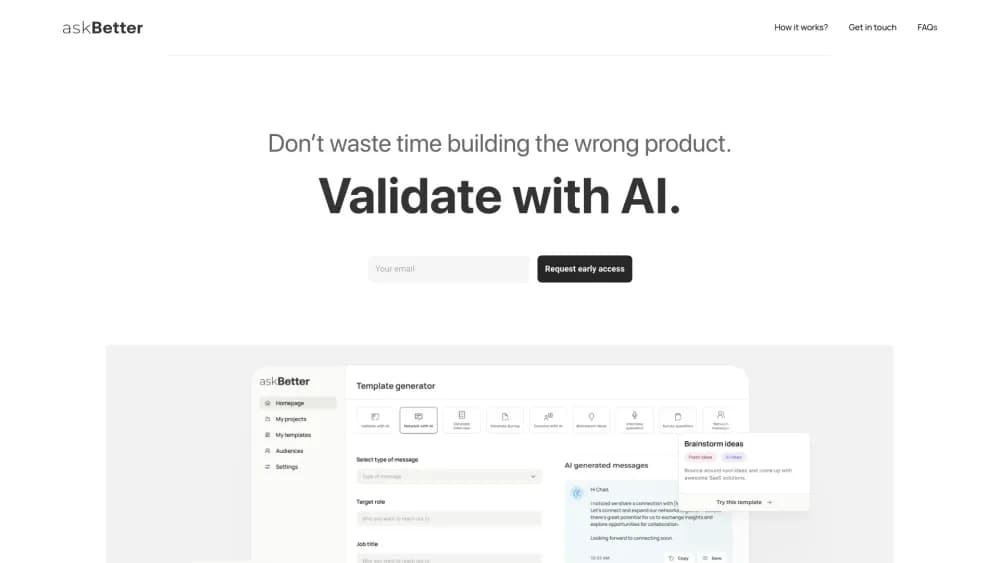
Validate AI, or AskBetter, writes customer interview questions, surveys, and polls with AI, then turns the answers into product insights you can act on.
About Validate AI
What Is Validate AI
Validate AI is the product name behind AskBetter, a web tool for testing a business idea before you build it. It works as an AI idea validation tool first and a writing shortcut second. You describe what you want to learn, and it writes the questions for you: interview scripts, survey forms, and quick polls aimed at the people who might buy.
Most founders skip validation because the research half is slow, and business idea validation has no shortcut that doesn't involve talking to someone. A neutral interview script costs an afternoon. Finding the right respondents costs a week. Reading twelve transcripts to spot the pattern costs another day. AskBetter squeezes the first and last parts into a generator plus an analysis step, so the bottleneck moves to getting people to answer.
The tool is small and focused, and that's also its limit. It designs questions and sorts feedback. It doesn't supply a panel of respondents, it isn't a research repository, and there's no documented API. One more thing to check before you plan around it: as of October 2026, askbetter.dev serves an unrelated guide about asking better questions at work rather than the validation app, so confirm the product still loads in your region.
Getting Started
- Open askbetter.dev and create an account, if the app is reachable where you are.
- Describe the idea and the single assumption you want to test, such as price sensitivity or the moment the problem shows up.
- Generate interview questions, a survey, or a poll, then edit the wording until it sounds like you.
- Send it to the audience you picked, collect the answers in the app, and run the analysis on what comes back.
- Turn the themes you can defend into a feature list, a pricing test, or a decision to stop.
Product Information
A quick look at Validate AI's pricing, supported platforms, and performance.
Best for
The users, tasks, and scenarios where this tool fits best.
Users
- First-time founders
- Solo product managers
- Indie makers and side-project builders
- Small UX or marketing teams without a researcher
Tasks
- Writing a customer interview script that doesn't pitch
- Building a first survey or poll
- Sorting open-text answers
- Turning feedback into a feature list
Scenarios
- Testing a pricing assumption before you publish a landing page
- Validating a niche B2B idea where only 15 people can answer
- Killing an idea cheaply
- Collecting pre-launch feedback from a waitlist
Key features
AI Question Generation
This is the core of the product. You describe the idea, and it writes interview questions, survey items, and poll options. The value isn't clever wording. It's that the questions get written on the day you decide to test something, instead of sitting in a notes app for a month.
Prompt Library and Survey Generator
AskBetter doubles as a lightweight AI survey generator: pick a template, answer two or three questions about your idea, and you get a form with matched interview questions behind it. The library ships a set of ready prompts built around common validation work: problem discovery, willingness to pay, switching from a competitor, and feature priority. Borrow one as-is or adapt it. Either way you skip the blank page and the guessing about what a good research question looks like.
Audience Targeting
The tool helps you describe who should answer before anything gets sent. Narrowing the audience is the difference between twelve useful replies and forty people telling you the idea sounds nice.
Response Collection and Tracking
Surveys and polls land in one place, and the tool tracks what came back. For a solo founder that replaces a spreadsheet and three browser tabs.
AI Analysis of Feedback
Paste interview notes or survey answers and the analysis pulls out repeated themes, objections, and requests. It gives you a first pass at the pattern. You still decide which themes are strong enough to change the product.
Idea Workspace
Ideas, questions, and responses sit together, so you can keep several concepts in flight and compare what each round of feedback said. Handy when you're testing a product and a pricing angle at the same time.
Pros and cons
Pros
- Question writing and analysis live in one place, so a validation project doesn't stall between tools.
- Fast enough to use on a hunch, not just on a serious bet.
- The prompt library gives non-researchers a decent starting point without a methods course.
- The free tier is enough to see whether the workflow fits how you work.
Cons
- It doesn't supply respondents. You still have to find people, and that's the slowest part of any validation project.
- No public API and no integrations, so answers get exported or read inside the app.
- Product status is unclear. The domain currently hosts a different site, which makes long-term availability a real question.
- Analysis is a summary, not statistics. A sample of six will still mislead you if you read the output as proof.
Frequently asked questions
It writes research questions for you, in the form of customer interview scripts, surveys, and polls, then analyzes the answers for repeated themes. The thinking about your idea stays with you. The tool removes the blank page and the sorting work.
Related content
Explore related tools, skills, and articles for Validate AI.
Validate AI Alternatives

Claude for Google Workspace
Anthropic · Writing · Productivity · BusinessClaude for Google Workspace puts Claude in a sidebar inside Google Docs, Sheets, and Slides, where it reads the file you have open and edits it in place.

KloudMate 2.0
KloudMate · Coding · BusinessKloudMate 2.0 is an AI observability platform that keeps logs, metrics, traces, and incidents in one place, with KloudMate Assistant investigating alerts and proposing the fix.
Cekura Bench
Cekura · Voice & Language · BusinessCekura Bench is a public benchmark that runs speech-to-speech models and deployed voice agents through 82 simulated phone calls, three times each, then publishes pass rates, latency and cost.