

Citation Generator AI
Paperguide · Business
Citation Generator AI is a free browser tool that turns a URL, DOI, ISBN, or PDF into APA, MLA, Chicago, and Harvard citations, then keeps the sources in folders.
About Citation Generator AI
What Is Citation Generator AI
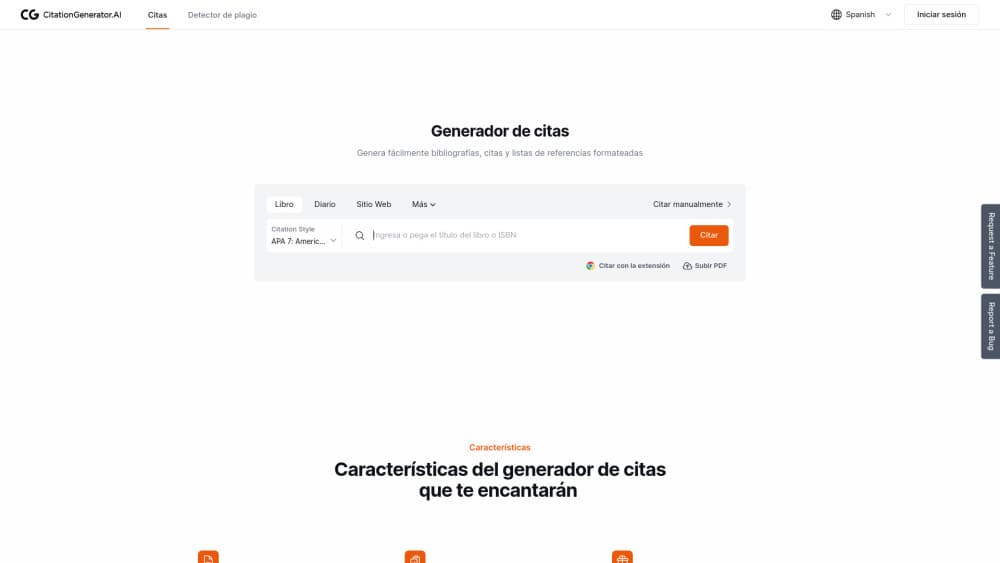
Citation Generator AI is a free citation maker from Paperguide, the research tool company behind paperguide.ai. The address citationgenerator.ai now lands on Paperguide's citation page, where the whole tool runs in a browser tab. Nothing installs, and no account sits between you and the first citation.
The core job is the boring part of writing a paper: getting the reference list right. You paste a link, type an ISBN, or upload a PDF, and the tool pulls the author, title, date, and publisher from that source, then formats them in the style you picked. The style list runs well past the usual four, covering Vancouver, IEEE, AMA, and Turabian alongside APA, MLA, Chicago, and Harvard. Generated citations save automatically in your browser, and a folder view keeps a long reading list from turning into a mess.
The limits are worth knowing before you commit a semester to it. Citations live in local browser storage, so clearing site data or switching machines loses them, and the automatic metadata pull is only as good as the record behind the link. This is a citation and bibliography tool first. Reference management on the scale of Zotero, with PDF annotation and syncing across devices, is a different product, and Paperguide keeps that behind its paid research plans.
Getting Started
- Open citationgenerator.ai in any browser. The page loads the generator directly, with no signup step.
- Choose a citation style and a source type, such as book, journal article, or website. The form changes with the type you pick.
- Paste a URL or DOI, type an ISBN or title, or upload a PDF. The tool fills in the fields, and you correct anything that came back wrong.
- Copy the finished citation, or send it to BibTeX, Word, or Google Docs. Saved sources stay in your browser for the next session.
Product Information
A quick look at Citation Generator AI's pricing, supported platforms, and performance.
Best for
The users, tasks, and scenarios where this tool fits best.
Users
- College students on a deadline
- High school students writing a first research essay
- Graduate researchers reading dozens of papers
- Teachers and librarians showing citation basics
Tasks
- Building an APA reference list from a stack of links
- Citing a book from its back cover
- Moving references into a draft
- Cleaning up a messy bibliography
Scenarios
- The night before a paper is due
- A semester-long reading list
- A group project on one laptop
Key features
Autocite From a Link, DOI, or ISBN
The generator takes a URL, DOI, ISBN, or title and looks up the metadata behind it. Author names, publication dates, and publisher details land in the form without typing. PDF upload works the same way for papers saved to disk. Every field stays editable, which matters because database records for older books and self-published pages are often incomplete.
Style Coverage Past the Big Four
A Chicago style citation comes out formatted to the current edition, and APA, MLA, and Harvard entries follow the same rule. Those four cover most courses. The list continues with Vancouver for medicine, IEEE for engineering, AMA for clinical work, and Turabian for history and theology. Style variants run into the thousands, so a journal with its own house format usually has a match.
Free With No Ads and No Account
Every feature on the page works without payment. There's no trial clock, no credit limit, and no ad slot pushing a competitor's tool mid-sentence. You also skip the signup wall, which is rare for a citation service and makes the tool usable on a library computer you don't own.
Reference Manager With Nested Folders
Saved citations collect in a panel beside the generator. Multi-level folders let you split sources by course, chapter, or project, and the bibliography maker pulls the whole folder into one list when you need it. It's a light layer of organization, enough for a thesis chapter and not meant to replace a dedicated reference manager.
Export to BibTeX, Word, and Google Docs
Finished citations leave the tool in the format your writing setup expects. BibTeX covers LaTeX users, while Word and Google Docs exports drop references into the document you're already drafting. Import works the same way, so a list built elsewhere can come back in.
Privacy, Backups, and Formatting Options
Citation data is encrypted in transit and stored in your own browser rather than on a shared server. Automatic backups protect against a lost tab. Font choices including Times New Roman, Arial, and Calibri let you match a department style guide when you paste a bibliography into a document.
Pros and cons
Pros
- Free across every style and feature, with no ad interruptions.
- Autocite from a URL, DOI, or ISBN removes most of the retyping from a reference list.
- Style coverage reaches niche formats such as Vancouver, IEEE, and Turabian, which many free tools skip.
- Export to BibTeX, Word, and Google Docs fits both LaTeX workflows and ordinary word processors.
- No account needed, so a citation takes seconds on any machine.
Cons
- Citations live in browser storage, so clearing site data or moving to another computer wipes the library.
- The automatic metadata pull misses details on older books and small websites, and you'll be fixing fields by hand.
- No PDF annotation, no cross-device sync, and no collaboration, which keeps it out of serious reference management.
- There's no built-in plagiarism check or writing assistant on this page, so it covers citing and nothing after it.
Frequently asked questions
It's a free web tool from Paperguide that formats references in APA, MLA, Chicago, Harvard, and other styles. You give it a URL, DOI, ISBN, title, or PDF, and it returns a finished citation plus a saved copy in your browser.
Related content
Explore related tools, skills, and articles for Citation Generator AI.
Citation Generator AI Alternatives

Claude for Google Workspace
Anthropic · Writing · Productivity · BusinessClaude for Google Workspace puts Claude in a sidebar inside Google Docs, Sheets, and Slides, where it reads the file you have open and edits it in place.

KloudMate 2.0
KloudMate · Coding · BusinessKloudMate 2.0 is an AI observability platform that keeps logs, metrics, traces, and incidents in one place, with KloudMate Assistant investigating alerts and proposing the fix.
Cekura Bench
Cekura · Voice & Language · BusinessCekura Bench is a public benchmark that runs speech-to-speech models and deployed voice agents through 82 simulated phone calls, three times each, then publishes pass rates, latency and cost.