

cram.fyi
cram.fyi · Business
cram.fyi is a web library of interview questions reported at more than 500 companies, with an AI-written answer outline on each one and filters for role, city, experience, and interview stage.
About cram.fyi
What Is cram.fyi
cram.fyi is a free question bank for job candidates who want to know what a specific employer actually asks. Pick a company and you get a list of reported interview questions, each tagged with the role it came from, a difficulty level, a city, the years of experience involved, and the interview stage. That last tag matters more than it looks. A phone screen question and an onsite question test different things, and most prep sites blur them together.
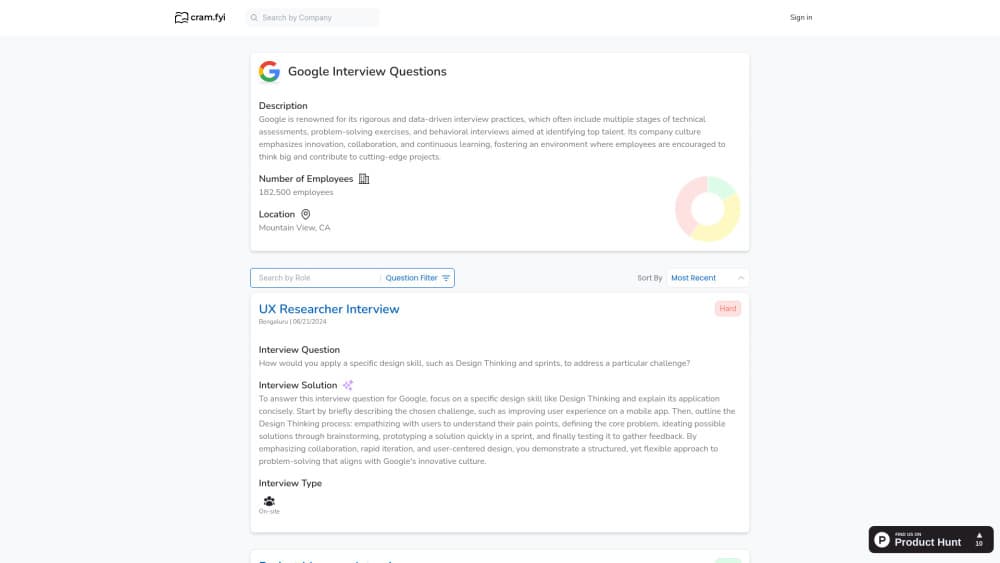
The site covers 547 company pages, from Google and Amazon down to regional employers you would not find in a general prep course. Big names carry the most material. Google has 66 questions across 46 roles and 37 locations, Amazon 58. Smaller employers may have three or four. Each question ships with a written answer outline, and a label on the page states plainly that the solution is AI-generated.
That label is the honest part of the product, and also the limit. You get a structure to react to, not a verified insider answer, and no employer signs off on the wording. The questions themselves are attributed to Glassdoor reports rather than to the companies. There is no mock interview, no voice practice, no resume matching, and no scoring of your own answer. You read, you filter, you take notes.
The catalog also sits still. Most question records date from mid-2024, so treat the site as a snapshot of hiring patterns rather than a live feed. Nothing here is broken. It just does one narrow job: showing you plausible company interview questions and a first draft of how to answer them.
Getting Started
- Open cram.fyi in a browser and type a company name into the search box at the top.
- Land on that company's question page and read the short profile: what the business does, how many people it employs, and where it's based.
- Narrow the list by role, location, experience level, difficulty, or interview stage, then sort by recency or votes.
- Open a question you expect to face and read the AI-written outline, then rewrite it in your own words with your own examples.
- Cross-check anything specific against the company's careers page before the interview, since the answer outlines are drafts, not official guidance.
Product Information
A quick look at cram.fyi's pricing, supported platforms, and performance.
Best for
The users, tasks, and scenarios where this tool fits best.
Users
- Candidates with an interview booked in the next week
- Career switchers aiming at a named employer
- Students and interns
- People who freeze on behavioral interview questions
Tasks
- Looking up what a company asks before an onsite
- Building interview answer examples
- Comparing rounds across companies
- Sanity-checking a job description
Scenarios
- The night before a first round
- A week with three onsites in different cities
- Deciding whether a company is worth applying to
Key features
Company question banks
Every company page collects reported questions in one place, with counts shown up front. Google's page holds 66 questions and Amazon's 58, spread across dozens of roles, so you can see the spread before you commit to reading. A search box in the header jumps between companies without going back to the homepage.
AI-written answer outlines
Each question carries a short solution that explains how to structure a response: what to lead with, which detail to include, and what the interviewer is listening for. The outline is generated, not collected from employees, and the page says so. Use it as scaffolding for interview answer examples in your own voice.
Filters for role, city, and experience
The filter rail breaks a company's list down by job title, location, and years of experience. A software engineer in Bengaluru and a product designer in Zurich see different questions on the same page. For AI interview prep this is the feature that earns its keep, because generic question lists are easy to find and company-specific ones are not.
Interview stage tags
Questions are labeled phone, screen, or onsite, which maps to how real hiring loops run. Recruiters screen, hiring managers go deeper, panels test breadth. Preparing in that order beats memorizing a flat list, and it stops you from walking into a phone screen with system design answers.
Difficulty levels and community votes
Every item is graded Easy, Medium, or Hard, and readers can vote on questions or flag the ones that look wrong. Votes act as a rough signal of how often a question really comes up. Treat them as a hint rather than a ranking, since most items carry few votes.
Company snapshots
Each page opens with a short company profile: a paragraph on the business, employee headcount, and headquarters. It's thin next to a proper research doc, but it's enough context to frame an answer around what the company actually does, which is the part candidates most often skip.
Pros and cons
Pros
- Every question carries role, location, difficulty, and stage metadata, so you can skip most of the list and still cover what matters.
- The AI outlines give you a starting structure for behavioral questions that would otherwise sit blank on the page.
- Browsing needs no account and costs nothing, which makes it a reasonable first stop before paying for a prep course.
- Coverage reaches past tech giants into retail, healthcare, logistics, and energy employers.
- Filtering by stage is the detail most interview question banks miss, and it changes how you sequence your prep.
Cons
- Answers are AI drafts. They read smoothly and say little that's specific to the company, so expect to rewrite every one you plan to use.
- There's no practice mode. You can't record an answer, get feedback, or run a timed mock interview, which is the part that actually builds fluency.
- Question records mostly date from 2024, so recent format changes at a company won't show up, and a stale question can cost you a round.
- No mobile app, no public API, and no published pricing page, so teams or coaches who want bulk access have nothing to work with.
Frequently asked questions
It's a lookup tool for company interview questions. You pick an employer, filter by role or stage, and read reported questions with an AI-written outline of how to answer each one. It replaces the scattered Reddit threads and Glassdoor pages people normally paste into a notes app.
Related content
Explore related tools, skills, and articles for cram.fyi.
cram.fyi Alternatives

Claude for Google Workspace
Anthropic · Writing · Productivity · BusinessClaude for Google Workspace puts Claude in a sidebar inside Google Docs, Sheets, and Slides, where it reads the file you have open and edits it in place.

KloudMate 2.0
KloudMate · Coding · BusinessKloudMate 2.0 is an AI observability platform that keeps logs, metrics, traces, and incidents in one place, with KloudMate Assistant investigating alerts and proposing the fix.
Cekura Bench
Cekura · Voice & Language · BusinessCekura Bench is a public benchmark that runs speech-to-speech models and deployed voice agents through 82 simulated phone calls, three times each, then publishes pass rates, latency and cost.