

Fluence
Yay Software (Yannick Huchard) · Writing · Voice & Language · Productivity
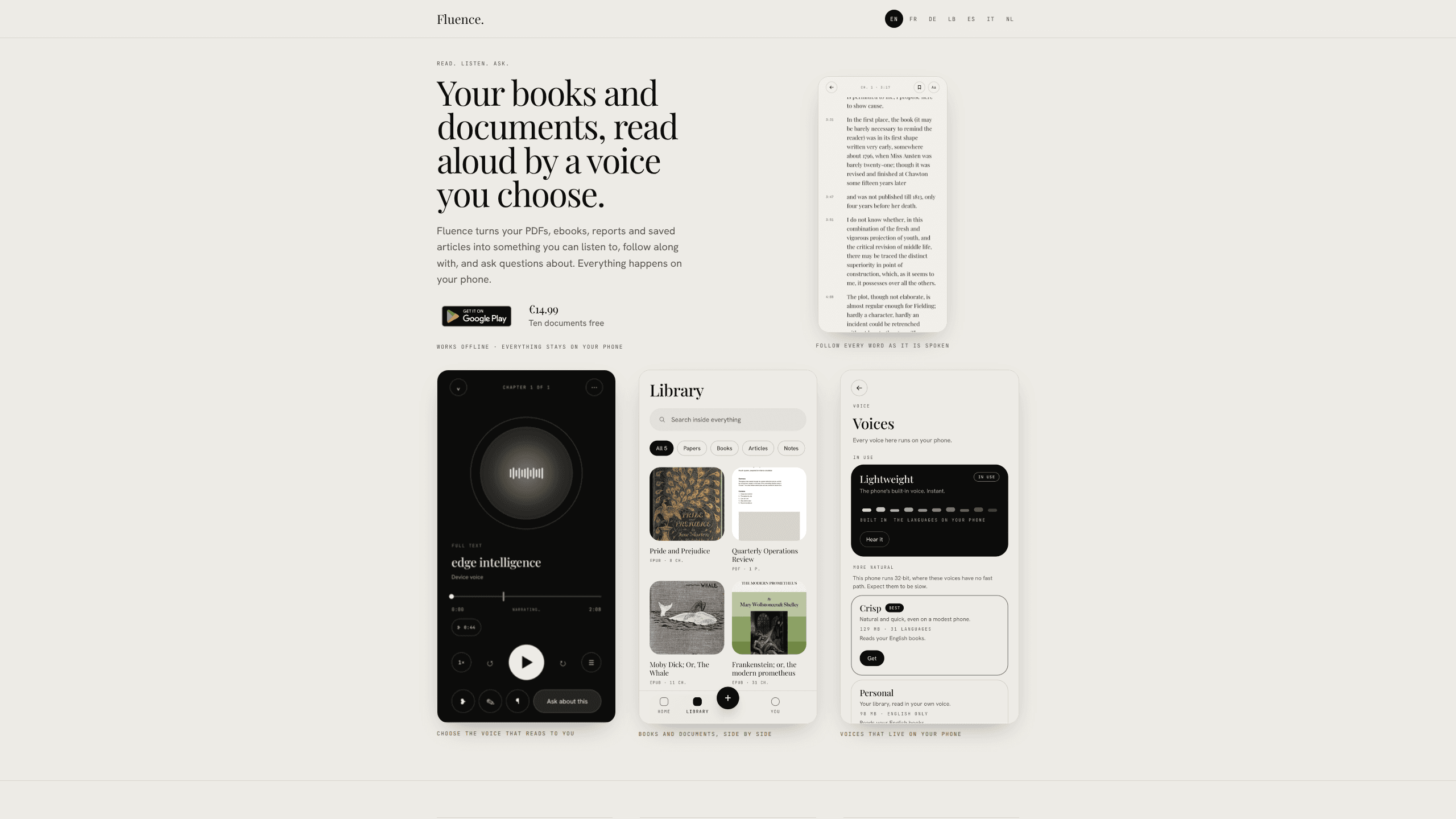
Fluence is an Android app that reads PDFs, EPUBs, Word files and web articles aloud, follows each sentence as it speaks, and answers questions about the text on the phone itself.
About Fluence
What Is Fluence
Fluence is a document reader built around one idea: the file you open should be read where it already sits. Yay Software, the studio of developer Yannick Huchard in Luxembourg, ships this text to speech app for Android. Nothing is uploaded, and there's no account to create.
The pitch fits a specific kind of reader. Regulations, contracts, reports and long books are easier to get through by ear on a train or in a car. Most services that do this send the document to a server and bill monthly. Fluence keeps the speech on the phone, offers offline text to speech from the first launch, and charges €14.99 once. The engine behind it is PDF text to speech first, then everything else.
That choice sets the limits. Your phone does the work, so a newer handset handles the full voice and the question model better than an older one. The iPhone and iPad version was still with Apple for review at the time of writing, and the Mac app is in development. The free tier stops at ten documents.
Getting Started
- Install Fluence from Google Play. The app has no sign-up screen and no card details to enter.
- Add a file: a PDF, an EPUB, a Word document, an OpenDocument file, Rich Text, Markdown, plain text or a web address you paste in.
- Choose a voice. One ships inside the app and reads 31 languages, and you can pick a lighter or fuller model for your hardware. You can also record a short sample and use your own voice in English.
- Press play and let it read aloud. The spoken sentence stays lit on screen, and you can bookmark a line or write a note beside it.
- Buy the full version for €14.99 when the ten free documents run out. The purchase follows your Google account onto another phone.
Product Information
A quick look at Fluence's pricing, supported platforms, and performance.
Best for
The users, tasks, and scenarios where this tool fits best.
Users
- People who work through long regulations and reports
- Students and researchers with a PDF backlog
- Readers who won't put their library on someone else's server
Tasks
- Turning a report into listening material
- Checking a clause during a meeting
- Preparing a document for the car
Scenarios
- A commute with no signal
- A week with a 400-page standard
- An evening where you'd rather listen than read
Key features
A voice that comes with the app
The reading voice is installed with Fluence, so there's no voice pack to download and nothing to buy before the first page. It reads 31 languages and works out which language a document uses. A light option starts speaking immediately, and a fuller neural voice sounds closer to a person reading to you.
The sentence you hear is the sentence you see
As the voice moves, the current sentence stays highlighted. Inside the player, the word being spoken is marked too. A table of contents jumps to any chapter or section, timestamps sit in the margin, and you can bookmark a line or attach a note to it. This is what makes the app usable for study rather than passive listening.
Questions answered from the page
Ask about the document and Fluence finds the passages that bear on your question, then runs a language model on the phone to write the answer. The passages appear under the answer, and the app tells you how many it read. When nothing matches, it says so and samples the document instead of inventing a source.
Nothing leaves the phone
There's no account and no company server holding your files. Documents, notes, questions and any recorded voice stay in the app's private storage. The network is used in three cases only: downloading a voice or model, pulling in a web article you paste, and completing the purchase through Google Play.
One audio file for the whole document
Fluence can prepare the speech for an entire document ahead of time, then notify you when the file is ready. You get a single track to keep, play in the car or pass to another app. Building the audio is free; saving it out belongs to the full version.
It opens the files you already have
The document reader takes PDF, EPUB, Word (.docx and .doc), OpenDocument, Rich Text, Markdown, plain text and web articles. PDFs get reassembled before reading, so headers, page numbers and footnotes stay out of the narration. Books and documents can sit side by side on the same shelf.
Pros and cons
Pros
- One payment of €14.99 covers everything. No subscription, no per-document credits, and the licence follows your Google account to a new phone.
- Documents never leave the device, and the app asks for no account. For contracts, medical papers or internal reports, that removes a real objection.
- The bundled voice reads 31 languages without a download, and a cloned voice from a short recording is available for English.
- Sentence highlighting, word marking and margin timestamps make it a study tool as much as a player.
- PDF cleanup handles running heads, page numbers and footnotes, and sentences run across page turns.
Cons
- Android only for now. The iPhone and iPad version was still in App Store review when this was written, so iOS readers have to wait.
- Questions are answered from a few thousand words at a time, which is what fits on a phone. Summarising a whole book in one go is beyond it.
- Saving the prepared audio as a file requires the paid version, so the free tier is for listening inside the app.
- There's no cloud sync. Moving a library to a new phone means making an encrypted backup and restoring it yourself.
Frequently asked questions
Yes. Once the voice is installed and the question model has been downloaded, everything runs offline, including on a plane or in a tunnel. The app only goes online to fetch a voice or model, to pull in a web article you paste, or to process a purchase.
Related content
Explore related tools, skills, and articles for Fluence.
Fluence Alternatives

Google EmbeddingGemma 2
Google DeepMind · Writing · Image · CodingGoogle EmbeddingGemma 2 is a 740M-parameter open model that turns text, code, images, audio, and video frames into vectors in one 768-dimension space, running on phones and laptops.

MePersona
MePersona, Inc. · Writing · Productivity · MarketingMePersona is an AI unified inbox for creators. It learns your voice, drafts replies to fan messages from 12 platforms, and sends only what you approve.

Claude for Google Workspace
Anthropic · Writing · Productivity · BusinessClaude for Google Workspace puts Claude in a sidebar inside Google Docs, Sheets, and Slides, where it reads the file you have open and edits it in place.