

Gunbot
Gunbot · Business
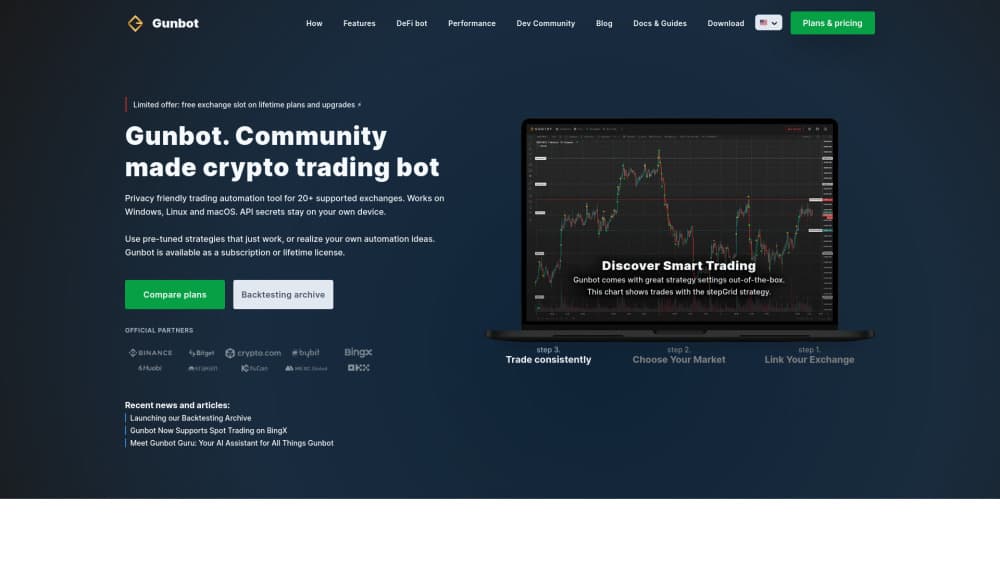
Gunbot is a crypto trading bot that runs on your own computer or server, with grid, DCA and custom JavaScript strategies for spot, futures and DeFi markets.
About Gunbot
What Is Gunbot
Gunbot is crypto trading software built by a small, community-driven team. The trading core sits on hardware you control, such as a desktop, a VPS or a Raspberry Pi. A hosted workspace gives you a dashboard for monitoring every connected bot from a browser.
The appeal is control. Your exchange API keys stay on your own machine, encrypted at rest. You decide which exchanges to connect, how much capital each strategy can touch, and when a bot stops. Gunbot Unlimited, the paid plan, opens the full toolkit: preset grid and DCA strategies, a no-code rule builder, JavaScript strategies, backtesting, arbitrage and DeFi trading.
The catch is setup. You install and maintain the core, create exchange API keys with the right permissions, and tune strategies before risking real money. Gunbot hands you a powerful engine, not a managed service that trades for you.
Getting Started
- Buy Gunbot Unlimited, either monthly or on a prepaid 6 or 12 month term, then create your workspace login.
- Install the trading core on Windows, macOS, Linux, a VPS or a Raspberry Pi. You can also run it headless and use the hosted dashboard.
- Add exchange API keys with trade permissions only. Leave withdrawals disabled and keep the keys on the core.
- Pick a preset strategy or assemble rules in Strategy Builder, then backtest it against historical data.
- Run the setup in simulation first, review the trades, and move to live capital only after the numbers make sense to you.
Product Information
A quick look at Gunbot's pricing, supported platforms, and performance.
Best for
The users, tasks, and scenarios where this tool fits best.
Users
- Active crypto traders who already understand order types and want automation they can host themselves.
- Power users who write JavaScript or want to automate configuration through an API.
- Traders running several strategies at once who need one dashboard for multiple bots and exchange accounts.
Tasks
- Running a grid bot through range-bound markets, buying low and selling high inside a set price band.
- Averaging into positions with DCA bot presets when you expect a recovery but can't time the bottom.
- Testing a rule set on historical candles before committing capital.
- Routing TradingView alerts into live orders without writing a full strategy from scratch.
Scenarios
- A trader with a spare VPS who wants 24/7 execution while keeping exchange keys off a third-party server.
- Someone comparing exchanges who needs one tool to manage Binance, Bybit, OKX and smaller venues side by side.
- A developer building a custom strategy in JavaScript and iterating on it with replay data.
Key features
Grid and DCA strategy presets
Gunbot ships with ready-made trading logic for grid and step-based setups, including Gridbot, SpotGrid, StepGrid and futures variants. You activate a preset, point it at a pair and set the range. The bot then places and manages orders inside that range, which suits sideways markets better than strong trends.
No-code Strategy Builder
Strategy Builder lets you combine indicators such as RSI, MACD and Bollinger Bands into entry, exit, DCA and stop rules. You assemble the logic from dropdowns instead of code. It covers most common retail setups and keeps the result testable before it goes live.
Custom JavaScript strategies
When presets run out, you can write the full decision logic in JavaScript and run it inside the core. This is the feature that separates Gunbot from plug-and-play bots. It also means the quality of a custom strategy depends entirely on the person writing it.
Backtesting and trade replay
The backtesting toolkit runs strategies against historical market data and shows trade-path charts with performance metrics. Gunbot Replay adds a step-through view of past market conditions. Both help you see how a rule set behaved through different volatility regimes before it touches real funds.
Multi-bot workspace and exchange profiles
One workspace can control many connected cores and exchange profiles. You add as many API keys and subaccounts as you need, keep strategy-specific keys separate, and watch pairs, tests and bots from the same screen. Unlimited bot instances are part of the Unlimited plan.
Risk management controls
You set capital per trade and per pair, stop limits, DCA safeguards and trailing stops. Profit targets account for configured exchange fees, which matters on grid strategies that can generate many small fills. These controls limit damage from a bad parameter. They don't remove market risk.
Arbitrage and DeFi trading
BitRage looks for price gaps across connected exchanges, and the bot also supports selected DeFi venues such as Hyperliquid, dYdX and PancakeSwap. Coverage varies by venue, so check the exchange list for your market before you plan around it.
Pros and cons
Pros
- Exchange keys and order execution stay on hardware you control, which reduces custody risk compared with cloud-only bots.
- One subscription covers unlimited exchange connections, subaccounts and bot instances.
- The exchange list is broad, with major spot and futures venues plus several DeFi protocols.
- Custom JavaScript, Strategy Builder and a configuration API give experienced users room to build their own logic.
- The core runs on Windows, macOS and Linux, and the hosted workspace works from any browser.
Cons
- There's no free plan. Access costs €29 per month, or a prepaid term, and that sits on top of exchange fees and hosting.
- Setup assumes you're comfortable installing software, creating scoped API keys and reading documentation.
- Preset strategies still need tuning. A grid bot can lose money in a strong trend, and no preset removes that risk.
- There's no native mobile app. You manage bots through the web workspace, which is usable on a phone but not designed for it.
Frequently asked questions
Gunbot handles automated crypto trading on exchanges you connect yourself. It runs grid, DCA, step and custom strategies, handles order placement, and gives you backtesting and monitoring tools in one workspace.
Related content
Explore related tools, skills, and articles for Gunbot.
Gunbot Alternatives

Claude for Google Workspace
Anthropic · Writing · Productivity · BusinessClaude for Google Workspace puts Claude in a sidebar inside Google Docs, Sheets, and Slides, where it reads the file you have open and edits it in place.

KloudMate 2.0
KloudMate · Coding · BusinessKloudMate 2.0 is an AI observability platform that keeps logs, metrics, traces, and incidents in one place, with KloudMate Assistant investigating alerts and proposing the fix.
Cekura Bench
Cekura · Voice & Language · BusinessCekura Bench is a public benchmark that runs speech-to-speech models and deployed voice agents through 82 simulated phone calls, three times each, then publishes pass rates, latency and cost.