

Index for ChatGPT
Index for ChatGPT · Chatbot
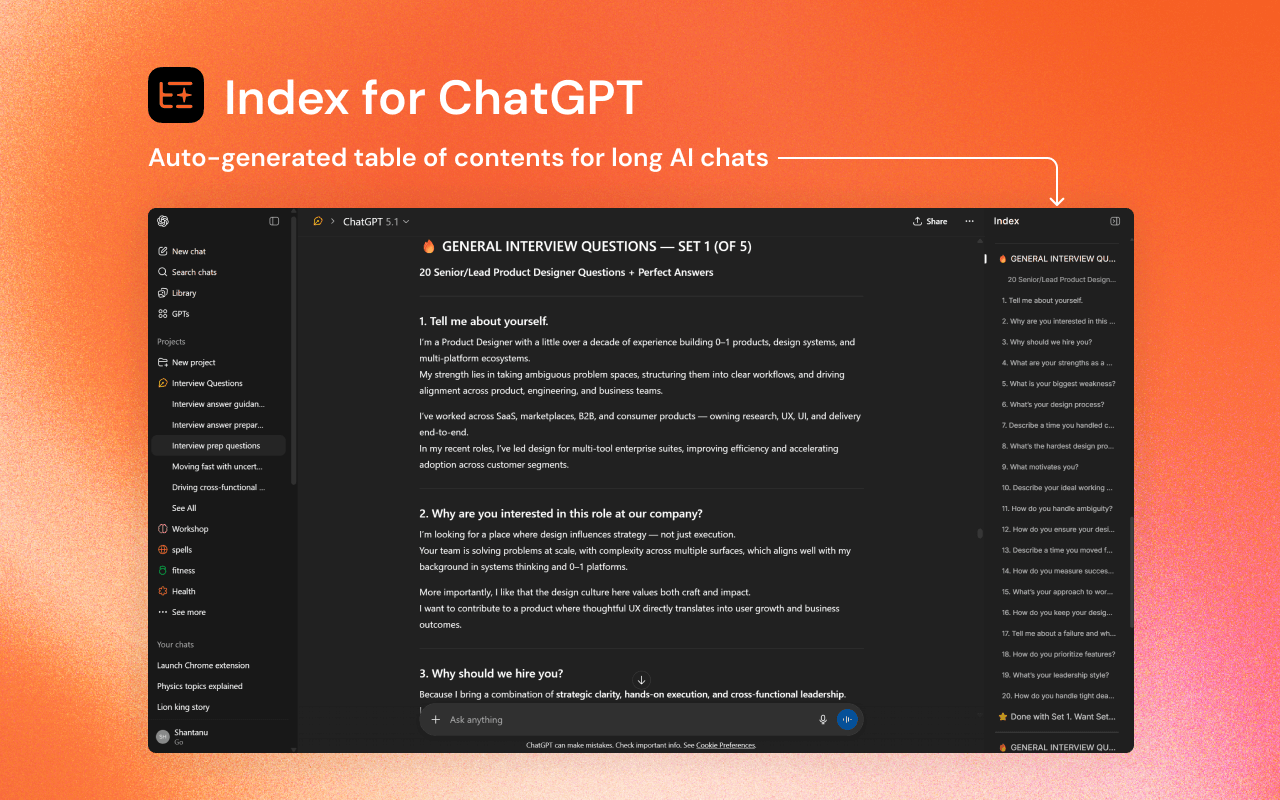
Index for ChatGPT is a Chrome extension that turns a long ChatGPT conversation into a clean, clickable table of contents. Instead of scrolling through dozens of replies to find one answer, you get a side index of every section and jump straight to it. It's a small add-on aimed at people who keep one chat thread running for hours and lose track of where anything is.
About Index for ChatGPT
What Is Index for ChatGPT
Index for ChatGPT is a browser extension that generates a navigable outline for your ChatGPT conversations. When a chat grows past a few exchanges, finding that one useful answer means endless scrolling, and that's exactly the problem this extension was built to solve. This extension reads the conversation and lays out a clickable list of its sections.
The tool doesn't change how ChatGPT works. It adds a navigation layer on top of the page you already use, and every entry in the index links back to the matching part of the thread. There's nothing to configure if you just want the basic behavior.
The main limit is scope. It's built for the ChatGPT web interface on desktop Chrome, so it won't help inside the mobile app or other AI chat sites. If you barely use long chats, you probably won't notice it's there.
Getting Started
- Open the Index for ChatGPT listing on the Chrome Web Store and click Add to Chrome.
- Confirm the permission prompt, then check that the extension icon shows in your toolbar.
- Go to chatgpt.com and open any conversation you want to navigate.
- Let the index build as the chat loads, then click an entry to jump to that section.
- Scroll freely. The index keeps track of where you're in the thread.
Product Information
A quick look at Index for ChatGPT's pricing, supported platforms, and performance.
Best for
The users, tasks, and scenarios where this tool fits best.
Users
- ChatGPT power users
- Students and researchers
- Writers and analysts
Tasks
- Jumping back to an earlier answer
- Reviewing a long brainstorm
- Reusing an old chat as a reference
Scenarios
- A research session that spills over hours
- Debugging with an AI assistant
- Drafting a document turn by turn
Key features
Auto-Generated Conversation Index
The extension reads your open ChatGPT thread and builds a table of contents automatically, pulling each exchange into a list you can scan at a glance. You don't tag anything or set up sections by hand. New exchanges get picked up as the chat continues, so the index stays current while you work.
Click to Jump Navigation
Each entry in the index is a link back to its spot in the conversation, so a single click takes you where you want to go. That beats mouse-wheel scrolling when a thread runs to hundreds of messages, and it saves you from losing your place while you search.
Works On Top of the Normal ChatGPT Page
Index for ChatGPT doesn't replace the ChatGPT interface. It doesn't move you to a separate app either. It just layers a navigation panel onto the page you already use. Your prompts, history, and settings stay put.
Lightweight and Free
The extension is free and has no paid tier. There's no account to create for it and no subscription to manage. For a single-purpose tool, that keeps it out of the way until you actually need to navigate a long chat.
Stays Out of the Way
The index is there when you want it and easy to ignore when you don't, since it's meant for occasional navigation rather than a second interface you have to babysit during every single message.
Pros and cons
Pros
- Free with no account or subscription to set up
- Turns messy long threads into a jump-to outline in one step
- Adds navigation without changing the ChatGPT page you know
- Useful the moment a chat gets long enough to scroll
Cons
- Built for the ChatGPT web app on desktop Chrome, so mobile and other AI chats aren't covered
- Value depends on chat length; short conversations won't need it
- A third-party extension, so you're trusting it with access to the ChatGPT page
Frequently asked questions
It generates a clickable table of contents for a ChatGPT conversation, so you can jump to a ChatGPT message instead of scrolling. It's a navigation aid, not a new chatbot.
Related content
Explore related tools, skills, and articles for Index for ChatGPT.
Index for ChatGPT Alternatives

Emma AI
Emma AI · Business · ChatbotEmma AI is a no-code AI assistant builder for creating custom assistants that answer questions from your own business data. You connect the tools your team already uses, like Slack, Notion, Google Sheets, or Zendesk, upload documents, or let Emma train the assistant through a Q&A process. It's fast. Each assistant you create can be scoped to a specific team, project, or workflow, so a marketing assistant and an accounting assistant never see the same sources.

Chatgbot
Chatgbot · Image · Productivity · ChatbotChatgbot is a multi-model AI chat platform that gathers OpenAI GPT models, Anthropic's Claude Sonnet, and open-source options like GLM and Qwen behind one login. Instead of juggling separate subscriptions, you pick a model per conversation, upload PDFs to question them, generate images, and search the web, all inside a single interface and a single membership.

Validator AI
ValidatorAI · Business · ChatbotValidator AI is an AI idea validation tool for founders who want a straight answer before they build anything. Think of it as a startup idea validator and an AI startup mentor rolled into one. You describe your startup, product, or small business concept, and the tool scores it, analyzes the competitive field, suggests who the ideal customer is, and points to next steps. It leans on behavioral data gathered from hundreds of thousands of founder sessions. The core check is free to run. It suits solo founders, indie makers, and small teams testing a concept in the earliest stage, not companies that have already shipped.