
Kapwing
Kapwing Inc. · Video
Kapwing is a browser-based AI video editor with auto subtitles, dubbing, translation, and a text-to-video generator, made for creators and marketing teams who edit without installing software.
About Kapwing
What Is Kapwing
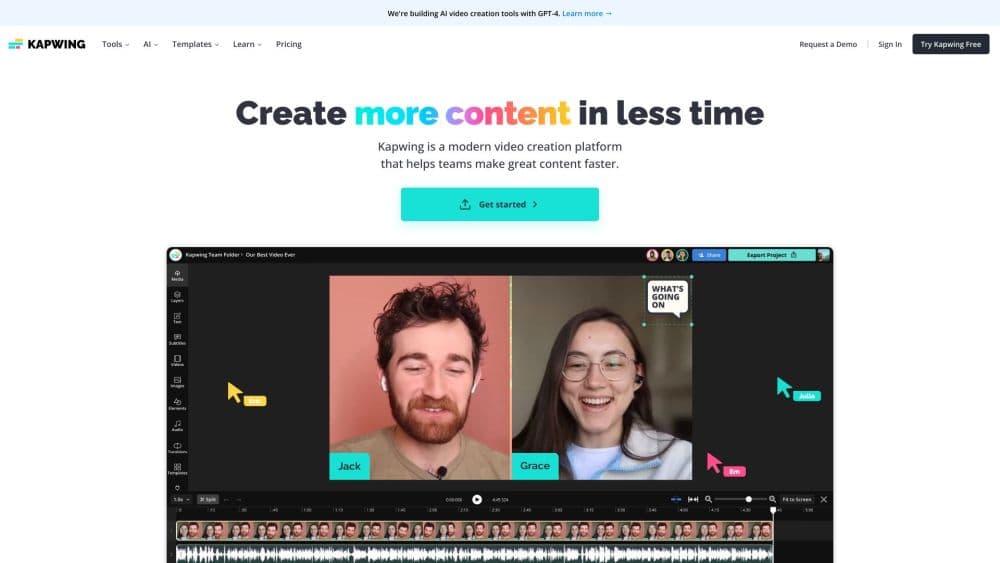
Kapwing is an online video editor that runs entirely in a web browser. You drop clips onto a drag-and-drop timeline, then lean on AI tools for the slow parts: subtitles, background noise removal, dubbing, translation, and generating footage from a prompt. It works on Mac, Windows, Chromebook, and mobile because there's nothing to install.
The product targets teams that publish a lot of video fast. A social media manager can turn one long recording into several vertical clips, subtitle them automatically, and translate the captions for other markets without leaving the editor. That workflow is the reason Kapwing markets itself to marketers, internal comms teams, and educators rather than to film editors cutting feature-length projects.
The limits are worth knowing up front. Kapwing meters most AI features through credits, so heavy subtitle, dubbing, or generation use burns through a plan faster than flat-fee software would. Free exports carry a watermark and cap videos at 4 minutes and 720p. Paid plans start at $16 per member per month on annual billing, and per-seat pricing adds up for larger teams.
Getting Started
- Open kapwing.com in a browser and start a project, or sign in with a Google account to save work to a workspace.
- Upload a video from your device, paste a link from YouTube or TikTok, or record your screen and camera directly in the editor.
- Trim and arrange clips on the timeline, then turn on AI tools such as auto subtitles, Smart Cut, or background removal.
- Add text, transitions, and music, or generate a video from a prompt if you start from scratch.
- Export as MP4, GIF, or audio, share a project link, or publish straight to a social channel.
Product Information
A quick look at Kapwing's pricing, supported platforms, and performance.
Best for
The users, tasks, and scenarios where this tool fits best.
Users
- Social media managers
- Marketing teams
- Educators and trainers
Tasks
- Subtitling videos
- Translating and dubbing
- Repurposing long footage
- Generating video from text
Scenarios
- A weekly social calendar
- A product launch
- A global training rollout
Key features
AI Video Generator
Kapwing turns a text prompt, script, article, or PDF into a multi-scene video with voiceover, visuals, and subtitles. You pick from integrated models including Veo, MiniMax, Seedance, and Kling, set the aspect ratio for each platform, and refine the result scene by scene. Every generation stays editable, so you can swap visuals or rerun a single scene instead of starting over.
Auto Subtitles and Translation
The auto subtitle tool transcribes your audio and times each caption, which you then correct in a text editor rather than retyping. From there you translate captions into over 60 languages or dub the full audio into over 100, and higher plans add lip sync so the mouth movement matches the translated track. It's the fastest way to make one video work in several markets.
Online Video Editor with Timeline
The drag-and-drop timeline handles trimming, splitting, layering B-roll, transitions, and effects in the browser, with exports up to 4K. Because it runs online, a Chromebook or a locked-down work laptop can edit the same project as a desktop. Projects save to a shared workspace, so a teammate can pick up the same file later.
Repurpose Studio and Clip Maker
Clip Maker scans a long video and pulls out short, platform-ready segments in 16:9, square, or vertical sizes, centering on the speaker and showing Safe Zones so you see how each clip lands. It turns a single recording into a stack of social posts, which is the main reason repurposing tools exist.
Audio and Cleanup Tools
Clean Audio removes background noise and evens out loudness, Smart Cut strips silences so a talking-head clip loses its dead air, and the audio editor lets you split, merge, and add music. Text to Speech reads your script in stock or cloned voices, so you can add narration without recording it yourself.
Brand Kit and Team Collaboration
The Brand Kit stores logos, fonts, and colors so every project starts on-brand, and custom fonts keep styling consistent. Teams edit in a shared workspace, leave comments directly on the video, and use real-time collaboration, which replaces sending draft files back and forth.
Pros and cons
Pros
- It runs in a browser on any OS, so there's no install and no device lock-in.
- Auto subtitles, dubbing, and translation cover over 100 languages, which is rare in one tool.
- The AI generator pulls from several leading video models in a single subscription.
- Every AI output stays editable on the timeline instead of being a locked clip.
- Shared workspaces, comments, and a Brand Kit fit how marketing teams actually work.
Cons
- Credits meter the AI features, so heavy subtitle, dubbing, or generation work runs out before the month ends.
- The free plan caps videos at 4 minutes and 720p and adds a watermark, which rules out serious use.
- Per-member pricing climbs fast for teams, and there's no free trial for the paid plans.
- There's no public API, so you can't automate edits from your own code.
Frequently asked questions
There's a free plan, but it's a starting point rather than a daily driver. Free exports carry a Kapwing watermark, cap videos at 4 minutes and 720p, give 10 credits, and store files for 3 days. Removing the watermark and lifting those limits requires a paid plan.
Related content
Explore related tools, skills, and articles for Kapwing.
Kapwing Alternatives

SocialGPT
Scrollmark · VideoSocialGPT is an AI video editor that turns chat instructions into cuts on an editable timeline, with captions, music, camera moves, plus content research and social insights.
PixVerse R2
PixVerse (AIVORA PTE. LTD.) · Video · OtherPixVerse R2 is a real-time world model that turns AI video into a continuous world you can walk through, prompt, and reshape while it keeps generating.

Hookest
Inolyzer LLC · Video · Marketing · BusinessHookest is a free viral hook library of short opening clips for TikTok, Instagram Reels, and YouTube Shorts, with downloads, a browser hook editor, and AI video tools on paid plans.