

2pr
2PR · AI Detection
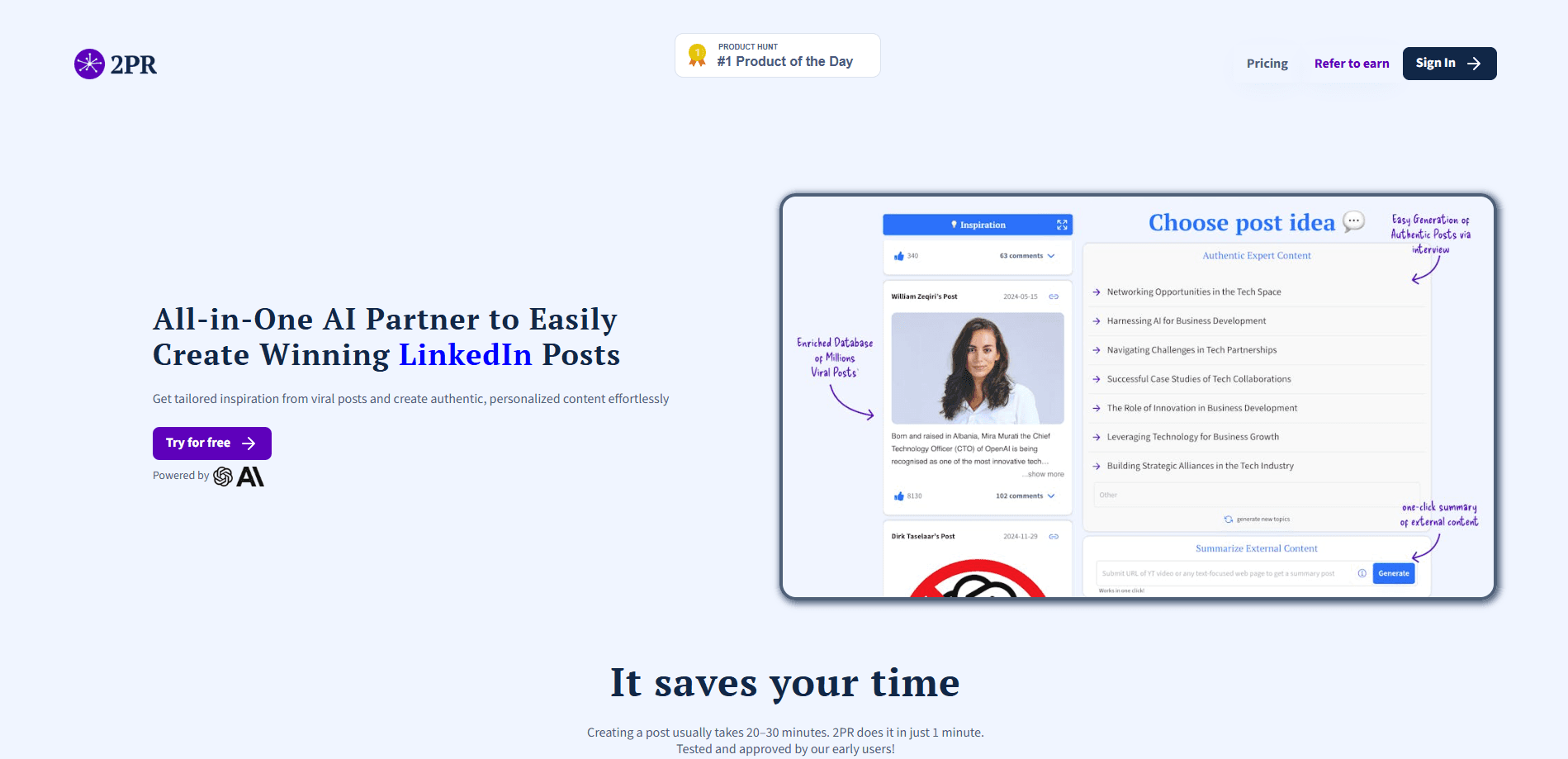
2PR is an AI agent for LinkedIn growth. It turns rough ideas into posts in your voice, then handles carousels, scheduling, replies, and analytics from one dashboard.
About 2pr
What Is 2PR
2PR (short for "second pair" of eyes) is a LinkedIn growth tool built around an AI agent that writes, plans, and replies for you. The company positions it as a replacement for a ghostwriter, and the pitch is simple: instead of hiring someone for thousands a month, you get an assistant that drafts in your own voice and keeps your feed active.
The core problem it solves is the blank page. Most people know what they want to say on LinkedIn but stall at the post box, or post twice and quit when a client project eats their week. An AI LinkedIn post generator is meant to close that gap, and 2PR pairs it with a LinkedIn ghostwriter's full workload. 2PR pulls ideas from trending sources, interviews you to surface stories you forgot you had, and writes drafts you can edit rather than blank prompts you have to fill.
The main limitation is that it works only on LinkedIn. There is no X, Threads, or newsletter support here, so you still need separate tools for other channels. It also depends on the official LinkedIn API, which keeps accounts safe from bans but means every posting and scheduling feature lives inside what LinkedIn permits.
Getting Started
- Connect your LinkedIn profile through the official API, with no password sharing and no browser extension.
- Answer a short AI interview so the agent picks up your tone, topics, and the stories you actually tell.
- Paste a source, such as an article, YouTube video, or podcast, or pick a curated trending idea to react to.
- Compare three post variants side by side, tweak the winner, and schedule it for the time your audience engages most.
- Track reach and pipeline in the analytics view, then let the agent draft replies in your voice for each comment.
Product Information
A quick look at 2pr's pricing, supported platforms, and performance.
Best for
The users, tasks, and scenarios where this tool fits best.
Users
- Founders and solo creators
- Agencies and consultants
- B2B sales and marketing teams
Tasks
- Turning a rough note into a finished post
- Writing carousels and images
- Replying to comments at scale
- Reading what actually landed
Scenarios
- Keeping a consistent posting schedule during a busy client sprint
- Launching your own content while juggling several client profiles at an agency
- Reviving a stalled profile before a job search or fundraise
Key features
Posts Written in Your Voice
The AI LinkedIn post generator studies your tone and topics, then drafts posts that read like you rather than a template. Every request returns three variants side by side, so you pick the angle that fits instead of accepting the first output. Past edits feed back into later drafts, which means the voice gets closer over time.
AI Interview and Source Repurposing
A short AI interview pulls stories out of you with tailored questions, which is useful when you know your field but freeze at the post box. You can also paste any article, YouTube link, or podcast and get a post in your voice from it. This turns material you already consume into content without extra writing.
Carousels and Visuals
2PR doubles as a LinkedIn carousel generator, building carousels and pictures alongside the text. The visuals follow LinkedIn's format, so you skip the usual tripping between a design tool and the composer. It matters most for posts that rely on a swipeable deck rather than a wall of text.
Scheduling and Optimal Posting Time
You queue posts and the tool suggests when your audience tends to engage. This keeps a rhythm going through weeks when you have no time to write. It is the feature that separates a growth tool from a plain text generator.
Replies and Commenting in Your Voice
The agent drafts three reply options for every comment, written in your tone. Replying consistently is where relationships form on LinkedIn, and doing it by hand for every thread is where most people give up. This covers the part of the job that ghostwriters usually handle.
Analytics and Funnel Tracking
The LinkedIn analytics tool tracks reach and separates TOFU, MOFU, and BOFU, mapping awareness, engagement, and leads. Instead of guessing which posts worked, you see which ones moved people toward a conversation. A coaching layer turns that data into suggestions for the next post.
Official LinkedIn API and Agent Pairing
2PR runs on the official LinkedIn API with no password sharing, no browser extension, and no cookies, which keeps profiles safe from the bans that cookie-based tools risk. It also ships an MCP connection, so you can pair it with Claude or another agent in your workflow.
Pros and cons
Pros
- Runs on the official LinkedIn API, so there is no password sharing or cookie-based automation that risks a ban.
- Three post variants for every request make it easy to pick an angle instead of editing one rigid draft.
- The AI interview and source repurposing turn notes, articles, and podcasts into posts without extra writing.
- Reply drafting and funnel analytics cover the parts of LinkedIn work that usually get dropped first.
- The Multi-profile plan gives each client or company page its own voice without per-seat fees.
Cons
- It only covers LinkedIn, so teams active on X, Threads, or newsletters still need other tools.
- There is no free plan, only a trial, so testing beyond a few days means paying.
- The individual plan is priced per creator, which adds up fast for a small team on personal accounts.
- Features that depend on the official API are capped by what LinkedIn allows, so some automations stay manual.
Frequently asked questions
2PR is an AI agent that writes LinkedIn posts in your voice and handles carousels, scheduling, replies, and analytics. It is built as a substitute for a ghostwriter, covering the whole posting loop rather than just draft text.
Related content
Explore related tools, skills, and articles for 2pr.
2pr Alternatives
Isgen AI
Isgen · AI DetectionIsgen AI is a web-based AI detector that scores text for machine authorship and shows you which sentences and phrases push the number up. It's built for teachers, editors, students, and writers. Their question is simple: did this draft come from ChatGPT, GPT-5, Claude, Gemini, DeepSeek, or another model? You paste or upload content, run a scan, and get a Human, AI, and Mixed breakdown in seconds. There's also a companion editor that scores text while you write it.
Humanizeai Tools
Humanizeai Tools · Writing · AI DetectionHumanizeai Tools is a web-based AI humanizer that rewrites machine-generated text so it sounds like a person wrote it, which is the whole point of the category it belongs to. Paste a draft from ChatGPT, Claude, or Gemini, run it through the tool, and it swaps out the phrases and sentence patterns that AI detectors flag. If your goal is to make AI text sound human before you publish it, this is the kind of tool built for exactly that. It suits students, bloggers, and marketers who need copy that reads naturally and clears tools like GPTZero, Copyleaks, and Winston AI after a single pass.

Hidemyai
Hidemyai · Writing · AI DetectionHidemyai is an AI content humanizer. It rewrites text from ChatGPT, Jasper, and similar tools so the result reads like a person wrote it. You paste your draft, pick a document type and tone, and the service returns a version meant to bypass AI detectors such as Originality.ai, Turnitin, and ZeroGPT. It targets writers, marketers, and students who lean on AI drafts but can't ship copy that sounds robotic. The promise is simple: make AI content undetectable.