

AflowMind
AflowMind · Writing · Productivity
AflowMind is an AI mind mapping tool that turns prompts, PDFs, web pages and recordings into editable mind maps you can expand, focus and export.
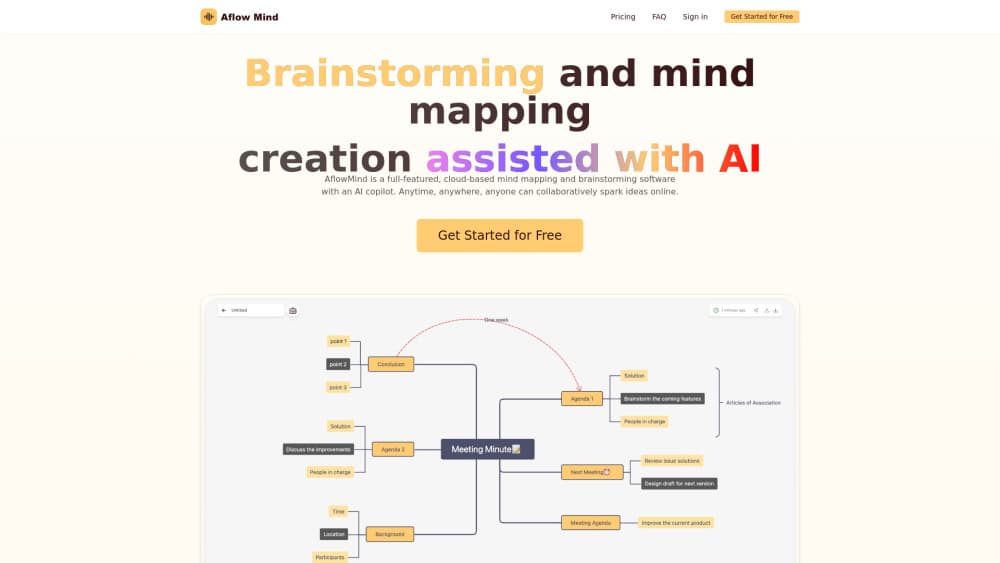
About AflowMind
What Is AflowMind
AflowMind is a browser-based mind mapping app built around one observation: most people already have the raw material for a map, they just don't have the structure. Paste a rough brief, upload a PDF, point it at a URL or drop in a recording, and the tool returns a first-pass hierarchy of topics and branches. The core move is text to mind map conversion, applied to whatever source you bring. From there you work in a normal editor.
It sits between a blank canvas and a full research assistant. AflowMind won't run your project or write your report. What it does is put a usable skeleton on screen in a minute or two, so the work of deciding what matters starts from something visible instead of an empty page.
The limits are worth knowing before you sign up. Everything runs in the browser, so there's no desktop install and no mobile app. Credits are the real constraint: the free plan gives 6 per day, and a dense document can burn through several in one sitting.
Getting Started
- Open aflowmind.com and enter the workspace.
- Choose the AI creation option and pick a starting point: prompt, document, website, recording, notes or an image.
- Set the output language, or let AflowMind detect it from the source.
- Review the generated hierarchy, rename vague nodes, merge duplicates and expand the branches that need depth.
- Export the map or keep editing it as a shared artifact.
Product Information
A quick look at AflowMind's pricing, supported platforms, and performance.
Best for
The users, tasks, and scenarios where this tool fits best.
Users
- Students
- Researchers and analysts
- Project managers
- Writers and content planners
Tasks
- Condensing a long PDF into review points
- Cleaning up scattered meeting notes
- Building a study guide
- Comparing several sources
Scenarios
- Literature review prep, where a mind map from PDF saves a first pass over five papers.
- Workshop follow-up, where an audio to mind map pass pulls decisions and open questions out of a recording.
- Early project scoping, before anyone has agreed on scope or vocabulary.
- Competitive research, where a website input turns a competitor's page into a claim-and-evidence structure you can annotate.
Key features
AI creation from mixed inputs
AflowMind accepts a prompt, a document, a web page, a recording, an image, a set of notes or a block of pasted text, and each one goes through the same generation step. Documents can be PDF, Word, presentation or Markdown files. That makes it more than a one-trick mind map generator, and it matters because most real projects start with material in three different formats, not one clean brief.
Expansion, summarization and focus
Once a map exists, you can grow a single topic, ask for second-order connections, or collapse everything down to the branch you're working on. Summarization works at map level, which is the faster way to get a handoff note out of a session that ran long. The editing stays manual, so nothing changes without your say.
Layout control
Three layouts cover most needs: centered for open exploration, aligned for a strict hierarchy, and directional for a process or sequence. Switching layout is a display decision, so you can test whether a structure reads better as a tree or as a flow without rebuilding it.
Mind map export in six formats
A mind map export can leave as PNG or SVG for slides and sites, PDF for printing and review, Markdown for docs, HTML for a quick share, or JSON if you want to feed the structure into another tool. Free accounts are limited to SVG and PNG, so anyone exporting Markdown or PDF needs a paid plan.
Language handling
AflowMind detects the source language automatically or takes a manual setting. The manual option is the one to use when a document mixes languages or when technical terms keep coming back translated. Output follows the language you set, which makes the tool usable for multilingual research without a second pass.
Credit-based workspace
The free tier allows 10 maps, 30 topics per map, 10 MB of storage and 6 credits a day. Paid plans raise that to 600 credits a month, unlimited maps and topics, and 1 GB of storage. Credits are consumed by AI actions, so the practical question isn't map count but how many generations a week of work actually needs.
Pros and cons
Pros
- The input range is wider than most AI mind map tools, with PDF, website, audio and image sources in one workflow.
- Export formats cover the formats people actually hand off: PDF for review, Markdown for docs, SVG for design.
- Layout switching works on an existing map, so restructuring costs a click instead of a rebuild.
- The free plan is usable for real work, not a demo, as long as you stay under 10 maps.
Cons
- 6 credits a day runs out fast on long documents, and there's no published credit cost per action.
- Browser only. No desktop app, no mobile app, no offline mode, which rules it out for field work.
- Generated branches need a careful pass. Names, numbers and technical terms are the usual casualties, especially from audio.
- No public API documentation, so a team that wants to script map creation can't plan around it.
Frequently asked questions
AflowMind is used to turn source material into a visual structure: study notes, research outlines, project plans, meeting summaries and content briefs. The output is an editable mind map rather than a document, which suits people who need to see relationships before they write.
Related content
Explore related tools, skills, and articles for AflowMind.
AflowMind Alternatives

Claude for Google Workspace
Anthropic · Writing · Productivity · BusinessClaude for Google Workspace puts Claude in a sidebar inside Google Docs, Sheets, and Slides, where it reads the file you have open and edits it in place.

Claude Haiku 5.5
Anthropic · Writing · Coding · ChatbotClaude Haiku 5.5 is Anthropic's fastest and cheapest small model, built for high volume tasks at $0.10 per million input tokens with a 1M token context window.

NoteWorthy
Suman Hansada · Writing · Productivity · AI AssistantNoteWorthy is a notes app for iPhone, iPad and Mac that writes titles, tidies formatting, summarizes long notes and files each one with on-device AI. No account, no upload, no network requests.