
Agent Activity
LeMax, LLC · Coding · Productivity
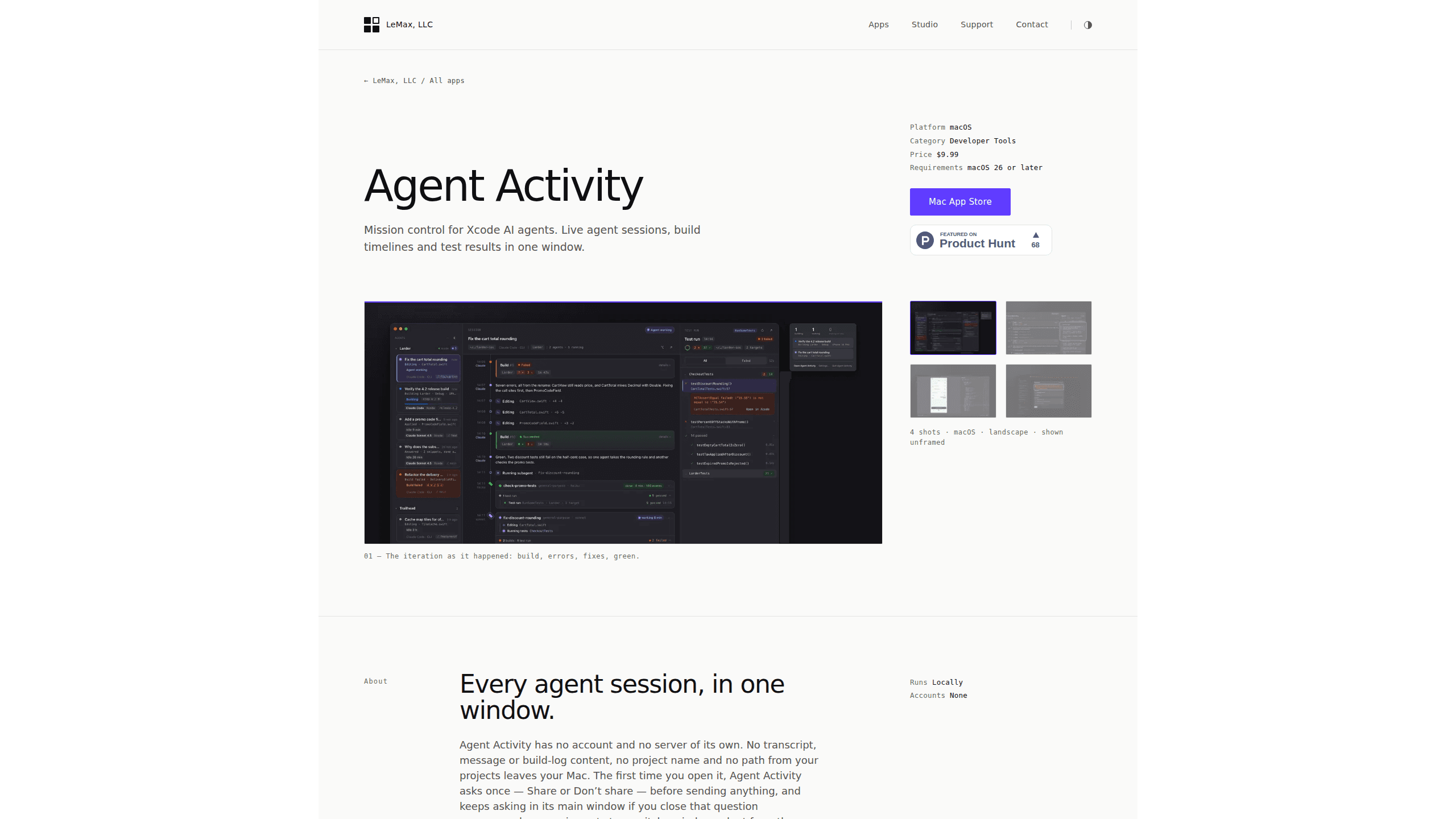
Agent Activity is a Mac app that turns what Xcode AI agents leave on disk into one live timeline of sessions, builds, test results, screenshots, and permissions.
About Agent Activity
What Is Agent Activity
Agent Activity is a Mac developer tool for watching AI coding agents work inside Xcode. Where Xcode shows a single status line, the app builds a timeline from the transcripts, agent build logs, test summaries, and previews those agents write to disk. Each session gets its own column, so a build belongs to the agent run that started it.
Reading files is the whole method. The app works as an Xcode AI agent monitor and never launches, stops, or controls an agent, holds no account, and runs no server of its own. What it reads stays in a local database, and the app is sandboxed, so it only sees folders you grant.
The limits follow from that design. It needs macOS 26, Xcode 27, and an Apple silicon Mac, which leaves older machines out. It's also an AI coding agent viewer rather than a controller, so when an agent goes off course you still stop it in the terminal or in Xcode.
Getting Started
- Buy Agent Activity on the Mac App Store for $9.99 and move it to your Applications folder.
- Open the app and answer the Share or Don't share prompt. Nothing is sent either way, and Settings → Diagnostics keeps the two switches separate afterward.
- Grant access to your project folders when macOS asks. Sandbox rules mean the timeline only covers what you allow.
- Start an agent in the terminal or from Xcode 27, then leave it running. Sessions appear as soon as the agent writes its first transcript entry.
- Click a session to read its builds, test runs, and screenshots in one place.
Product Information
A quick look at Agent Activity's pricing, supported platforms, and performance.
Best for
The users, tasks, and scenarios where this tool fits best.
Users
- iOS developers running Claude Code in a terminal
- Teams that switch between Codex, Antigravity, and Xcode's built-in chat
- Developers who care where agent output goes
Tasks
- Following a long build and fix loop
- Finding test results an agent left behind
- Reviewing what an agent rendered
Scenarios
- Two agents work on separate targets at once
- An agent has been running for 20 minutes and you want a status read
- Handing a project to a teammate
Key features
Session Timeline per Agent Run
Claude Code sessions from the terminal or spawned by Xcode 27 appear as their own timeline, headless runs included. Codex, Antigravity, and Xcode's chat come from Xcode's conversation store and show up once Xcode saves the conversation. Every session keeps its own record, which makes parallel work readable.
Build Cards with File and Line
Each build is linked to the session that started it. Errors and warnings are parsed into a list you can scan by file and line, so a fix pass has a target instead of a wall of console text. You can follow build 9 with 16 errors through the fixes to build 10 that passes.
Test Results by Target
Test runs are grouped per run and per target, with pass or fail plus the file involved. Agent-triggered runs are the reason this matters: they leave no result bundle in DerivedData, so the app is where those results exist at all.
Screenshots and SwiftUI Previews
The app keeps every SwiftUI preview an agent rendered and every simulator screenshot it took. The UI tree sits beside the image, which helps when a layout looks wrong and you need to know which view produced it.
Permission Overview
A panel lists which agents Xcode trusts, down to signing identity and team, and which folders they may touch. A banner appears when the unsafe "allow all agents" flag is on, or when an agent's workspace sits outside the allowed folders.
Local Data Handling
There's no account and no server behind the app. Transcripts, messages, build logs, project names, and paths stay in a local database, and the app is sandboxed. Usage events and crash reports are opt-in, and the two switches stay independent.
Pros and cons
Pros
- Build and test history per agent session fills a gap Xcode leaves at "Idle".
- Test runs started by an agent are visible here and nowhere else in DerivedData.
- Screenshots and previews arrive with the UI tree, which shortens layout debugging.
- Local-only storage and an opt-in prompt keep project content on the Mac.
- One payment of $9.99 with no subscription behind it.
Cons
- macOS 26, Xcode 27, and Apple silicon are all required, so older Macs can't run it.
- It's read-only. You can't stop an agent or rerun a build from inside the app.
- Codex, Antigravity, and Xcode chat sessions lack build cards and only appear after Xcode saves the conversation.
- There's no iPhone or iPad view and no way to share a timeline with a teammate.
Frequently asked questions
It reads the files Xcode AI agents write to disk and turns them into a live timeline for each session, covering builds, test runs, screenshots, and permissions.
Related content
Explore related tools, skills, and articles for Agent Activity.
Agent Activity Alternatives

Base Code
Base44 (Wix) · Coding · ProductivityBase Code is a shared cloud development environment from Base44. Teammates describe changes to an existing GitHub codebase in chat, preview them live and send them back as pull requests.

Google EmbeddingGemma 2
Google DeepMind · Writing · Image · CodingGoogle EmbeddingGemma 2 is a 740M-parameter open model that turns text, code, images, audio, and video frames into vectors in one 768-dimension space, running on phones and laptops.

GitGlow
GitGlow · Coding · ProductivityGitGlow is a local-first desktop Git client that lets independent developers review their own code and their AI agents' changes in one place before shipping.