

GitGlow
GitGlow · Coding · Productivity
GitGlow is a local-first desktop Git client that lets independent developers review their own code and their AI agents' changes in one place before shipping.
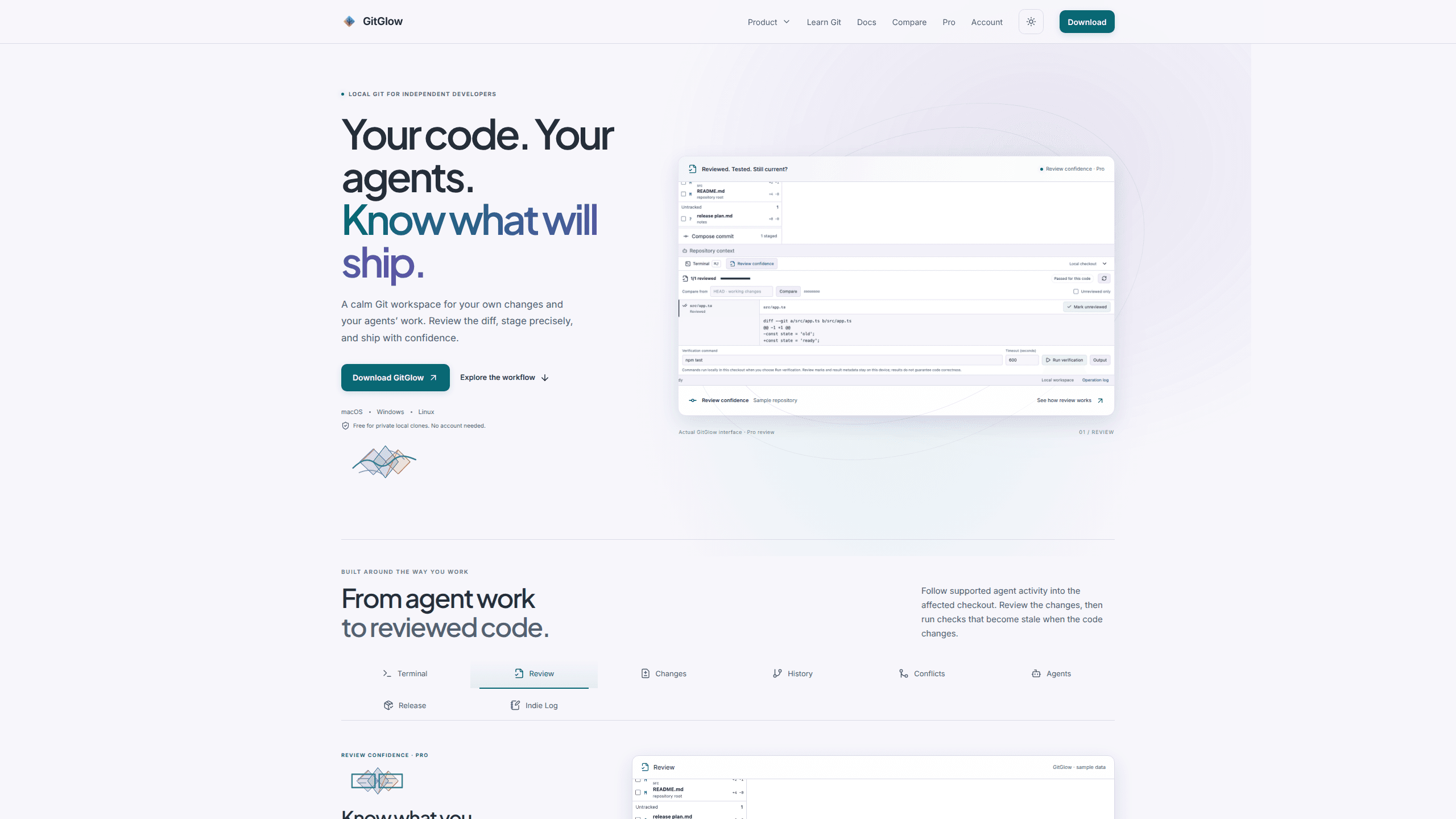
About GitGlow
What Is GitGlow
GitGlow is a desktop app for people who work alone or in small teams and want to see exactly what is about to leave their machine. It handles the ordinary Git jobs (staging, commits, branches, conflicts, history, blame, reflog) and adds a review layer on top. The review layer is the reason it exists: coding agents now write a lot of code, and those changes arrive in the same working tree as your own edits.
The product takes a local-first stance. Repository content, diffs, history, paths and audit records stay on your device. You can use the free version without creating an account, which matters if you keep client work under an NDA or simply don't want another login. GitHub, AI provider connections and billing are optional and carry their own data boundaries.
The limits are mostly about scope. GitGlow is not a hosted collaboration platform, it has no public API, and the advanced review tools sit behind Pro. Its agent features work with supported coding-agent clients rather than any tool that happens to write files. If your team lives inside GitHub pull requests, GitGlow complements that workflow instead of replacing it.
Getting Started
- Download the build for macOS, Windows or Linux from the official site and install it. No GitGlow account is needed for local work.
- Open Home, then open an existing clone or clone a repository from a URL.
- Switch to Changes, check the current checkout identity and review the diff file by file.
- Stage only the hunks you want, write a commit message and commit. Branch, merge and conflict tools sit in the same view set.
- Optional: connect GitHub for hosted context, or connect a supported agent client so its runs appear in the same review flow.
Product Information
A quick look at GitGlow's pricing, supported platforms, and performance.
Best for
The users, tasks, and scenarios where this tool fits best.
Users
- Independent developers who review their own work
- Developers who run Claude Code, Codex or another supported agent
- Small studios that want review discipline without a server
Tasks
- Reviewing an agent's output
- Running checks against the right code
- Preparing a release
Scenarios
- A late-night refactor where you no longer remember what you changed
- A laptop with three client repositories
- A codebase under an NDA
Key features
File-by-File Review State
GitGlow lets you mark files as reviewed while you read a diff, and that state is the backbone of its AI agent code review workflow. When an edit lands after you marked a file, the file returns to your attention. You stop relying on memory to know whether you have seen the latest version, which is the usual failure mode when a diff grows past a few hundred lines.
Agent Runs Inside the Changes View
Supported agent activity is connected to the affected checkout, so an agent's run carries repository, checkout, event and attributed-file context into the same review surface. You see which files the run touched, then review them with the ordinary diff tools. Observed and managed runs are handled differently, and managed runs add approval handling on Pro.
Checks That Go Stale
You can run an explicit check from the review view with a timeout and a cancel control. The result stays attached to the checkout that was tested. Change the code afterwards and the earlier result is marked stale rather than presented as current. That single rule prevents the most common false comfort in agent-assisted work: a green check that no longer describes the code in front of you.
Concurrent Workspaces
Pro keeps several repositories and worktrees active at once, each with its own terminal session. You can fetch selected repositories and see which ones need attention instead of cycling through tabs. For anyone maintaining more than one project, this is the difference between a tool you open for a task and one you leave running all day.
Release Workspace and Indie Log
The release side brings GitHub context, checks and release preparation into the same window. Selected evidence can become an editable Indie Log report pack or a set of release notes. It is aimed at small teams and solo builders who ship often but don't want a separate reporting tool for every launch.
Local Git Core With No Account
The everyday Git layer is complete enough to stand alone: precise staging, commits, branches, merge conflicts, history, blame, reflog and terminal tabs in the active checkout. The free plan supports one active local repository, and local private clones work without signing in. A desktop Git client that asks for nothing before it opens a repo is still rare.
Pros and cons
Pros
- Review state and check results are tied to a specific checkout, so you can tell what you actually verified and what changed afterwards.
- Agent work and your own edits meet in one Changes view, which removes the usual copy-paste between a terminal, an agent log and a Git GUI.
- The free plan is usable for real solo work: local commits, branches, conflicts and history need no account and no payment.
- Repository content stays local, and the product analytics that ship enabled in 2.0.7 can be switched off for free on any plan.
- Pro costs €2.99 per month or €29 per year, which is low enough to try on a single side project.
Cons
- Review confidence, concurrent workspaces, managed agents and release tools all require Pro, so the free plan is a conventional Git client rather than the full product.
- Agent support depends on which clients GitGlow can observe, and you still pay the AI provider separately for model usage.
- There is no public API, CLI automation or hosted workspace, so teams that need shared review state across machines won't find it here.
- Product analytics are on by default. They exclude repository content, but anyone who wants zero telemetry has to change a setting after install.
Frequently asked questions
GitGlow is a desktop Git client for macOS, Windows and Linux with a review layer built for agent-assisted work. It shows your changes and supported coding agents' changes in the same view, then keeps track of which files you reviewed and which checks still apply.
Related content
Explore related tools, skills, and articles for GitGlow.
GitGlow Alternatives

Base Code
Base44 (Wix) · Coding · ProductivityBase Code is a shared cloud development environment from Base44. Teammates describe changes to an existing GitHub codebase in chat, preview them live and send them back as pull requests.

Google EmbeddingGemma 2
Google DeepMind · Writing · Image · CodingGoogle EmbeddingGemma 2 is a 740M-parameter open model that turns text, code, images, audio, and video frames into vectors in one 768-dimension space, running on phones and laptops.

Together Link
Together AI · CodingTogether Link is a free, open-source tool from Together AI that points coding agents like Claude Code and Codex at open models, with an auto router and a cost receipt for every session.