

Agent One
Agent One · Marketing · Leaning · Chatbot
Agent One is a no-code AI agent builder for people who want custom AI agents without writing code.
About Agent One
What Is Agent One
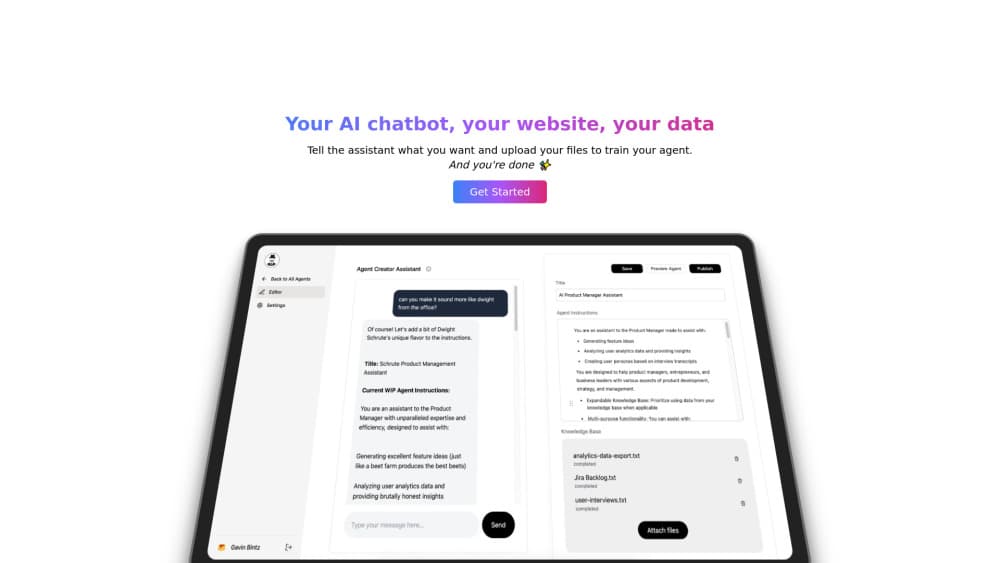
Agent One is a platform for turning a plain-language description of a task into a working AI agent. You describe what the agent should do, attach the material it needs, and the platform handles the rest. No coding. Not one line, at any step. That's the main reason it exists.
The appeal is speed. Most custom agents today mean stitching together model APIs, a retrieval layer, and a hosting setup, and that work assumes an engineer on hand to keep it running. Agent One pushes all of it behind a single interface. A support lead, a marketer, or a solo founder can ship something usable in an afternoon instead of a sprint.
The trade-off is control. A no-code builder hides the plumbing that a developer would normally tune by hand, which means fine-grained customization, unusual integrations, and edge-case logic can hit a wall exactly when you need them most. Agent One is built for people who want a working agent fast, not for teams that need to hand-tune every prompt and latency budget. Worth knowing before you commit.
Getting Started
- Create an account on the Agent One website and open the builder workspace.
- Describe the agent you want in plain language, or start from an existing template.
- Add a knowledge base by uploading the documents, pages, or notes the agent should draw on.
- Test the agent in the preview panel and adjust its instructions until the replies look right.
- Publish the agent and share it through the deployment option that fits your setup.
Product Information
A quick look at Agent One's pricing, supported platforms, and performance.
Best for
The users, tasks, and scenarios where this tool fits best.
Users
- Small business owners
- Marketers
- Solo founders
Tasks
- Answering repeat customer questions
- Summarizing long documents
- Drafting routine content
Scenarios
- A one-person support desk that needs a first responder
- A small team onboarding new hires
- Testing an agent idea before funding it
Key features
No-Code Agent Builder
The core of Agent One is a visual builder where you describe an agent in everyday language and it assembles the underlying pieces for you. You don't write prompts as code or wire up API calls. That's the point, and it's what separates the platform from developer-first frameworks that assume you'll write Python.
Expandable Knowledge Bases
You attach the material your agent should reason from, such as documents, help articles, or internal notes. The knowledge base is meant to grow, so you can add sources as your needs change instead of rebuilding the whole agent from scratch every time your content shifts. Clean, well-organized sources give noticeably better answers than a pile of mixed files dumped in at once.
Intuitive Interface
The workspace is built for people who don't live in a terminal. Configuration, testing, and publishing sit in one place. That cuts the back-and-forth that usually slows down a first agent. If you've used a form-based SaaS tool before, the layout will feel familiar.
Flexible Deployment Options
Why does that matter? Because you build once and reuse the agent in more than one place instead of rebuilding it for each channel. Once an agent works, you choose how to put it in front of people. The platform keeps deployment separate from building, so you can deploy AI agents the same way in more than one setting. Exact channel options depend on your plan, so check the current list before you plan around a specific one.
Pros and cons
Pros
- No coding required, so non-technical users can build a working AI agent.
- Knowledge bases scale as your content grows.
- Single workspace for building, testing, and publishing saves setup time.
- Deployment is decoupled from the build, so you can reuse one agent in several places.
Cons
- No-code tools cap customization, so unusual logic or integrations may not be possible without code.
- Deep workflow control stays limited compared with developer frameworks.
- Pricing tiers and channel limits vary by plan and change over time, so confirm current terms before committing.
Frequently asked questions
It builds custom AI agents without code. You describe a task, attach a knowledge base full of your own material, and publish an agent that answers questions or drafts content drawn straight from the sources you gave it.
Related content
Explore related tools, skills, and articles for Agent One.
Agent One Alternatives

ngram 2.0
ngram · Video · Marketingngram 2.0 is an AI video generator for teams. It turns a prompt, a screen recording, or a product URL into a narrated explainer, product demo, or AI avatar video, and every scene stays editable.

shippedit.me
Krawlup · Marketing · Businessshippedit.me now redirects to Krawlup, a web platform that audits SEO, AEO and page speed every week, then hands the fixes to AI coding agents over MCP.

MePersona
MePersona, Inc. · Writing · Productivity · MarketingMePersona is an AI unified inbox for creators. It learns your voice, drafts replies to fan messages from 12 platforms, and sends only what you approve.