

AgentEcho
Areshkew · Coding
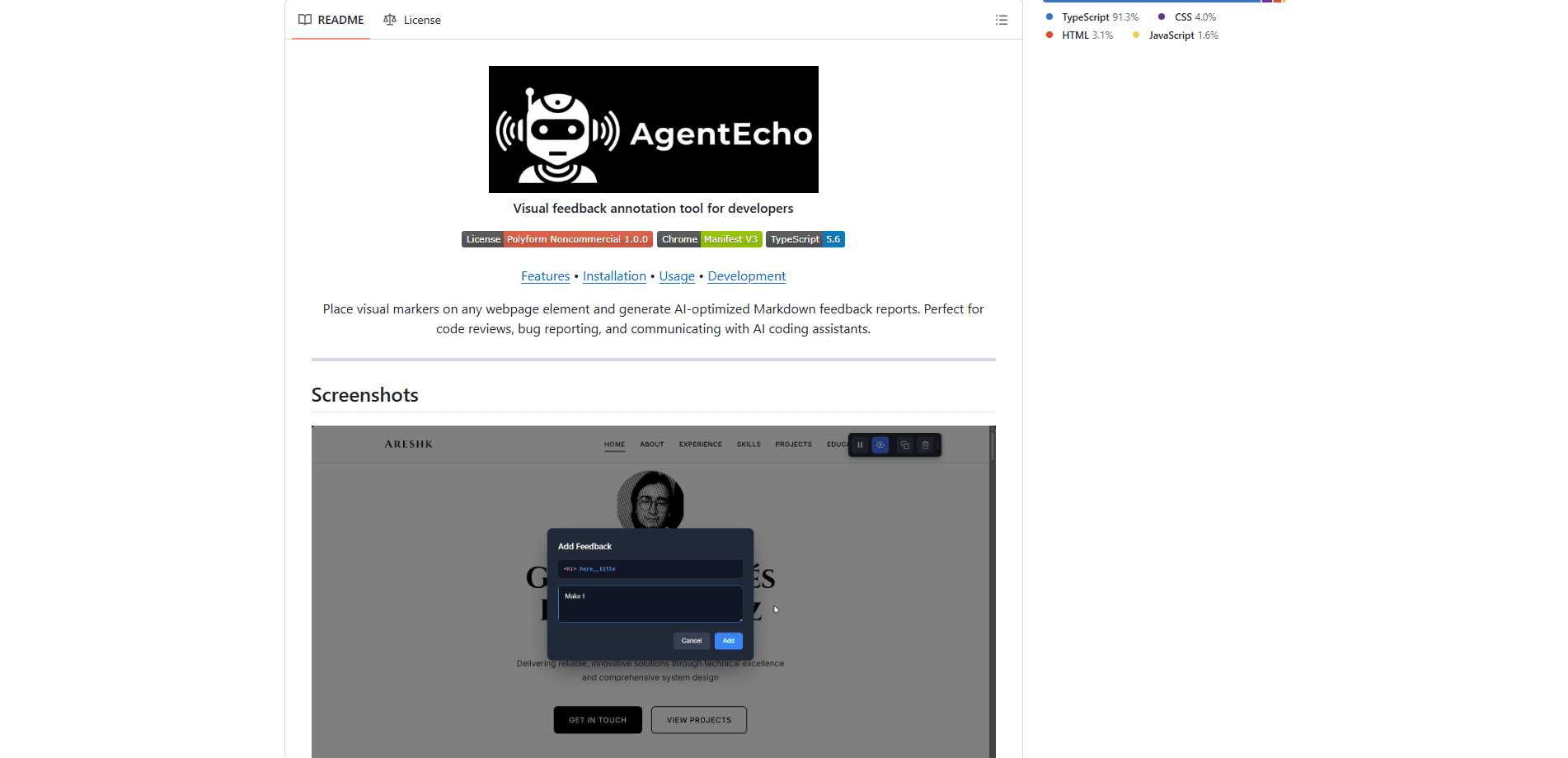
AgentEcho is a visual feedback annotation Chrome extension that lets you drop numbered markers on any webpage element and turn them into a clean Markdown report. Instead of writing "the button near the top right," you click the actual button, type your note, and AgentEcho captures the element's selector, classes, text, and framework component name for you. It's built for developers who need to send precise UI feedback to teammates or AI coding assistants.
About AgentEcho
What Is AgentEcho
AgentEcho is a browser extension that adds an annotation layer on top of any website. You activate it, hover over elements until the blue highlight lands on the right one, and click to place a marker. Each marker holds your note plus the technical details of that element, so the person or AI reading your feedback knows exactly what you meant.
The problem it solves is a familiar one. Pasting a screenshot into a bug tracker loses the CSS selector. Text descriptions like "the small link under the header" get misread. Sound familiar? AgentEcho closes that gap. It pairs your words with machine-readable element context that a coding agent can act on directly.
The biggest limitation comes from its scope. AgentEcho runs on Chrome only and works through the Manifest V3 extension platform, so Firefox and Safari users are out of luck. It also has no cloud sync. Feedback stays tied to the browser profile where you created it, and there's no built-in way to share reports beyond copy-pasting the Markdown.
Getting Started
- Install AgentEcho from the Chrome Web Store, or clone the GitHub repo and load the
dist/folder as an unpacked extension. - Pin the extension icon to your toolbar and open a page you want to review.
- Click the icon, then hit Activate to turn on annotation for that tab.
- Hover to highlight an element, click it, and type your feedback in the modal that pops up.
- Repeat across the page, then click Copy to send the formatted Markdown wherever you need it.
Product Information
A quick look at AgentEcho's pricing, supported platforms, and performance.
Best for
The users, tasks, and scenarios where this tool fits best.
Users
- Front-end developers
- QA testers
- Solo builders using AI coding assistants
Tasks
- Writing precise bug reports
- Directing AI coding assistants
- Code review follow-ups
Scenarios
- Reviewing a staging build before release
- Reporting layout bugs on mobile-width pages
- Giving feedback on a design a teammate shared
Key features
Click-to-Mark Annotation
You place a numbered marker on any element with a single click. A blue highlight shows exactly what you're targeting before you commit. Markers stay visible and positioned on the page, so you can build up a full list of notes in one pass rather than fixing things one at a time. Why bother? Because a single combined report beats ten scattered messages.
Framework Component Detection
AgentEcho identifies React and Angular components on the page and records the component name with each piece of feedback. That means your note arrives attached to SubmitButton rather than just a raw DOM node, which cuts down on back-and-forth when someone else has to find the code.
Automatic Element Analysis
Every marker captures a stable CSS selector, the element's classes, IDs, and data attributes, plus its visible text and on-page position. That CSS selector annotation is what makes a report usable. A manual screenshot or written description can't reproduce it.
AI-Ready Markdown Export
One click copies everything to your clipboard as a structured Markdown report, with a header for the URL, capture time, and item count. The layout is tuned for AI coding agents, so you can paste it into a chat with an assistant and get edits that match the elements you flagged.
Shadow DOM Isolation
The annotation UI runs inside a Shadow DOM, which keeps it from picking up or leaking page styles. In practice, this means the toolbar and markers look consistent and don't break the site you're reviewing, even on pages with aggressive CSS.
Keyboard Shortcuts
A small set of shortcuts speeds up repeat work. Press C to copy all feedback. Press H to hide markers. Delete clears them, and Escape leaves annotation mode without touching the toolbar. Handy once you've placed a dozen notes.
Pros and cons
Pros
- Sends element context that plain screenshots can't, including selectors and framework component names.
- The Markdown output is structured for AI assistants, so it drops into an agent chat without reformatting.
- Runs on any website and stays out of the page's styling thanks to Shadow DOM isolation.
- Costs a dollar on the Chrome Web Store, and you can build it free from source if you prefer.
Cons
- Chrome only, so anyone on Firefox or Safari can't use it at all.
- No cloud sync or team sharing, which means reports live in the browser profile that made them until you copy them out.
- Vue and Svelte detection are still listed as planned, so non-React/Angular projects get less framework context.
Frequently asked questions
It's a visual feedback annotation tool that runs as a Chrome extension. You click page elements to place numbered markers, add a note to each, and export everything as a Markdown report that carries the element's selector and component details. Think of it as a bug reporting tool that keeps the technical context attached to your note.
Related content
Explore related tools, skills, and articles for AgentEcho.
AgentEcho Alternatives
Forefront
Forefront · CodingForefront is a web platform for building with open-source AI. It lets you fine-tune leading open-source language models on your own data, evaluate how they perform, and run them through an API or export them to host yourself. Developers who want the convenience of a closed-source platform but insist on owning their models and data are the target audience here.

Startkit
StartKit.AI · CodingStartkit is a boilerplate for building AI SaaS and AI wrapper products. Think of it as an AI startup boilerplate with the boring parts already wired up: authentication, Stripe and Lemon Squeezy payments, usage limits, transactional email, and an AI API starter that talks to OpenAI, Anthropic, Groq, or Llama. You clone the repo, set your price, and start on the part of your product that people actually pay for. It's Next.js under React and Tailwind, so most of the boilerplate code already feels familiar.
Testim
Tricentis · CodingTestim is an AI-powered test automation platform for building and running end-to-end tests across web, mobile, and Salesforce applications. It leans on machine learning to keep tests stable when an interface changes, so teams spend less time fixing broken selectors. Not bad for an automated testing tool you can start using today. You create tests by recording actions in a browser, then optionally add JavaScript when you need more control. It's a solid pick for busy QA teams.