
AI Bypasser
AI Bypasser · Writing · AI Detection
AI Bypasser is a web tool that rewrites AI-generated text so it reads like human writing and slips past detectors such as Turnitin, GPTZero, and Originality.ai.
About AI Bypasser
What Is AI Bypasser
AI Bypasser is a browser-based AI humanizer from a small team based in the USA. You paste a draft, pick a rewrite strength, and the tool returns a new version with different sentence rhythm and word choices. The goal is narrow and clear: make machine-written text look like something a person typed so you can bypass AI detection on drafts headed for a publisher or a grader.
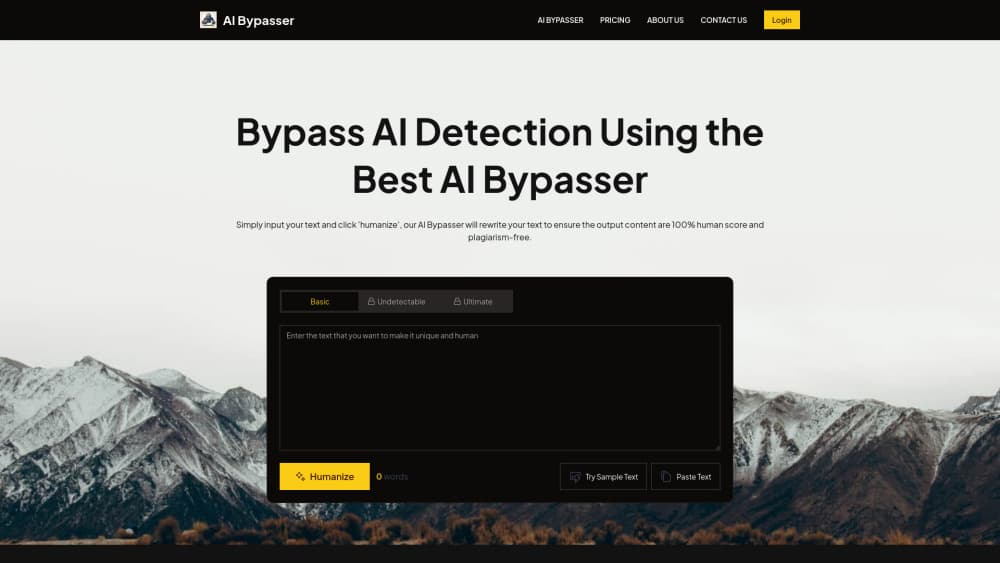
The tool covers three rewrite levels. Basic makes light edits, Undetectable balances readability against detector evasion, and Ultimate pushes the rewrite hardest. Each level changes how much of your original phrasing survives, so the right pick depends on whether you care more about tone or about a low AI score.
Its limits are worth knowing before you pay. Detector results shift as the detectors retrain, and no rewriting tool can promise a fixed score forever. Long documents also get chopped into sessions because of per-run word caps. And the site publishes no API, so the only way in is the web page.
Getting Started
- Open aibypasser.pro and paste your text into the input box, or load the sample text to see how the tool behaves.
- Choose Basic, Undetectable, or Ultimate depending on how aggressive you want the rewrite.
- Press Humanize and wait a few seconds for the rewritten version.
- Read the output for meaning changes, then run it through a detector and a plagiarism checker before you use it.
Product Information
A quick look at AI Bypasser's pricing, supported platforms, and performance.
Best for
The users, tasks, and scenarios where this tool fits best.
Users
- Students who draft with AI and need the final text to read like their own writing
- SEO writers and webmasters publishing AI-assisted blog posts
- Non-native English writers
Tasks
- Humanizing a ChatGPT or Claude draft before editing
- Rewriting marketing copy so it doesn't repeat the same model phrasing
- Cleaning up a report written under deadline
- Testing how a detector responds to a draft
Scenarios
- A blog post due tonight and a flagged draft on your screen
- Coursework where AI assistance is allowed but AI-sounding prose is penalized
- Agency work at volume
Key features
Three rewrite strengths
Basic, Undetectable, and Ultimate sit side by side above the input box. Basic keeps more of your wording, Ultimate changes more of it, and Undetectable sits between the two. Trying all three on the same paragraph is the fastest way to see which level keeps your meaning intact. Undetectable AI is the promise here, and the middle setting is where most people land.
Detector coverage
The site names Turnitin, GPTZero, Originality.ai 3.0, OpenAI's classifier, CrossPlag, ContentAtScale, Sapling, Copyleaks, and ZeroGPT as targets. Coverage claims come from the vendor, and each detector updates on its own schedule, so a pass today is not a permanent pass.
Plan-based word limits
The Standard plan allows 10,000 words a month with 500 words per session. Advanced raises that to 30,000 words a month and 2,000 words per session. The Lifetime plan removes both caps. Long chapters have to be split into chunks on the cheaper plans.
Built-in AI detector
Every plan includes a detector that scores text before and after the rewrite. It's the practical part of the workflow: you can see whether a paragraph still reads as machine-written without paying for a second subscription elsewhere.
Paste-and-go interface
There's no install and no editor to learn. A word counter tracks input length, a sample text button shows the tool in action, and the output appears in the same panel. The whole flow fits on one screen, and the tool is built to humanize AI text rather than write new copy for you.
Fast turnaround
Sessions finish in seconds rather than minutes, according to the vendor. That speed matters when you're checking several drafts in a row, and it's the main reason people keep the tab open instead of using a general chatbot for the same job.
Pros and cons
Pros
- Three rewrite levels give you a real choice between keeping your voice and lowering the AI score.
- Per-plan pricing is easy to compare: $5 monthly for light use, $8 for steady publishing, and a one-time $99.99 for unlimited words.
- The bundled detector saves a separate subscription and lets you check the output on the spot.
- No install, no onboarding, and no learning curve beyond pasting text.
- Annual billing knocks a dollar or two off each monthly plan.
Cons
- Session caps mean long documents get split, which can leave style differences between chunks.
- Detector vendors keep retraining their models, so results can change without any update on your side.
- No API or bulk upload, which rules it out for teams that need humanizing inside a publishing pipeline.
- Heavier modes can flatten technical terms and shift meaning, so every output needs a read-through.
Frequently asked questions
It rewrites AI-generated text so it looks less like model output. You paste a draft, pick a strength level, and get a new version with different sentence structure and vocabulary.
Related content
Explore related tools, skills, and articles for AI Bypasser.
AI Bypasser Alternatives

Google EmbeddingGemma 2
Google DeepMind · Writing · Image · CodingGoogle EmbeddingGemma 2 is a 740M-parameter open model that turns text, code, images, audio, and video frames into vectors in one 768-dimension space, running on phones and laptops.

MePersona
MePersona, Inc. · Writing · Productivity · MarketingMePersona is an AI unified inbox for creators. It learns your voice, drafts replies to fan messages from 12 platforms, and sends only what you approve.

Fluence
Yay Software (Yannick Huchard) · Writing · Voice & Language · ProductivityFluence is an Android app that reads PDFs, EPUBs, Word files and web articles aloud, follows each sentence as it speaks, and answers questions about the text on the phone itself.