

AI Chat App - AI Chat bot
App Business Ventures LLC (PowerBrain AI) · Other · Chatbot · China AI
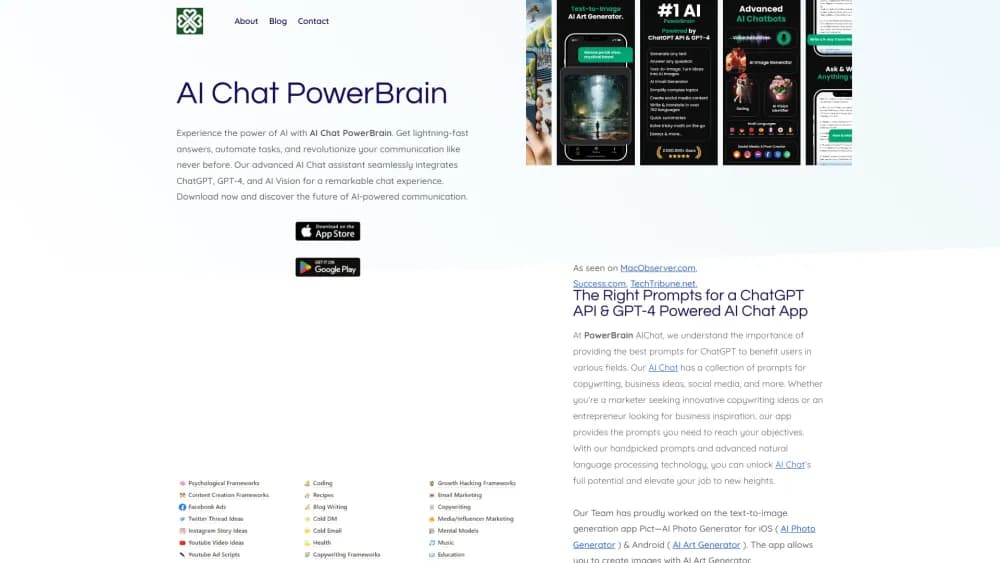
AI Chat App - AI Chat bot (PowerBrain) is a free assistant for iOS, Android, and web. It runs on OpenAI models, reads photos, takes voice input, and bundles 273 ready-made chatbots.
About AI Chat App - AI Chat bot
What Is AI Chat App - AI Chat bot
PowerBrain AI Chat is a consumer chatbot app published by App Business Ventures LLC. It appears as AI Chat App - AI Chat bot on Google Play and as AI Chat on the App Store, with powerbrainai.com as its home on the web. The company positions it as a pocket assistant for writing, study, and everyday questions. The underlying models come from OpenAI, and the site states plainly that the app is not affiliated with OpenAI.
The pitch is breadth. A general chat window sits next to a library of 273 specialized chatbots for travel, wellness, translation, and other topics. You can type, speak, or send a photo, and the answer lands in the same thread. Chat history follows the account across phone and browser, so a question started on the bus can be finished at a desk.
The limits matter if you are weighing it against ChatGPT or Gemini. There is no public API, no shared team workspace, and no documented way to export a full history. Image generation, which older builds advertised, is switched off in the current Android release. The app earns money from in-app subscriptions, and the website publishes no price list, so you only see the cost inside the store.
Getting Started
- Install the app from Google Play or the App Store, or open powerbrainai.com in a browser.
- Sign in with an email or social account. Free chat works right away. Online Mode needs a signed-in account but no paid plan.
- Choose a mode. Standard chat answers from the model's training data, Online Mode pulls current web results, and Genius Mode runs on a stronger model behind the Pro plan.
- Send a prompt. Type it, tap the microphone to talk, or attach a photo for AI Vision to identify.
- Reopen the thread later. Conversations stay with the account and sync between devices.
Product Information
A quick look at AI Chat App - AI Chat bot's pricing, supported platforms, and performance.
Best for
The users, tasks, and scenarios where this tool fits best.
Users
- Students who need a fast explanation
- Writers and social media managers
- Casual users who do not want to learn prompting
- Travelers and curious shoppers
Tasks
- Drafting and rewriting short text
- Checking grammar and clarity
- Translating a paragraph or a menu
- Identifying an object from a picture
Scenarios
- A student revising at night
- A small shop owner writing listings
- A traveler standing in front of an unfamiliar sign
Key features
GPT Chat for Everyday Questions
The core chat window is the part most people will use. It answers questions, writes short text, explains code, and keeps the context of the conversation, so you can correct it without starting over. On Android, the Play listing says the GPT chat runs on a recent GPT model, and the app handles both quick factual questions and longer drafting tasks. It is a general assistant, not a specialist tool, and that is the point.
Genius Mode for Harder Prompts
Genius Mode swaps in a stronger model for reasoning-heavy requests. The company says it brings more knowledge, steadier logic, and cleaner wording, and it sits behind the PowerBrain Pro subscription. For a legal-style explanation, a multi-step plan, or a tricky debugging session, the difference is noticeable enough to matter. For a grocery list, it is not worth the upgrade.
Online Mode with Live Web Results
Online Mode lets the chatbot browse the web during a reply, which fixes the stale-knowledge problem that plagues any model trained months earlier. It covers news, prices, and current events, and it requires a signed-in account without requiring a subscription. Answers come back with fresher context, and you can ask it to check a specific site or compare two recent announcements.
AI Vision Photo Recognition
AI Vision reads an image and answers questions about it. The official examples include plants, animals, rocks, crystals, insects, and banknotes, which makes it useful for learning and for quick identification on the go. You attach a photo and ask a question in the same message. Accuracy varies with lighting and framing, so a clear, close shot gives the best result.
Voice Input and Spoken Replies
You can talk to the app instead of typing, and it can read answers back. The official site describes three input styles: speak, type, or show. That matters in the car, in the kitchen, or for anyone who finds a phone keyboard slow. The Android release notes mention text-to-speech stability fixes, a sign the voice path is still being tuned rather than finished.
273 Specialized AI Assistants
Beyond the blank chat box, the app ships 273 assistants built around specific jobs. The list covers travel planning, wellness advice, language practice, creative writing, and novelty roles such as a comedian or a debate partner. Each one arrives with its own framing, so you skip the blank page and start with a task. It is the feature that separates this AI chatbot app from a plain GPT wrapper.
Pros and cons
Pros
- Free entry point with a usable daily quota, so you can test the AI assistant before paying anything.
- One account across iOS, Android, and the web, with chat history that follows you between devices.
- Photo, voice, and text input in the same thread, which covers more situations than a text-only chatbot.
- 273 prebuilt assistants remove the blank-page problem for travel, study, and writing tasks.
- Online Mode adds current web results without an extra subscription, a feature some paid rivals still gate.
Cons
- Image generation is unavailable in the current Android build, so anyone who wants pictures from a prompt has to use another tool.
- Reviews on Google Play repeat two complaints: answers that miss the mark, and ads or rating prompts that interrupt a session. The developer says both are being worked on.
- The website shows no pricing table. You learn the Pro cost only inside the app store, and the listing gives a wide range of $4.99 to $42.99 per item.
- There is no public API and no documented export, which rules it out for developers or teams that need to move data elsewhere.
Frequently asked questions
It is a general AI assistant for questions, short writing, translation, and photo identification. You can also open one of 273 specialized chatbots when you want a narrower task, such as trip planning or language practice.
Related content
Explore related tools, skills, and articles for AI Chat App - AI Chat bot.
AI Chat App - AI Chat bot Alternatives

Odyssey 3
Odyssey · OtherOdyssey-3 is Odyssey's foundation world model. It simulates physics in real time, turns a prompt into an interactive environment, and adapts to robots, cars and games.

JarvisCore
Prescott Data · Coding · Productivity · OtherJarvisCore is an open source Python runtime where AI agents work as equal peers on an agent mesh, claim tasks from a shared ledger, and reach external services through a zero-trust broker.
Clef
Cloudflare · Business · OtherClef is Cloudflare's open-source decision model for Workers AI. It returns calibrated probabilities for typed questions, not generated text, so agents can classify, route, and act fast.