

AI Clone Voice Free
MixVoice · Voice & Language
AI Clone Voice Free is a browser-based voice cloning tool that turns a 5-second sample into a usable AI voice in 646 languages, with free previews and paid plans from $4.95/mo.
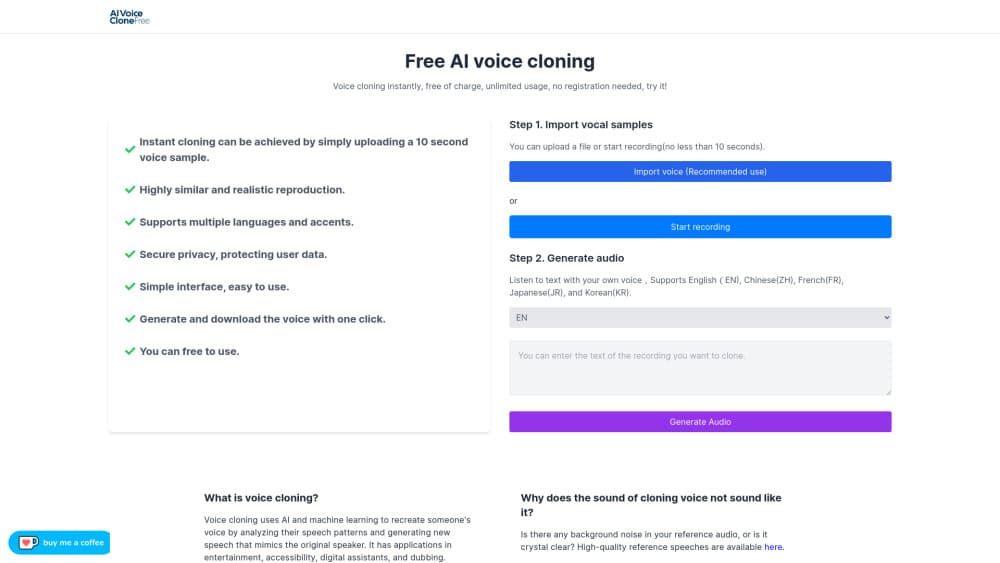
About AI Clone Voice Free
What Is AI Clone Voice Free
AI Clone Voice Free is an online voice cloning tool from MixVoice. You record or upload a short sample, type a script, and the service returns speech in that voice. No install, no account for the first preview. The output lands as a downloadable audio file at 44.1kHz, which is the sample rate most editors and video tools expect.
The product covers more than cloning. The same dashboard runs text to speech with a preset voice library, batch jobs for long scripts, speech to text, vocal extraction, speaker separation, denoising, dubbing, and even AI cover songs. That breadth is the reason people stay after the first clone works. Instead of paying for a cloning service plus a separate TTS subscription, one account covers both.
The limits show up in the free plan. Each queued generation caps at 200 characters and the free voice similarity sits around 70.5%, so the preview tells you whether the timbre is close, not whether the result is broadcast ready. Paid plans raise similarity to 99.5%, lift the input limit to 10,000 characters, and add a commercial license. The tool runs in a browser only, so there's no mobile app and no offline mode. Cloning someone else's voice without permission is on you, and the site says so.
Getting Started
- Open aiclonevoicefree.com. The cloning box sits on the home page, so you don't need to sign in to test it.
- Record a sample in the browser or upload a clean clip of about 5 seconds. One speaker, no music, no room echo works best.
- Paste your script into the text field and pick a style or preset if you want one.
- Generate the preview and listen. Free previews run in a queue, so expect a short wait at busy times.
- Create an account and pick a plan when you need longer scripts, higher similarity, or the commercial license that comes with paid tiers.
Product Information
A quick look at AI Clone Voice Free's pricing, supported platforms, and performance.
Best for
The users, tasks, and scenarios where this tool fits best.
Users
- YouTube and Shorts creators
- Podcasters and audiobook narrators
- Indie developers
- Marketers running multilingual campaigns
Tasks
- Narrating a video
- Dubbing a clip into another language
- Turning articles into audio
- Repairing rough recordings
Scenarios
- Testing a voice direction before booking studio time
- Running a channel in several languages without a local team
- Producing a scratch track for video editing
Key features
Voice Cloning From a 5-Second Sample
The core feature takes a short recording and builds a voice model from it. Five seconds is the stated minimum, and clean audio matters more than length. A noisy 30-second clip usually produces a worse clone than a quiet 6-second one. Paid plans push similarity to 99.5%, which is where the output stops sounding like a cousin of the original.
646-Language Output
AI Clone Voice Free lists support for 646 languages, and the practical use is cross-language speech: record in English, generate in Japanese. Paid plans add cross-language emotion preservation, so the delivery keeps some of the original performance instead of flattening into a neutral read. Quality varies by language, and the site notes that voice characteristics differ between models.
Text to Speech With a Voice Library
Beyond your own clone, the tool ships a preset library and a voice design mode for building a voice from scratch. You type the script, pick a voice, and export. This is the part that replaces a separate TTS subscription for most users, and the built-in AI voice generator is the fastest way to compare your clone against a stock voice before committing.
Batch Jobs and Long Scripts
Paid plans accept up to 10,000 characters per input, and batch processing lets you queue several scripts at once. That turns a full audiobook chapter or a week of video scripts into a single sitting. Credits are shared across web and API on the same quota, which matters if you plan to automate generation later.
Speech to Text and Audio Cleanup
The dashboard includes speech recognition with 500 seconds of free transcription, plus vocal extraction, speaker separation, denoising, and accompaniment removal. These tools cover the cleanup work that usually sends people to a second app after the voiceover is done. Accuracy on transcription depends on audio quality, and heavy accents will need a manual pass.
API Access on Paid Plans
Every paid plan includes API usage inside its monthly character quota, so the same credits work in the browser and in code. That's unusual at this price. It makes the tool usable for prototypes and small products. Teams with high volume will burn through a 1M character allowance faster than they expect.
Pros and cons
Pros
- Free entry with no signup for the first preview, so you can judge clone quality before paying anything.
- 646 languages from a single sample, with cross-language emotion preservation on paid plans.
- One subscription covers cloning, text to speech, dubbing, transcription, and audio cleanup instead of four separate tools.
- API access is bundled into paid plans at no extra line item, which is rare under $10/mo.
- 44.1kHz export and a commercial license on paid tiers make the output usable in client work.
Cons
- The free plan caps each generation at 200 characters and holds similarity near 70.5%, so free output works as a demo and not as a finished voiceover.
- There's no mobile app or desktop client. Everything runs in the browser, which means no offline work and no local batch processing.
- Voice cloning consent isn't verified inside the product. If you upload a voice you don't own, the legal exposure is yours, and that risk sits with the user rather than the tool.
- Independent reviews are thin, so claims about accent handling and language coverage are hard to check against outside testing.
Frequently asked questions
Yes, with limits. You can clone a voice and generate previews without paying or signing up, but each free generation caps at 200 characters and the voice similarity stays around 70.5%. Longer scripts, higher fidelity, and the commercial license require a paid plan.
Related content
Explore related tools, skills, and articles for AI Clone Voice Free.
AI Clone Voice Free Alternatives

Foley
Hanamori Labs, LLC · Voice & Language · Productivity · AI AssistantFoley is a voice to-do list that turns a spoken sentence into a filed task, complete with project, date and time, then helps you plan the day around what is already there.

HireKey
HireKey · Voice & Language · Productivity · LeaningHireKey is an AI job search copilot built by a former tech recruiter. It checks role fit, tailors resumes, runs interview practice and tracks every application.

Fluence
Yay Software (Yannick Huchard) · Writing · Voice & Language · ProductivityFluence is an Android app that reads PDFs, EPUBs, Word files and web articles aloud, follows each sentence as it speaks, and answers questions about the text on the phone itself.