
AI Cover Generator
AI Cover Generator · Voice & Language
AI Cover Generator is a free browser tool that turns any song into an AI voice cover by swapping the original vocals with a voice model you pick.
About AI Cover Generator
What Is AI Cover Generator
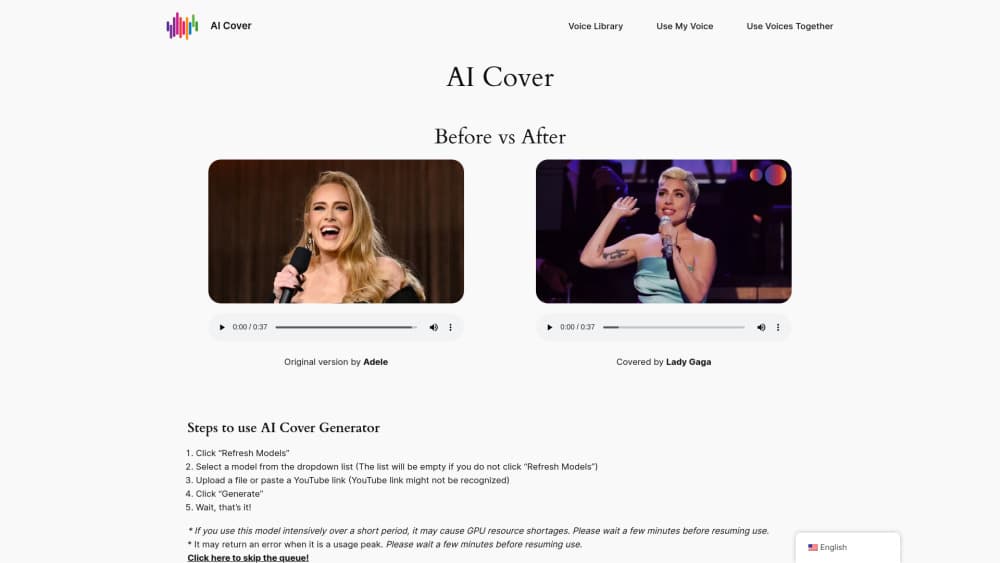
AI Cover Generator is a web app that recreates the vocals of a song using a different voice. You feed it an audio file or a YouTube link, choose a trained voice model, and it rebuilds the track so the singing sounds like that voice instead.
The pitch is simple: no singing talent, no studio, no editing skills. Think of it less as a song cover maker and more as a vocal swap. Upload a track, pick a voice, hit Generate. The original melody and backing stay intact while the lead vocal gets replaced, so what you hear is the same arrangement with a brand new singer on the mic.
There are real limits worth knowing. The tool runs on shared GPU resources, so heavy use in a short window can stall your queue. It also points users toward Jammable for queued access and custom voice training, which means the free tier here isn't the whole story.
Getting Started
- Open aicover.fun in your browser and click "Refresh Models" to load the voice list.
- Pick a voice model from the dropdown. The list stays empty if you skip the refresh.
- Upload an audio file or paste a YouTube link as your source song.
- Click "Generate" and wait for the cover to render.
- Download or play the finished AI song cover.
Product Information
A quick look at AI Cover Generator's pricing, supported platforms, and performance.
Best for
The users, tasks, and scenarios where this tool fits best.
Users
- Music fans who want to hear a favorite song in a different voice, as long as they can wait out a busy queue
- Content creators who need quick cover vocals for short clips, with a working browser and internet connection
- Beginners with zero audio editing background, since the whole flow is upload, pick, generate
Tasks
- Swapping a lead vocal for a chosen voice model on a track you already have
- Making novelty covers to post on social feeds
- Testing how a voice model handles a song before committing to a bigger project
Scenarios
- A quick experiment on a laptop over a lunch break
- Drafting cover audio for a meme video
- Comparing a handful of voice models on the same song to hear the difference
Key features
Voice Model Swapping
The core move is replacing the original vocal with a trained voice model. You select from a dropdown list of available voices, and the tool rebuilds the singing so it carries that voice's tone. This is what makes it a cover tool rather than a simple audio filter. So what actually changes in the final file? The backing track, the melody, and the timing all stay, while the lead vocal is the only part that gets swapped out for the model you picked.
YouTube Link and File Input
You can hand the tool either an uploaded audio file or a pasted YouTube link. Files tend to be the safer route, since the site itself warns that YouTube links might not always be recognized. If one fails, try the other.
One-Click Generation Flow
There's no timeline, no mixing board, no manual pitch work. The whole process is Refresh Models, pick a voice, add a song, and click Generate. For anyone who's fought with a full digital audio workstation, that simplicity is the point.
Custom Voice Training Path
The site links out to a training flow that lets you build a voice model from your own voice. That path runs through a separate service, not the main generator page, so treat it as an add-on rather than a built-in feature.
Free Browser Access
Everything runs in the browser with no install and no account wall visible on the landing page. That keeps the barrier low. The trade-off is shared GPU capacity, which is why busy periods can push your job back in line.
Pros and cons
Pros
- Free to use with no install or signup shown on the page
- Simple four-step flow that even non-musicians can follow
- Accepts both audio files and YouTube links
- Multiple voice models to pick from in a dropdown
- Works in any modern browser on desktop
Cons
- Heavy short-term use can trigger GPU shortages and delays
- YouTube links may fail to load, so file upload is more reliable
- Custom voice training sits outside the main tool
- Queue times can stretch during peak hours
Frequently asked questions
Yes. The landing page offers the cover generation flow at no cost and no visible paywall. The site does steer heavy users toward Jammable for faster queue access and voice training, but the base generator is free.
Related content
Explore related tools, skills, and articles for AI Cover Generator.
AI Cover Generator Alternatives

Foley
Hanamori Labs, LLC · Voice & Language · Productivity · AI AssistantFoley is a voice to-do list that turns a spoken sentence into a filed task, complete with project, date and time, then helps you plan the day around what is already there.

HireKey
HireKey · Voice & Language · Productivity · LeaningHireKey is an AI job search copilot built by a former tech recruiter. It checks role fit, tailors resumes, runs interview practice and tracks every application.

Fluence
Yay Software (Yannick Huchard) · Writing · Voice & Language · ProductivityFluence is an Android app that reads PDFs, EPUBs, Word files and web articles aloud, follows each sentence as it speaks, and answers questions about the text on the phone itself.