
AI Detect
XYZAI, Inc. · AI Detection
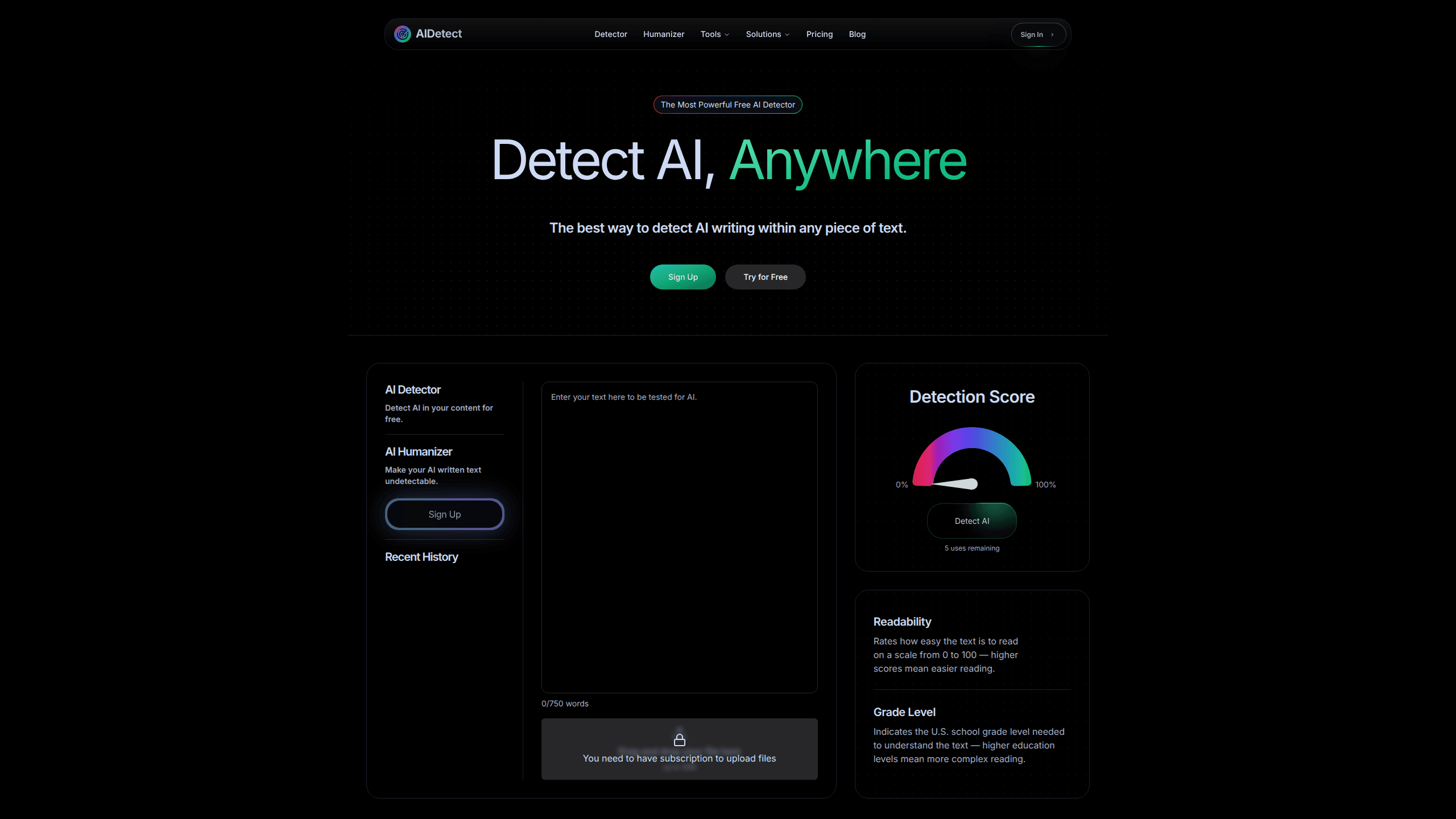
AI Detect is a web-based AI detector and humanizer that checks whether a block of text was written by a person or a language model. You paste in an essay, article, or draft, and it returns an AI detection score plus readability and grade-level ratings within seconds. It's aimed at students, teachers, editors, and hiring teams who need to verify writing before they submit or publish it. The free tier allows 5 scans per day, and paid plans lift the word limit and daily scan count.
About AI Detect
What Is AI Detect
AI Detect is an online tool for spotting AI-generated writing. It runs text through detection models and gives you a score that shows how much of the content reads as machine-made, along with two side scores for readability and U.S. grade level. The company behind it, XYZAI, Inc., positions it for high-stakes checks: academic review, editorial workflows, recruiting screens, and brand publishing.
The appeal is speed and simplicity. No install. No desktop app. No API keys to manage for casual use. You open the site, paste text, and get a result. That makes it easy to reach for before you send a paper off to a professor or push a draft live.
The catch is the free plan's limits. At 5 scans a day and no humanizer access, heavy users hit the ceiling fast. The humanizer, which rewrites flagged text, sits behind the paid tiers. So you can't test that part without paying. There's also no mobile app or public API right now. It stays a browser tool.
Getting Started
- Go to aidetect.com and open the AI detector page.
- Paste the text you want to check, or type it into the input box.
- Run the scan and read the AI detection score along with the readability and grade-level ratings.
- If the text gets flagged, either revise it yourself or upgrade to a paid plan to use the humanizer.
- Sign in if you want your scan history and higher daily limits tied to an account.
Product Information
A quick look at AI Detect's pricing, supported platforms, and performance.
Best for
The users, tasks, and scenarios where this tool fits best.
Users
- Students
- Teachers and professors
- Editors and content managers
Tasks
- Screening essays
- Reviewing marketing drafts
- Checking recruitment writing samples
Scenarios
- Pre-submission check on a term paper the night before it's due.
- A publisher's quality-control pass on contributed articles.
- A hiring team comparing dozens of written work samples in one sitting.
Key features
AI Detection Scoring
The core feature takes pasted text and returns a score for how likely it's AI-generated. AI Detect says it uses detection models built to catch output from tools like ChatGPT. That means you get a judgment, not just a similarity match. Results come back fast. That matters when you're checking several pieces in a row.
Built-In Humanizer
Paid plans include a humanizer that rewrites flagged text to read more naturally. This is what separates AI Detect from a plain AI detection tool, and the company claims the rewritten output bypasses other detectors. You can't use it on the free tier, so it stays a paid-only workflow.
Readability and Grade Level
Alongside the AI score, the tool rates how easy the text is to read on a 0 to 100 scale and estimates the U.S. school grade level needed to understand it. For teachers, that's a quick way to see if a piece matches the level it's meant for.
Daily Scan Limits by Plan
Each paid tier sets its own ceiling: 100 scans a day on Detection Beginner, 150 on Pro, and 500 on Ultimate, with per-scan word limits of 750, 1,000, and 1,500 words. The free tier gives you 5 scans a day. Higher plans also raise how many humanizations you get daily, which matters most if you plan to run the rewrite step on every flagged draft.
Weekly, Monthly, and Yearly Billing
You can pay weekly, monthly, or yearly, and the plans are priced per day in the weekly view, starting around $0.57 a day. That suits people who need the tool for a short stretch, like exam season, rather than a year-long commitment. If you only have a handful of documents to check, the free plan already does the job.
Pros and cons
Pros
- Free tier works without a credit card, so you can test detection before paying.
- Combines detection, readability, and grade-level scoring in one screen.
- The humanizer gives you a way to fix flagged text without a separate tool.
- Short-term weekly billing fits one-off projects and exam periods.
- Results come back quickly, which helps when checking many samples.
Cons
- The free plan's 5 daily scans run out fast if you're checking more than a couple of documents.
- The humanizer is locked behind paid plans, so you can't evaluate the full workflow for free.
- Web only, with no mobile app, so you can't scan text offline or on the go.
- No public API, which rules it out if you want to plug detection into your own system.
Frequently asked questions
AI Detect is an AI checker that scans text and scores how likely it's AI-generated. It also reports readability and grade-level ratings, and its paid plans add a humanizer for rewriting flagged text.
Related content
Explore related tools, skills, and articles for AI Detect.
AI Detect Alternatives
Isgen AI
Isgen · AI DetectionIsgen AI is a web-based AI detector that scores text for machine authorship and shows you which sentences and phrases push the number up. It's built for teachers, editors, students, and writers. Their question is simple: did this draft come from ChatGPT, GPT-5, Claude, Gemini, DeepSeek, or another model? You paste or upload content, run a scan, and get a Human, AI, and Mixed breakdown in seconds. There's also a companion editor that scores text while you write it.
Humanizeai Tools
Humanizeai Tools · Writing · AI DetectionHumanizeai Tools is a web-based AI humanizer that rewrites machine-generated text so it sounds like a person wrote it, which is the whole point of the category it belongs to. Paste a draft from ChatGPT, Claude, or Gemini, run it through the tool, and it swaps out the phrases and sentence patterns that AI detectors flag. If your goal is to make AI text sound human before you publish it, this is the kind of tool built for exactly that. It suits students, bloggers, and marketers who need copy that reads naturally and clears tools like GPTZero, Copyleaks, and Winston AI after a single pass.

Hidemyai
Hidemyai · Writing · AI DetectionHidemyai is an AI content humanizer. It rewrites text from ChatGPT, Jasper, and similar tools so the result reads like a person wrote it. You paste your draft, pick a document type and tone, and the service returns a version meant to bypass AI detectors such as Originality.ai, Turnitin, and ZeroGPT. It targets writers, marketers, and students who lean on AI drafts but can't ship copy that sounds robotic. The promise is simple: make AI content undetectable.