

AI Drum Generator
AI Drum Generator · Coding
AI Drum Generator is a free browser tool that turns a BPM setting and a creativity slider into new drum patterns you can play on the spot, with no account and nothing to install.
About AI Drum Generator
What Is AI Drum Generator
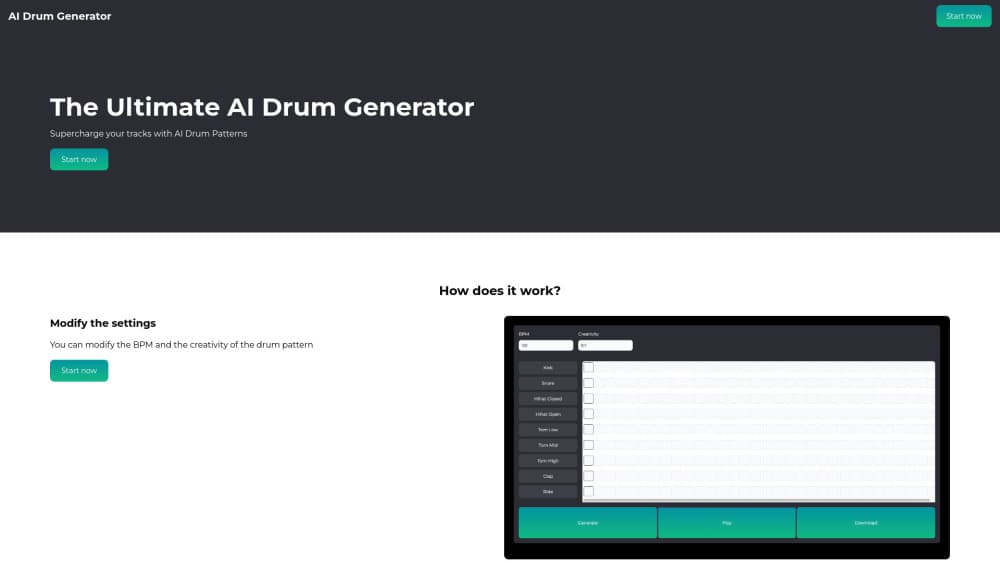
AI Drum Generator is a web app that writes drum patterns for you. You pick a tempo, decide how adventurous the result should be, and the site builds a beat and plays it back in the browser. It sits between a blank MIDI grid and a full AI drum machine, with less control than a DAW and far less setup than either.
Producers who need a starting groove, and anyone sketching a song idea late at night, can get something listenable in a couple of clicks. No plugin, no sample pack, no signup screen.
The tradeoff is depth. The public interface offers two dials, so the AI decides which drums hit and where they land. That means no per-lane editing for kick, snare and hats on the page itself, and no pattern browser to flip through when you want reference material.
Getting Started
- Open aidrumgenerator.com in any desktop or mobile browser and press Start now to reach the generator.
- Set the BPM to match the track you're building. Slow settings suit hip-hop and ballads, faster ones push toward house and drum and bass.
- Move the creativity slider. Low values stay close to familiar patterns, high values take more chances with syncopation and placement.
- Press Generate and listen. Adjust the two settings, generate again, and take the idea into your own drum machine when a beat fits.
Product Information
A quick look at AI Drum Generator's pricing, supported platforms, and performance.
Best for
The users, tasks, and scenarios where this tool fits best.
Users
- Bedroom producers
- Songwriters without drum skills
- Music students
Tasks
- Finding a tempo
- Escaping a rhythmic rut
- Building a reference beat for a session
- Practising programming by ear
Scenarios
- Late-night idea capture
- Rehearsal warm-ups
- Demo prep
Key features
BPM Control That Sets the Feel
A single tempo field drives the whole pattern. Type a value, and the generated beat lands at that speed, which makes it easy to audition the same idea at 80 and 140 BPM. Tempo is the one setting that changes how a groove reads before any note moves.
Creativity Slider
The slider decides how far the AI strays from a conventional pattern. Low settings return patterns close to a standard backbeat, high settings add syncopation and unexpected hits. It's the fastest way to explore variations without editing steps by hand.
One-Click Generation
Press Generate and the site returns a complete drum pattern rather than a loop fragment. There's no queue and no credit balance to watch, so you can regenerate as often as you like while hunting for a beat that fits.
Browser Playback
The pattern plays straight from the page, so you hear the result without exporting a file or opening another app. That keeps the loop between idea and judgment short, which is the main reason to reach for an AI drum pattern generator instead of a DAW.
Free Access Without an Account
The tool opens without a login and shows no subscription screen. For a quick test of an AI beat generator, that removes the usual friction of trial limits and email confirmations.
Runs on Any Screen
The site is a web app that loads on desktop and mobile browsers, so drum patterns online are available on the machine you already have open. There's no companion app and no sync step between devices.
Pros and cons
Pros
- Two controls cover the whole workflow, so there's nothing to learn before your first pattern.
- Free and login-free, which makes it easy to test on a whim.
- Regeneration is instant, so you can audition dozens of variations in a few minutes.
- The creativity slider produces genuinely different results rather than small shuffles of the same beat.
- Loads in a browser tab on desktop or phone with no install.
Cons
- The public interface shows no MIDI or audio export, so you can't take the pattern into a DAW as a file. Rebuilding it by ear is the workaround.
- No per-instrument editing is exposed, which means you can't fix one snare hit you dislike without regenerating the whole pattern.
- No saved library or history, so a pattern you liked an hour ago is gone unless you recorded it.
- Documentation is thin. There's no published API, help centre or support page, so questions about the model behind the beats go unanswered.
Frequently asked questions
It generates drum patterns from two inputs: a tempo and a creativity level. You set both, press Generate, and the site plays back a beat that you can regenerate until it fits your track.
Related content
Explore related tools, skills, and articles for AI Drum Generator.
AI Drum Generator Alternatives

Base Code
Base44 (Wix) · Coding · ProductivityBase Code is a shared cloud development environment from Base44. Teammates describe changes to an existing GitHub codebase in chat, preview them live and send them back as pull requests.

Google EmbeddingGemma 2
Google DeepMind · Writing · Image · CodingGoogle EmbeddingGemma 2 is a 740M-parameter open model that turns text, code, images, audio, and video frames into vectors in one 768-dimension space, running on phones and laptops.

GitGlow
GitGlow · Coding · ProductivityGitGlow is a local-first desktop Git client that lets independent developers review their own code and their AI agents' changes in one place before shipping.