
AI Email Generator
Emailor · Writing · Productivity
AI Email Generator is a free browser tool from Emailor that turns a one-line prompt into a send-ready email draft, with tone, language, and template controls. No sign-up required.
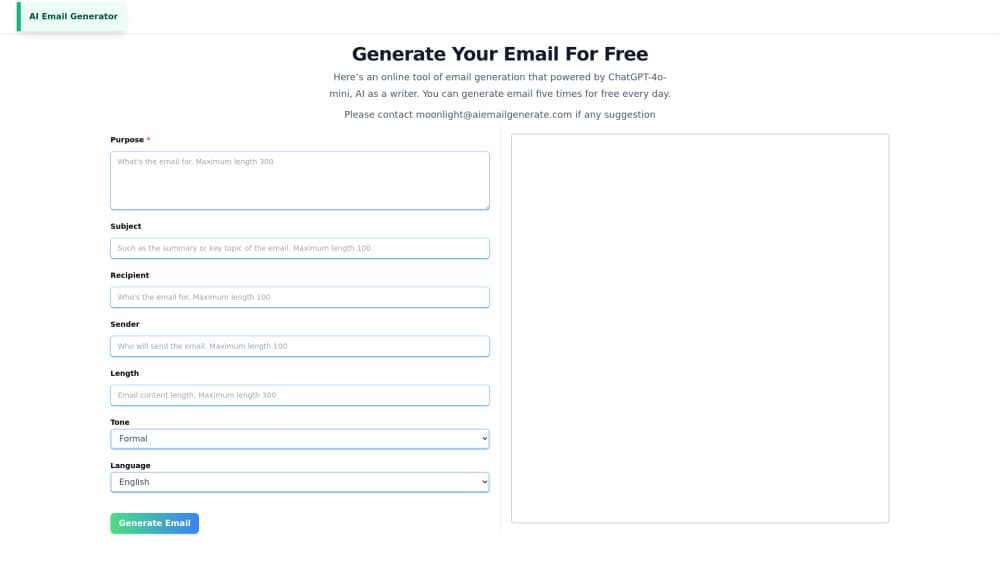
About AI Email Generator
What Is AI Email Generator
AI Email Generator is a web page that writes email copy for you. You type what the message needs to do, pick a tone and a language, and it returns a full draft with a subject line, body, and call to action. The page runs in the browser and the free version does not ask for an account, so the distance between "I need to reply to this" and "here is the reply" is one prompt.
Think of it as an AI email writer with a short memory and no opinions: it only knows what you tell it, which is why context matters here more than prompt tricks. The tool targets the writing that eats a working day in small pieces. Follow-ups after a demo, an apology to a customer, a payment nudge, a project update nobody wants to draft. Those messages are short and repetitive, which is exactly where a generator pays for itself. Emailor also ships a template library for the usual cases, so you can start from a known structure instead of a blank box.
Two limits shape when it fits. Output quality tracks how much context you give it. A three-word prompt gets generic copy that needs rewriting, while a prompt naming the recipient, the history, and the desired action gets something close to usable. The other limit is that this is a drafting tool, not a sender. It has no inbox, no contact sync, and no scheduling, so the copy still ends up pasted into Gmail or Outlook. Emailor states the generator is built on GPT-4o mini, a small OpenAI model.
Getting Started
- Open aiemailgenerate.com. The generator sits on the landing page, and there is no account step before you can type.
- Write the purpose. Name the recipient, the situation, and the action you want, then stay inside the 3,000 character limit. Simple Mode takes one prompt, Custom Mode exposes the extra fields.
- Set tone, urgency, relationship, and language. Formal, friendly, and direct options cover most business writing, and the language list goes past English.
- Generate and read the draft. It comes back in seconds with a subject line and a closing ask.
- Regenerate or copy. Change one setting and run it again if the voice is off, then paste the result into your email client.
Product Information
A quick look at AI Email Generator's pricing, supported platforms, and performance.
Best for
The users, tasks, and scenarios where this tool fits best.
Users
- Sales reps
- Customer support staff
- Small business owners
- Recruiters and hiring managers
Tasks
- Following up after a call
- Answering a complaint
- Chasing an overdue invoice
- Publishing in a second language
Scenarios
- Clearing an inbox backlog on a Monday morning
- Running outreach without a copywriter
- Keeping a support team on message
Key features
Simple Mode and Custom Mode
The generator offers two entry points. Simple Mode takes one description of the email and returns a draft, which suits quick replies and anything you would otherwise type in a hurry. Custom Mode opens the individual fields for purpose, tone, urgency, relationship, and language, so you can steer a message that has to land a specific way. The 3,000 character prompt box is generous enough to paste in a thread summary before generating.
Tone and Relationship Controls
Tone is the setting that decides whether a draft is usable. Emailor exposes formality, urgency, and the relationship between sender and recipient, which matters when the same request goes to a client and to a colleague. Change the setting and regenerate instead of editing sentence by sentence. For a business email generator, that loop is the whole value: the structure stays, the register shifts. Treat AI email drafting as a first pass on a message you would have rewritten twice anyway.
Intent-Aware Drafting
The prompt asks for purpose and audience rather than a topic. In practice, naming the goal and the reader gets a draft with a subject line, a short opening, the ask, and a closing, in that order. The output reads like a message written to someone, not like a form letter with placeholders. Give it a thin prompt and you get thin copy, which is the honest trade for a tool this fast.
Multilingual Email Generation
The language selector covers English, Chinese, German, Spanish, French, and Japanese, which makes it a serviceable multilingual email generator for small teams. Output is generated in the chosen language rather than translated from an English draft, which keeps idioms from sounding borrowed. A support team handling a handful of markets can answer in the customer's language without hiring for each one. Accuracy still needs a human read if the message carries legal or pricing detail.
Template Library
Nine templates cover the repeat work: polite follow-up, meeting request, project update, service apology, payment reminder, job application, cold outreach, support reply, and thank-you note. Each one loads a prewritten structure you can edit or feed into the generator with your own details. Templates help most when a team needs the same shape every time, and least when the situation is unusual.
Credit Plans and Fast Queue
The paid side runs on monthly credits: 10,000 on Starter, 25,000 on Pro, and 60,000 on Ultra, billed annually at $47.90, $95.90, and $191.90. Pro and Ultra add a fast queue, and Ultra adds dedicated support plus custom requirements for teams with a fixed format. Credits reset monthly, so a heavy month means moving up rather than buying a top-up.
Pros and cons
Pros
- No account needed for the free version, so you can test output quality on a real email in under a minute.
- Tone, urgency, and relationship settings change the register of a draft without rewriting it.
- Output arrives in the target language instead of an English draft run through a translator.
- Nine templates cover the messages that repeat most in sales, support, and hiring.
- Entry plan at $47.90 a year is cheap next to most AI writing subscriptions.
Cons
- No inbox integration, so every draft gets copied into Gmail, Outlook, or a CRM by hand.
- Generic prompts produce generic copy. The tool rewards users who can describe context precisely.
- The free allowance is a few emails a day, which runs out fast for anyone writing outreach at volume.
- Credits are metered monthly and do not roll over, so unused volume is lost.
Frequently asked questions
Yes, with a daily cap. You can generate a few emails a day without an account, which is enough to judge output quality. Sustained use needs a paid plan, and plans start at $47.90 per year.
Related content
Explore related tools, skills, and articles for AI Email Generator.
AI Email Generator Alternatives

Google EmbeddingGemma 2
Google DeepMind · Writing · Image · CodingGoogle EmbeddingGemma 2 is a 740M-parameter open model that turns text, code, images, audio, and video frames into vectors in one 768-dimension space, running on phones and laptops.

MePersona
MePersona, Inc. · Writing · Productivity · MarketingMePersona is an AI unified inbox for creators. It learns your voice, drafts replies to fan messages from 12 platforms, and sends only what you approve.

Fluence
Yay Software (Yannick Huchard) · Writing · Voice & Language · ProductivityFluence is an Android app that reads PDFs, EPUBs, Word files and web articles aloud, follows each sentence as it speaks, and answers questions about the text on the phone itself.