
AI Essay Grader
GraderAI · Leaning · AI Detection
AI Essay Grader (GraderAI) is a rubric-based AI grading tool for teachers. It scores uploaded essays against your own criteria and returns written feedback in about 30 seconds.
About AI Essay Grader
What Is AI Essay Grader
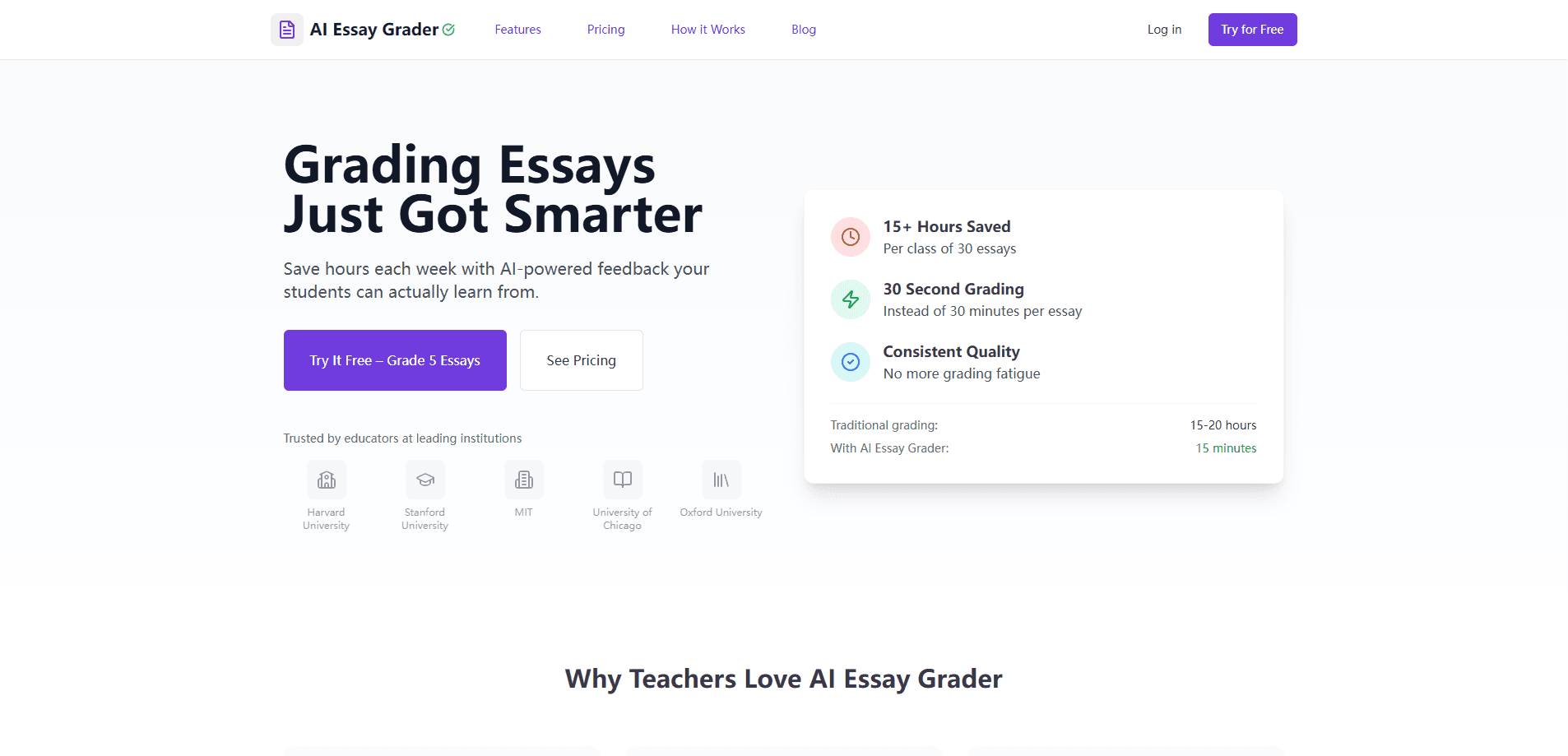
AI Essay Grader, sold under the name GraderAI, is a web platform that grades student essays against a rubric you supply. Instead of a generic score, you paste or build your own grading criteria, then upload the essays and let the tool work through them. Each paper comes back with a score per rubric category, inline comments, and a short strengths-and-improvements summary.
The pitch is time. A teacher grading a class of 30 essays by hand spends an evening or more on the stack. GraderAI's own numbers put the same class at about 15 minutes, with roughly 30 seconds per essay once the rubric is set. That claim comes from the vendor, so treat the exact figure as their estimate rather than a measured result. Automated essay scoring tools have existed for years, but most lean on a fixed model; this one works as an AI grading assistant that stays tied to the criteria you hand it.
Two things shape whether it fits your workflow. It is built for teachers and institutions, not students grading their own work, so the account and the analytics are all set up around a classroom. And the most useful features, like Google Classroom sync and bulk upload, sit on the paid plans. The free tier exists but is tight.
Getting Started
- Create an account and pick the free plan or start a trial, no credit card needed for the free tier
- Set up a rubric by pasting your criteria or building categories with their own weights
- Add essays by uploading files, pasting text, snapping a photo of handwriting, or importing straight from Google Classroom
- Review the scores and feedback, edit anything you disagree with, then export results or push grades back to your gradebook
Product Information
A quick look at AI Essay Grader's pricing, supported platforms, and performance.
Best for
The users, tasks, and scenarios where this tool fits best.
Users
- High school and college English teachers
- Teachers juggling several classes
- Special education and IEP coordinators
- Instructors on Canvas or Google Classroom
Tasks
- First-pass essay scoring
- Rubric-based feedback
- Handwritten essay grading
- Bulk assignment grading
- AI-content checks
Scenarios
- The end-of-term essay pile
- Weekly response papers
- Parent conferences and IEP meetings
- Department-level planning
Key features
Rubric-Based Scoring
Every essay is graded against the rubric you provide, not a fixed template. You can build categories with their own weights, like organization at 25% and content at 35%, or import an existing rubric from a PDF, Word file, spreadsheet, or plain text. The result is a score per category plus an overall mark, so students see where the points came from instead of a single number.
Custom Rubric Builder
If you do not already have a rubric, the builder walks you through creating one. You set the criteria, the weight of each, and the performance levels. Rubrics can be shared across a department on the higher tiers, which keeps grading aligned when several teachers cover the same course.
Multiple Upload Options
Essays can come in several ways. You can upload PDF or Word files, paste text straight into the tool, or photograph handwritten work and let the built-in OCR turn it into text. For a whole class, bulk uploading lets you select a batch and grade it in one pass rather than one paper at a time.
Google Classroom and Canvas Integration
On the paid plans, GraderAI connects to Google Classroom and Canvas. Rosters and assignments import in a click, and grades can be pushed back to your gradebook. For teachers already running their course in an LMS, this removes the copy-paste step that otherwise eats the time the tool was supposed to save.
AI Detection
Alongside the grade, the tool reports whether a paper looks machine-written and gives a confidence score with the signals behind it, such as even sentence structure and limited vocabulary range. It is a flag to look closer, not proof, and the final call stays with you.
Analytics Dashboard
Every graded essay feeds a dashboard that shows grade distribution, performance trends over time, class comparisons, and common writing issues. These views are what a department or an IEP meeting tends to ask for, and they come from the work you were already doing rather than a separate reporting task.
Pros and cons
Pros
- Grades against your own rubric, so the feedback matches the criteria you actually use
- Handwritten essay support through OCR covers exam papers and in-class writing that most graders skip
- Google Classroom and Canvas sync pulls rosters and pushes grades back, cutting manual entry
- Analytics dashboard comes with the account rather than as a separate purchase
- FERPA and GDPR compliant, with essays kept out of AI training by contract
Cons
- Free plan caps you at 10 essays every 30 days, which is a trial more than a working tier
- Google Classroom and Canvas integration sit on paid plans, so the free tier misses the workflow features
- The 30-seconds-per-essay figure is the vendor's claim, and real times vary with essay length and rubric depth
- No public API or mobile app is listed, so custom integrations and phone-first grading are out
- AI detection results can be wrong in both directions, and you still need to review every flag
Frequently asked questions
It grades student essays against a rubric you set and returns a score plus written feedback for each paper. Teachers use it to clear the first pass on a class of essays, then review and adjust before anything goes back to students.
Related content
Explore related tools, skills, and articles for AI Essay Grader.
AI Essay Grader Alternatives
Kaggle AI
Google · Coding · LeaningKaggle AI is a community platform where people build, test, and compare machine learning models against shared data. It combines data science competitions, tens of thousands of public datasets, and free cloud notebooks with GPU and TPU access, so anyone with a browser can train a model without buying hardware. Google owns the platform, and joining costs nothing.

Bunch
Bunch AI · Leaning · BusinessBunch is an AI leadership coaching app that turns a few spare minutes a day into real management practice. It hands you one short, personalized tip each day, tracks how you respond, and lets you compare notes with peers inside private groups. The pitch is simple: you lead better by practicing a little, often, instead of sitting through a weekend seminar. Think of it as a leadership training app you actually open.

AI Mock Interview
SQLPad · Coding · LeaningAI Mock Interview is a practice tool built into SQLPad that simulates real job interviews and gives you instant feedback on both what you say and how you say it. You pick a role template or upload a job description, answer questions out loud in real time, and then review a transcript with notes on structure, clarity, and grammar. It's aimed at data professionals prepping for SQL, Python, data engineering, machine learning, and system design roles, and it works entirely in the browser. No install needed.