

AI Formula Wizard
David Bressler · Coding · Productivity
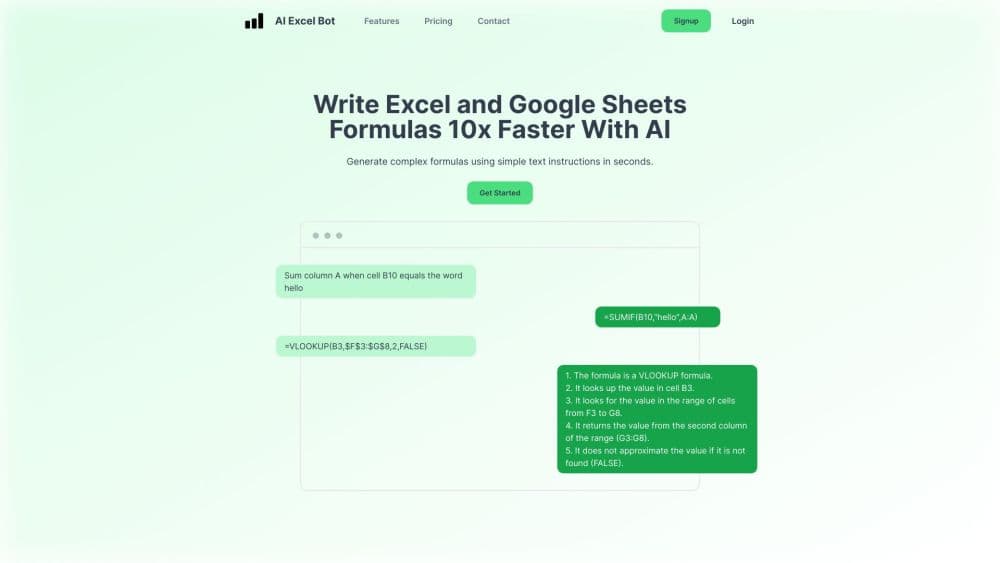
AI Excel Bot is a ChatGPT powered Excel formula generator and Google Sheets formula assistant that turns plain text into working formulas and explains them step by step.
About AI Formula Wizard
What Is AI Excel Bot
AI Excel Bot is a browser assistant for Excel and Google Sheets. You type what you want in plain English, and it returns a working formula you can paste straight into a cell. It came out of a simple observation from its founder, David Bressler: general chatbots write formula answers that land around 85 percent correct, which is fine for a rough draft and risky for real analysis. This tool was built to close that gap.
The product covers more than formulas. It works as a formula explainer too: paste an existing formula and it unpacks each part in English. The same assistant generates and explains VBA code, and offers that help for SQL and Google Apps Script. That range is why people use it as a learning tool as much as a time saver. If you have never understood how a nested IF nests, asking the assistant to unpack it teaches you the pattern.
The main limit is scope. AI Excel Bot writes formulas and code, but it does not touch your sheet on its own. It hands you the answer, and you decide where it goes. Heavy users also hit the free credit ceiling fast, so the free plan works best as a trial rather than a daily driver.
Getting Started
- Add the Chrome extension from the Chrome Web Store, or install the AI Excel Bot add-in inside Excel.
- Sign in with your Google account and start on the free plan, which comes with a small monthly credit allowance.
- Open your spreadsheet and describe the task in plain text, for example "sum every value in column B where column A says March."
- Copy the generated formula into the cell you want, or ask the assistant to explain a formula you already have.
- Upgrade to Pro when the free credits run out if you rely on this Excel add-in and its formula generation most days.
Product Information
A quick look at AI Formula Wizard's pricing, supported platforms, and performance.
Best for
The users, tasks, and scenarios where this tool fits best.
Users
- Analysts who live in spreadsheets
- Finance and operations staff
- Students learning Excel
- Teachers and trainers
Tasks
- Writing a complex nested formula
- Understanding a formula someone else built
- Generating VBA code for a repeated task
- Writing SQL or Apps Script
Scenarios
- A deadline report with a formula you cannot debug
- A new hire who never learned lookups
- A recurring cleanup job on Google Sheets
Key features
Plain Text to Working Formula
The core move is simple, and it's the reason most people install the tool. You describe what you need in everyday language, and the assistant returns a formula built for Excel or Google Sheets. It understands the difference between the two platforms, so the syntax it hands back fits the app you are working in rather than forcing a manual rewrite.
Step by Step Formula Explainer
Paste in a formula you did not write, and the tool breaks it down in plain English, one piece at a time. This is the feature that turns the product into something more than a shortcut. You walk away knowing why the formula works, which matters when you have to change it later or explain it to someone else.
VBA Code Generation and Explanation
Beyond cell formulas, the assistant writes and explains VBA code for automated tasks. If you have a monthly report you rebuild by hand, you can ask for a macro that does the repetitive part and read the explanation to see what each block does. The same help extends to SQL queries and Google Apps Script.
Works Inside Excel and Google Sheets
The tool runs as a Chrome extension and as an add-in inside Excel, so the assistant sits next to your data instead of in a separate tab. You copy the result into the cell you want. It does not edit the sheet for you, which some people prefer because nothing changes without a deliberate paste.
Free Plan With a Monthly Credit Allowance
New users get a set number of credits each month at no cost, which covers light use and lets you test the output quality before paying. The Chrome extension and email support come with the free tier. When the credits run out, a Pro subscription lifts the limit and unlocks unlimited formula and code generation.
One Assistant Across Formulas, Code, and Queries
Formula help is the headline, but the tool also covers Excel only problems like macros and database side work like SQL. For someone who moves between a spreadsheet and a query editor in the same project, keeping one assistant for both cuts down on context switching.
Pros and cons
Pros
- Turns a described task into a paste ready formula, which removes the slowest part of spreadsheet work.
- Explains formulas and VBA in plain language, so it doubles as a learning tool rather than a black box.
- Runs inside Excel and Google Sheets through a Chrome extension, keeping the answer next to your data.
- Covers formulas, VBA, SQL, and Apps Script, which covers most of the code a spreadsheet user needs.
- Free tier lets you judge output quality before committing to a subscription.
Cons
- Sits on top of a general language model, so a complex or unusual formula still needs a manual check before you trust it in a real report.
- Free plan tops out at a small monthly credit allowance, which is a trial level of use rather than a daily budget.
- It writes formulas and code but does not apply changes to your sheet automatically, so every result is a copy and paste step.
- Pricing details are not published in a stable public page, so you verify the current Pro cost inside the product.
Frequently asked questions
It converts plain text instructions into Excel and Google Sheets formulas, explains complex formulas in step by step English, and generates or explains VBA code. The same help extends to SQL queries and Google Apps Script.
Related content
Explore related tools, skills, and articles for AI Formula Wizard.
AI Formula Wizard Alternatives

Base Code
Base44 (Wix) · Coding · ProductivityBase Code is a shared cloud development environment from Base44. Teammates describe changes to an existing GitHub codebase in chat, preview them live and send them back as pull requests.

Google EmbeddingGemma 2
Google DeepMind · Writing · Image · CodingGoogle EmbeddingGemma 2 is a 740M-parameter open model that turns text, code, images, audio, and video frames into vectors in one 768-dimension space, running on phones and laptops.

GitGlow
GitGlow · Coding · ProductivityGitGlow is a local-first desktop Git client that lets independent developers review their own code and their AI agents' changes in one place before shipping.