

AI for Math
aimathproblemsolver.com · Leaning
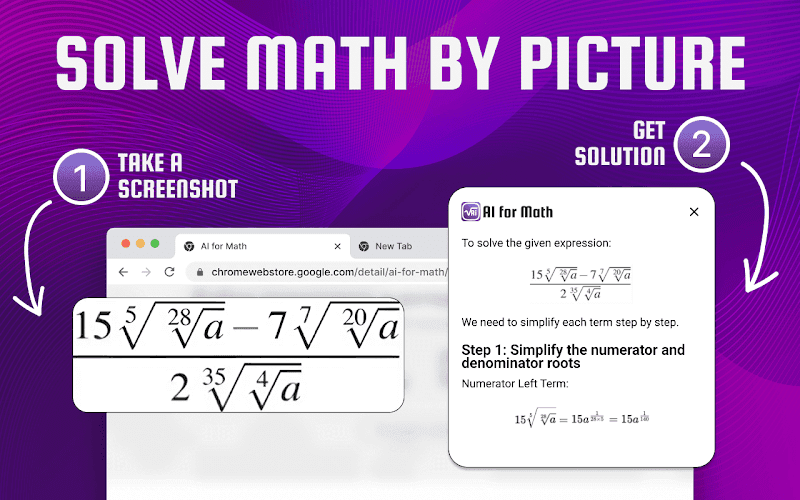
AI for Math is a free Chrome extension that solves math problems from typed equations or uploaded photos and walks through each step instead of only giving the answer.
About AI for Math
What Is AI for Math
AI for Math is a Chrome extension that acts as an AI math solver and shows the working behind each answer. You type an equation or upload a picture of a question, and the math problem solver returns a step-by-step solution in your browser tab.
It targets a common frustration: getting a bare answer tells you nothing about how to reach it. Students and teachers who want to see the method get the full breakdown here, covering arithmetic, algebra, geometry, calculus, and word problems.
The limits matter too. It is a browser extension rather than a standalone app, so you need Chrome to use it. It leans on AI models on the developer's side, which means harder problems can still return a wrong step, and there is no manual editor to correct a solution by hand.
Getting Started
- Install AI for Math from the Chrome Web Store and pin the extension to your toolbar.
- Type an equation into the input box, or upload a photo of a problem.
- Let the AI process the input and generate a solution.
- Read the step-by-step breakdown to follow the method, not just the result.
- Keep the tab open for quick checks while you study or prepare lessons.
Product Information
A quick look at AI for Math's pricing, supported platforms, and performance.
Best for
The users, tasks, and scenarios where this tool fits best.
Users
- Students who want to check their work
- Teachers preparing practice material
- Professionals who hit occasional math
Tasks
- Solving equations from a typed prompt
- Reading a problem straight from an image
- Studying a method rather than an answer
Scenarios
- Working through homework in a browser
- Prepping a lesson
- Quick on-the-job math
Key features
Solve by typing or by photo
The extension takes two kinds of input: a typed equation or an uploaded image of a question. The photo path is the one that saves time, because you can solve math by photo when you snap a textbook page or grab a screenshot instead of retyping a messy equation by hand.
Step-by-step solutions
Rather than handing you a final number, the tool breaks the problem into the steps that reach it. This is the feature that separates it from a plain calculator: you see which rule applies at each stage, so the method carries over to the next problem.
Coverage across math topics
The store listing says the extension handles arithmetic, algebra, geometry, calculus, and word problems. That range matters because most study sessions mix topics, and an equation solver that only does algebra sends you looking elsewhere for the rest.
Works inside the browser
Because it is a Chrome extension, the solver sits in the tab where you already work. There is no separate app to install or window to switch to, which keeps the solve-and-check loop short while you study.
No sign-up required
The extension runs without an account, so there is no registration step before your first problem. For students who want a fast check, skipping sign-up removes the friction that usually sits between opening a tool and using it.
Multi-language support
The listing notes support for a range of languages, so the interface and answers adapt for users outside English-speaking markets. For anyone studying in a second language, that makes the worked steps easier to follow.
Pros and cons
Pros
- Free to install and use, so you can test the solver before relying on it.
- Step-by-step output teaches the method, which a bare answer never does.
- Photo and typed input cover both clean equations and problems you would rather not retype.
- Loading it as a Chrome extension keeps solving inside the tab you already have open.
- No account needed, so the first problem takes seconds to reach.
Cons
- It is Chrome only, so Firefox, Safari, and Edge users cannot install it as a browser extension.
- AI models can slip on harder problems, and there is no way to correct a wrong step by hand.
- It is a solver rather than a full learning platform, so there are no saved history, courses, or progress tracking, and no word problem solver mode for written-out text.
Frequently asked questions
AI for Math is a Chrome extension that solves math problems and shows each step. You can type an equation or upload a photo, and it returns a worked solution covering topics from arithmetic to calculus.
Related content
Explore related tools, skills, and articles for AI for Math.
AI for Math Alternatives

Kaggle AI
Google · Coding · LeaningKaggle AI is a community platform where people build, test, and compare machine learning models against shared data. It combines data science competitions, tens of thousands of public datasets, and free cloud notebooks with GPU and TPU access, so anyone with a browser can train a model without buying hardware. Google owns the platform, and joining costs nothing.

Bunch
Bunch AI · Leaning · BusinessBunch is an AI leadership coaching app that turns a few spare minutes a day into real management practice. It hands you one short, personalized tip each day, tracks how you respond, and lets you compare notes with peers inside private groups. The pitch is simple: you lead better by practicing a little, often, instead of sitting through a weekend seminar. Think of it as a leadership training app you actually open.

AI Mock Interview
SQLPad · Coding · LeaningAI Mock Interview is a practice tool built into SQLPad that simulates real job interviews and gives you instant feedback on both what you say and how you say it. You pick a role template or upload a job description, answer questions out loud in real time, and then review a transcript with notes on structure, clarity, and grammar. It's aimed at data professionals prepping for SQL, Python, data engineering, machine learning, and system design roles, and it works entirely in the browser. No install needed.