

AIforWork.co
AI for Work · Other · Prompts
AI for Work is a free platform from aiforwork.co that gives professionals AI prompts, a tool directory, and step-by-step workflows, all organized by role and task.
About AIforWork.co
What Is AI for Work
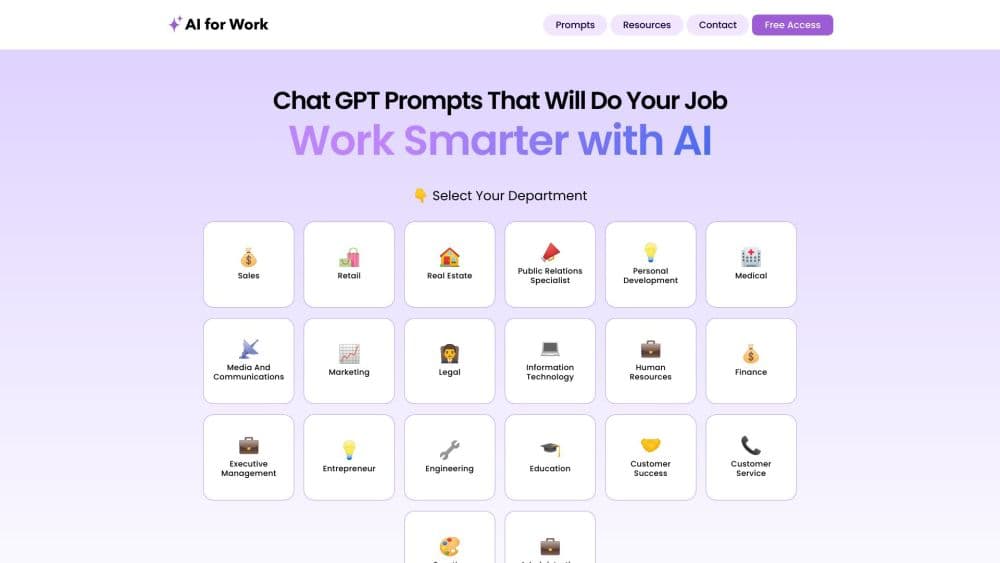
AI for Work is a web platform built for people who want to use AI at their job but don't know where to start. Instead of a single chatbot, it collects ready-to-run prompts, a directory of AI tools, and guided workflows in one place, then sorts everything by role and department.
Think of it as an AI productivity platform for people who work, not a lab tool. The pitch is simple. You pick your work, not your AI model. A marketing manager browses marketing prompts, an HR lead opens HR prompts, and a developer pulls from engineering and IT. Each prompt comes with a short description of what it does, so you can copy one and paste it into the assistant you already use.
Two things shape how you should think about it. First, the platform is free to browse, and the team says it stays free for readers. Second, it's a discovery and reference site, not an AI model itself. It doesn't generate text on its own, and it doesn't store your documents. You bring your own ChatGPT, Gemini, or Claude account.
Getting Started
- Open aiforwork.co and pick your department or role from the prompt library.
- Browse trending and role-specific prompts, then open the one that fits your task.
- Read the short brief, then copy the prompt text.
- Paste it into your own AI assistant, like ChatGPT, Gemini, or Claude, and adjust the details.
- For tool decisions, use the comparison table to weigh features and pricing side by side.
Product Information
A quick look at AIforWork.co's pricing, supported platforms, and performance.
Best for
The users, tasks, and scenarios where this tool fits best.
Users
- Busy professionals
- Teams new to AI
- Tool shoppers
Tasks
- Drafting routine work documents
- Choosing the right AI tool
- Learning a workflow
- Generating images or diagrams
Scenarios
- Onboarding a new role
- Auditing an AI stack
- Prepping a one-off deliverable
Key features
Prompt library by role and department
The core of the site is a prompt library sorted into more than 20 departments, from administrative and marketing to legal, finance, engineering, and retail. Each entry names the role it targets, such as office manager or technical support specialist, and gives a one-line brief. You can start from trending prompts or filter down to your own function.
AI tools directory with side-by-side comparison
The tools section lists hundreds of AI products with short descriptions and tags like multimodal, long context, or coding. It's built to answer the question of the best AI tools for work. A comparison view puts up to three tools next to each other, showing features, pricing, and reviews, so you can weigh a chat assistant against a search engine without opening ten tabs.
Guides and workflows
Beyond prompts, the platform publishes step-by-step guides and workflows that connect AI into daily work. These walk through automation and creative collaboration tasks in sequence, which suits people who need the full process rather than a single prompt.
Prompt building and refinement
A dedicated area shows how small wording changes shift AI output. The idea is to teach the habit of refining a prompt, not just copying one, so you can save and reuse prompts that actually work for your role.
Role-based discovery
Because browsing starts from a job title, the platform answers the question "what can AI do for me specifically" rather than "what can AI do in general." That framing turns a huge category into a short, relevant list for each visitor.
Free access to the whole library
Every prompt, tool listing, and workflow is open without a paywall, and the team says it's free for readers. An optional email sign-up adds curated updates over time.
Pros and cons
Pros
- Free to browse, with no paywall on prompts or the tool directory
- Organized by department and job title, which cuts down search time for role-specific requests
- Covers prompts, tool comparisons, and workflows in one place, so you don't jump between sites
- Plain-language briefs make it usable for readers with no AI background
- Works with whatever assistant you already pay for, so there's no new subscription to add
Cons
- It doesn't generate content itself, so you still need your own AI account to run any prompt
- Prompt quality varies by contributor, and there's no built-in way to test a prompt without leaving the site
- Tool ratings lean on a mix of sources, so high-value purchase decisions still warrant a check against the vendor's own pricing page
- No public API means you can't pull the prompt library into your own internal tools
Frequently asked questions
It's a free web platform where professionals find AI prompts, compare AI tools, and follow workflows for daily work. You use it to plan and copy prompts, then run them in your own AI assistant.
Related content
Explore related tools, skills, and articles for AIforWork.co.
AIforWork.co Alternatives

Odyssey 3
Odyssey · OtherOdyssey-3 is Odyssey's foundation world model. It simulates physics in real time, turns a prompt into an interactive environment, and adapts to robots, cars and games.

JarvisCore
Prescott Data · Coding · Productivity · OtherJarvisCore is an open source Python runtime where AI agents work as equal peers on an agent mesh, claim tasks from a shared ledger, and reach external services through a zero-trust broker.
Clef
Cloudflare · Business · OtherClef is Cloudflare's open-source decision model for Workers AI. It returns calibrated probabilities for typed questions, not generated text, so agents can classify, route, and act fast.