

AI Humanize
AIHumanize.io · Writing · AI Detection
AI Humanize is a browser-based AI humanizer that rewrites AI text so it reads like human writing and clears detectors such as Turnitin and GPTZero. Free runs are short, plans start at $6 per month.
About AI Humanize
What Is AI Humanize
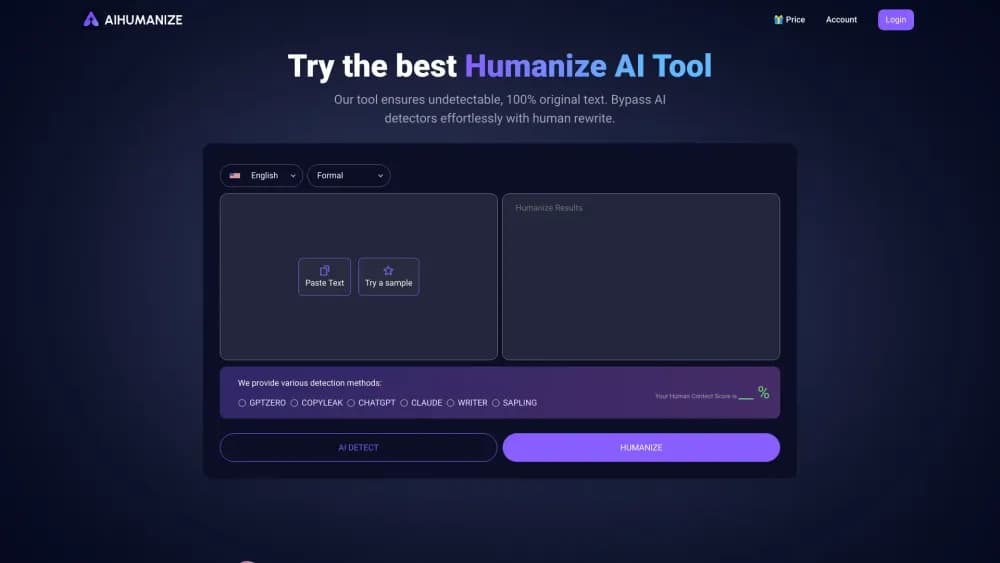
AI Humanize sits between the draft you got from ChatGPT or Claude and the place you plan to send it. You paste the text, the tool runs your draft through its detector, then a rewriting model reshapes the wording until the checker stops flagging it. The company says the result keeps your argument and facts while changing the sentence patterns detectors react to.
The people behind it describe a small, student-run team of graduate students and PhD candidates working on algorithms. That fits what the site offers: a narrow tool that does one job, no writing assistant attached, no plagiarism database, no citation builder. You bring finished copy and you get it back sounding less mechanical.
Two limits shape how you use it. Every rewrite costs words from a quota, so a free account gets roughly 300 words per pass before the tool asks for a subscription. And detectors keep changing, so no single run is guaranteed to pass. The site's own advice is to rerun until the score drops.
The tool also sells an API, so teams that produce a lot of copy can call the same rewriting engine from code instead of opening the browser every time.
Getting Started
- Open aihumanize.io and paste your text into the editor, or upload a .docx, .pdf, .txt, or .md file up to 10MB.
- Pick a mode and a style. Balance is the default, Enhanced pushes harder on detection, and General, Academic, Blog, Formal, and Informal cover the common writing settings.
- Turn on Lock Keywords if you need to protect search terms, or Lock Citations when quoted material has to survive untouched.
- Click Humanize AI Text. The rewrite takes about ten seconds for a short passage, and queued requests show an estimated wait.
- Read the AI score the tool reports, then copy the output. If the number stays high, run it again with a stronger mode.
Product Information
A quick look at AI Humanize's pricing, supported platforms, and performance.
Best for
The users, tasks, and scenarios where this tool fits best.
Users
- Students
- Bloggers and SEO writers
- Non-native English speakers
- Small teams shipping content at volume
Tasks
- Cleaning up a ChatGPT or Claude draft before publishing
- Getting a paper past Turnitin before a deadline
- Rescuing flagged marketing copy
- Adding a humanize step to an existing pipeline
Scenarios
- A freelancer delivering five articles a week
- A student with one paper due
- A content team that feeds AI drafts into a publishing tool
Key features
AI Text Rewriting
The rewrite is the whole product. You paste text, choose how hard the model should push, and get back a version with the same meaning and different sentence structure. The site is upfront that results vary between runs, and it asks you to repeat a rewrite when the score doesn't move. Treat it as an iterative tool rather than a one-click promise.
Built-in AI Detection
Before and after a rewrite, AI Humanize shows an estimated AI score based on how detectors such as Turnitin, GPTZero, Copyleaks, ZeroGPT, QuillBot, Writer, Sapling, and Originality.ai are likely to read your text. The detector is the practical half of this AI rewriting tool: it tells you which paragraphs to rewrite instead of throwing the whole document at the model again.
Writing Styles
General, Academic, Blog, Formal, and Informal styles change how the rewrite sounds, not just how it scores. Academic keeps a formal register for coursework, Blog loosens the rhythm for content marketing, and Enhanced trades some closeness to your original wording for a harder push against detection. The choice matters most when your audience is narrow, like a peer reviewer or a recruiter.
Lock Keywords and Citations
Two toggles protect the parts of your text that shouldn't change. Lock Keywords holds a list of terms through the rewrite, which keeps SEO targets from turning into synonyms. Lock Citations preserves quoted material, so an academic paper doesn't come back with a paraphrase where a direct quote used to be. Combined with a stronger mode, this is what gets you undetectable AI text on a long document. Both are the difference between a usable rewrite and a draft you have to repair by hand.
File Upload and Bulk Input
You don't have to paste. The editor accepts .txt, .md, .pdf, and .docx files up to 10MB, which makes a long report practical to process in one pass. Paid plans raise the per-request ceiling: Basic caps at 1,000 words per request, while Pro and Unlimited remove that cap.
Developer API
The rewrite endpoint takes text between 100 and 10,000 characters, a model setting, and your registered email, and returns the rewritten text plus the words used and the balance left. A second endpoint reports remaining credits. The published plan starts at $25 a month for 50,000 words, so the API is aimed at agencies and product teams that humanize copy as part of a pipeline rather than by hand.
Pros and cons
Pros
- The detector and the humanizer live on the same screen, so you can rewrite a paragraph and check the score without opening another site.
- A free tier exists. It's capped, but it's enough to see whether the rewrite helps on your kind of text.
- Lock Keywords and Lock Citations solve the two ways a humanizer usually damages a document: lost search terms and broken quotations.
- The API is straightforward. One POST request with a model number and your text returns the rewrite and the remaining balance.
- File upload covers PDF and Word, which saves converting long documents to plain text first.
Cons
- The free tier is thin. Rewrites are limited to a few hundred words and the tool pushes a subscription before you finish a long page.
- Results swing between runs. The site itself warns that multiple attempts may be needed, so a single pass isn't a reliable outcome.
- The styles change tone, not substance. If your draft argues badly, a humanized version argues badly in a more natural voice.
- No detector is guaranteed to pass. The stated bypass list is the company's claim, not a tested guarantee, and checkers update often.
Frequently asked questions
AI Humanize rewrites AI-generated text so it reads less like a machine wrote it and more likely passes AI detectors such as Turnitin and GPTZero. You paste a draft from ChatGPT, Claude, or Gemini, choose a style, and get back a version that keeps your meaning with different wording and sentence structure. That makes it a practical AI to human converter for one document at a time.
Related content
Explore related tools, skills, and articles for AI Humanize.
AI Humanize Alternatives

Google EmbeddingGemma 2
Google DeepMind · Writing · Image · CodingGoogle EmbeddingGemma 2 is a 740M-parameter open model that turns text, code, images, audio, and video frames into vectors in one 768-dimension space, running on phones and laptops.

MePersona
MePersona, Inc. · Writing · Productivity · MarketingMePersona is an AI unified inbox for creators. It learns your voice, drafts replies to fan messages from 12 platforms, and sends only what you approve.

Fluence
Yay Software (Yannick Huchard) · Writing · Voice & Language · ProductivityFluence is an Android app that reads PDFs, EPUBs, Word files and web articles aloud, follows each sentence as it speaks, and answers questions about the text on the phone itself.