

AI Life
Huawei Device Co., Ltd. · Voice & Language · Productivity
HUAWEI AI Life is a free app from Huawei for setting up and controlling Huawei earbuds, speakers, routers, and smart home devices from one screen.
About AI Life
What Is HUAWEI AI Life
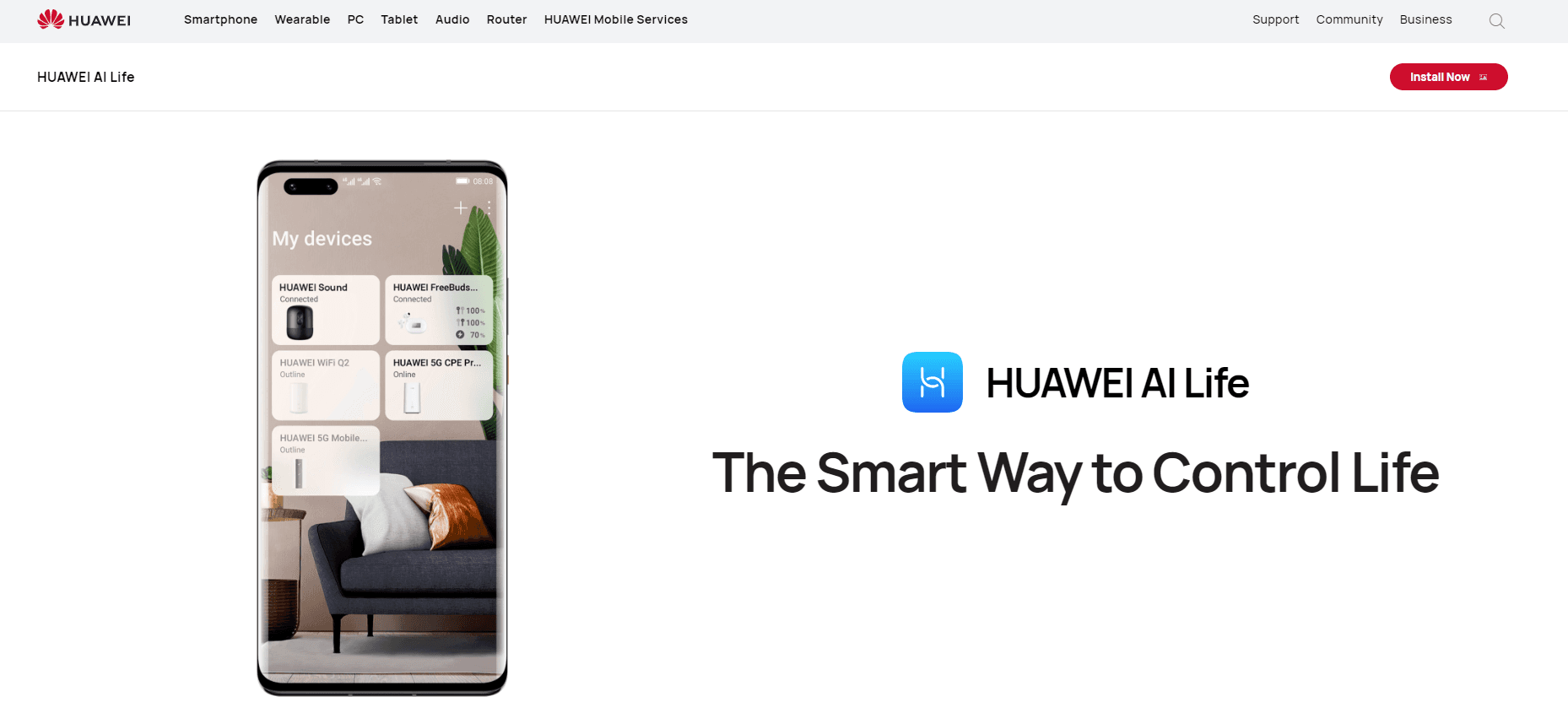
HUAWEI AI Life is the smart device management app Huawei ships for its connected hardware. Instead of juggling a separate app for each gadget, you open one screen and see every Huawei device tied to your account: FreeBuds in their case, a Sound speaker on the shelf, the router in the hallway, plus lights, plugs, and cameras that carry the Huawei smart home label.
The app does the unglamorous work that makes the hardware usable. It pairs new devices over Bluetooth or by scanning a QR code, shows battery levels, pushes firmware updates, and exposes settings that the hardware hides from you otherwise. Noise cancellation modes, an ear tip fit test, guest Wi-Fi, and time limits for the kids are all ways to control Huawei smart devices from the same card layout.
The limits are as concrete as the features. AI Life only manages Huawei hardware, so a TP-Link plug or a Sony headset won't show up no matter how you scan. You also need a HUAWEI ID to sign in, and the iOS build ships fewer controls than the Android one, which matters if your household mixes iPhones and Huawei phones.
Getting Started
- Install AI Life from the App Store, Google Play, or Huawei AppGallery, then sign in with your HUAWEI ID.
- Power on the device and bring it close to your phone. Most Huawei earbuds and routers appear on the home screen automatically.
- If nothing shows up, tap the plus icon and pick Add device, then either scan the QR code on the box or select the model manually.
- Open the device card to rename it, check battery or signal status, and adjust the settings you actually use, such as noise control or a guest network.
- Turn on automatic updates in the same card so firmware reaches the device without you thinking about it.
Product Information
A quick look at AI Life's pricing, supported platforms, and performance.
Best for
The users, tasks, and scenarios where this tool fits best.
Users
- Huawei phone owners
- FreeBuds and speaker owners
- Household network managers
Tasks
- Pairing new earbuds
- Finding a lost earbud
- Blocking a device from Wi-Fi
- Checking why the Wi-Fi is slow
Scenarios
- Setting up a new router
- Letting guests online
- Limiting screen time for kids
- Updating firmware in bulk
Key features
One Dashboard for Every Huawei Device
The home screen stacks device cards in the order you arrange them, and each card shows live status: battery percentage, connection state, or how many clients sit on the router. You can turn a device on or off from the card and jump into its full settings screen with one tap. The layout stays readable once you pass ten devices, which is more than most people expect to connect.
Earbud Controls and Fit Test
For FreeBuds, the card exposes noise cancellation modes, Awareness mode, and a custom EQ you build by dragging bands. A fit test plays a short tone and tells you whether the tip seals your ear canal, which is the usual reason bass sounds thin. You can also rename the earbuds, read the serial number, and switch playback between paired phones or laptops from the audio connection center.
Router Management and Guest Wi-Fi
The Huawei router app section covers the jobs people usually open a browser for: changing the Wi-Fi name and password, picking between Wi-Fi modes, reading signal strength per room, and creating a guest network. A connected devices list lets you block anyone with a toggle. Parental controls add time windows per device, so a child's tablet goes offline at 21:00 whether or not they hand it over.
Speaker Volume and Sound Effects
Huawei speakers show up as their own card with volume, sound effect presets, and alarm or multi-room grouping depending on the model. The app also reports firmware version and pushes updates in the background, which fixes the common complaint of a speaker that sits on an old build for a year because nobody opens a settings menu.
Automatic Firmware Updates
Every device card carries an update section with a manual check and an automatic option. Leaving automatic updates on means earbuds, speakers, and routers pick up fixes without a prompt. If a release breaks something, that's also the reason to switch the option off for a week and update by hand after reading release notes.
Device Sharing Inside One HUAWEI ID
Smart home devices attach to the HUAWEI ID you signed in with, and family members added to that account see the same cards on their own phones. Data about linked devices syncs through HUAWEI Mobile Cloud over an encrypted channel, and unlinking a device deletes its data from the cloud. There's no anonymous mode, so the account requirement applies from the first launch.
Pros and cons
Pros
- Free with no subscription, and it ships preinstalled on most Huawei phones, so there's nothing to buy.
- One place for earbuds, speakers, routers, and smart home gear instead of four separate apps.
- Router tools that normally need a browser admin page, including guest Wi-Fi, device blocking, and coverage maps, work from the phone.
- The ear tip fit test and custom EQ solve real audio complaints that generic Bluetooth settings can't touch.
Cons
- Huawei hardware only, so mixed-brand homes still need other apps for third-party bulbs, plugs, and headphones.
- The iOS version drops features such as auto power off for earbuds, which is awkward in households with an iPhone user.
- A HUAWEI ID is mandatory, and there's no local-only mode, so you can't set up a device without an account.
Frequently asked questions
Yes. The app costs nothing and has no subscription tier. You pay for the hardware, not the software, and there are no in-app purchases for the controls described here.
Related content
Explore related tools, skills, and articles for AI Life.
AI Life Alternatives

Foley
Hanamori Labs, LLC · Voice & Language · Productivity · AI AssistantFoley is a voice to-do list that turns a spoken sentence into a filed task, complete with project, date and time, then helps you plan the day around what is already there.

HireKey
HireKey · Voice & Language · Productivity · LeaningHireKey is an AI job search copilot built by a former tech recruiter. It checks role fit, tailors resumes, runs interview practice and tracks every application.

Fluence
Yay Software (Yannick Huchard) · Writing · Voice & Language · ProductivityFluence is an Android app that reads PDFs, EPUBs, Word files and web articles aloud, follows each sentence as it speaks, and answers questions about the text on the phone itself.