

AI Lingo Play
Alex (GrumpyChap) · Other · Chatbot
AI Lingo Play is a browser-based language learning app where you rehearse real conversations with AI characters, across 13 languages and more than 30 everyday scenes.
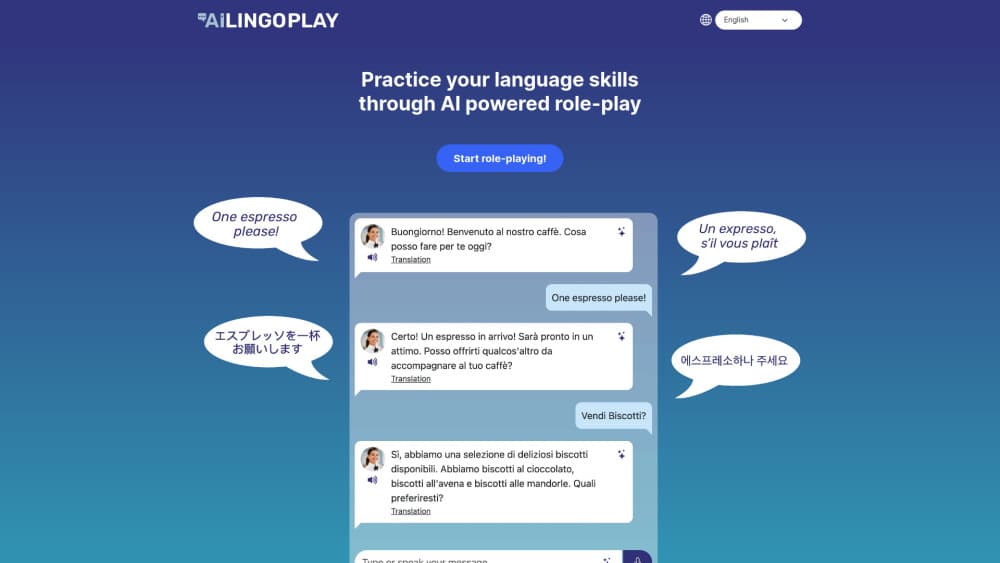
About AI Lingo Play
What Is AI Lingo Play
AI Lingo Play is a practice space for people who already know some words and freeze when it's time to use them. You pick a language, set your level, then step into a scene: a café in Paris, a hotel desk in Kyoto, a pharmacy in Madrid. An AI character plays the other person and replies in text and in speech.
The point is conversation practice without an audience. You can order the same coffee five times, mangle the past tense, and nobody minds. Each message you send gets checked, and the app offers a better phrasing when yours sounds off. Ask for help mid-sentence and you get a suggested reply you can actually say out loud.
Some limits matter before you subscribe. This isn't a course. There are no lessons, no grammar syllabus, and no spaced repetition, so it won't teach you a language from zero. It runs in a web browser only, with no mobile app, and it comes from a single independent developer in the UK. That means fast replies to feedback and a small team behind the roadmap.
Getting Started
- Create an account on the AI Lingo Play website and start the 7-day free trial.
- Pick one of the 13 languages and set your level to beginner, intermediate, or advanced.
- Choose a scene and a character, then speak into the microphone or type your side of the conversation.
- Tap any reply for a translation or a word-by-word breakdown, and ask for a suggested response when you get stuck.
- Finish the scene to get a wrap-up review with corrections and tips that carry into your next conversation.
Product Information
A quick look at AI Lingo Play's pricing, supported platforms, and performance.
Best for
The users, tasks, and scenarios where this tool fits best.
Users
- Travellers with a trip on the calendar
- Self-study learners who want to speak a language out loud without booking a tutor
- New arrivals and people moving abroad
Tasks
- Rehearsing a specific errand
- Practising spoken replies without a partner
- Getting corrections on grammar you already know
- Preparing for an interview or a first day at work in another language
Scenarios
- A trip two weeks out
- Returning to a language after years away
- Practising where a real mistake would be embarrassing
Key features
Thirteen languages with three level settings
The app covers French, Spanish, Italian, German, Portuguese, Dutch, Polish, Russian, Japanese, Korean, Mandarin, Cantonese, and English. You set beginner, intermediate, or advanced per language, and characters adjust their vocabulary and sentence length to match. Switching languages doesn't reset your account, so a learner juggling two of them can keep both moving.
Voice or text, with spoken replies
Tap the microphone and talk, or type when you're on a train and can't speak. Your speech is transcribed into the chat, and the AI character replies with a natural voice as well as text. Hearing the reply matters more than it sounds: it gives you the cadence and stress that text alone can't show.
Instant translation and word lookup
Every reply can be translated in one tap, and you can highlight a single word for its meaning in context. Japanese learners get furigana and romaji alongside the kanji, which removes the usual copy-and-paste trip to a dictionary. The translation sits inside the chat, so you don't lose your place in the conversation.
Corrections on every message
Each message is reviewed as you send it. If the sentence works, you keep going. If it's understandable but clumsy, you see a more natural version and can reuse it in your next reply. The tone is encouraging rather than graded, and there are no scores to chase.
Suggested responses when you freeze
A blank moment is the most common reason practice sessions die. The app offers a suggested response in your language or in the target language, so you can keep the scene alive. You can accept the wording, adapt it, or ignore it and try your own version.
Grammar breakdowns and scene reviews
Ask for a breakdown of any reply and you get the vocabulary, the grammar, and the nuance behind it. When you finish a scene, a wrap-up review sums up what went well and what to watch next time. Those tips carry into later conversations instead of disappearing with the chat.
Pros and cons
Pros
- The price is hard to argue with: $2.50 a month covers every language, every scene, voice, translations, and feedback.
- Scenes map to real errands, so practice has an obvious use the same week you do it.
- Voice input plus spoken replies trains listening and speaking together, not just reading.
- Feedback arrives per message rather than at the end, which shortens the loop between a mistake and a fix.
- It runs in the browser with nothing to install, so it works on a laptop, a Chromebook, or a work machine.
Cons
- There's no free tier. The 7-day trial requires payment details, which stops casual testing.
- No curriculum or revision system, so it can't replace a course, and it won't build vocabulary from scratch.
- It's a one-person project with no mobile app, so you're tied to a browser and updates depend on one developer.
- Scene depth varies by language, and less common languages may feel thinner than French or Spanish.
Frequently asked questions
AI Lingo Play is an AI role-play app for language practice. You choose a language, a level, and a scene, then hold a conversation with an AI character who plays a barista, a receptionist, or a pharmacist. The character replies in text and voice, and your messages get corrected as you go.
Related content
Explore related tools, skills, and articles for AI Lingo Play.
AI Lingo Play Alternatives

Odyssey 3
Odyssey · OtherOdyssey-3 is Odyssey's foundation world model. It simulates physics in real time, turns a prompt into an interactive environment, and adapts to robots, cars and games.

JarvisCore
Prescott Data · Coding · Productivity · OtherJarvisCore is an open source Python runtime where AI agents work as equal peers on an agent mesh, claim tasks from a shared ledger, and reach external services through a zero-trust broker.
Clef
Cloudflare · Business · OtherClef is Cloudflare's open-source decision model for Workers AI. It returns calibrated probabilities for typed questions, not generated text, so agents can classify, route, and act fast.