

AI or Not
AI or Not · AI Detection
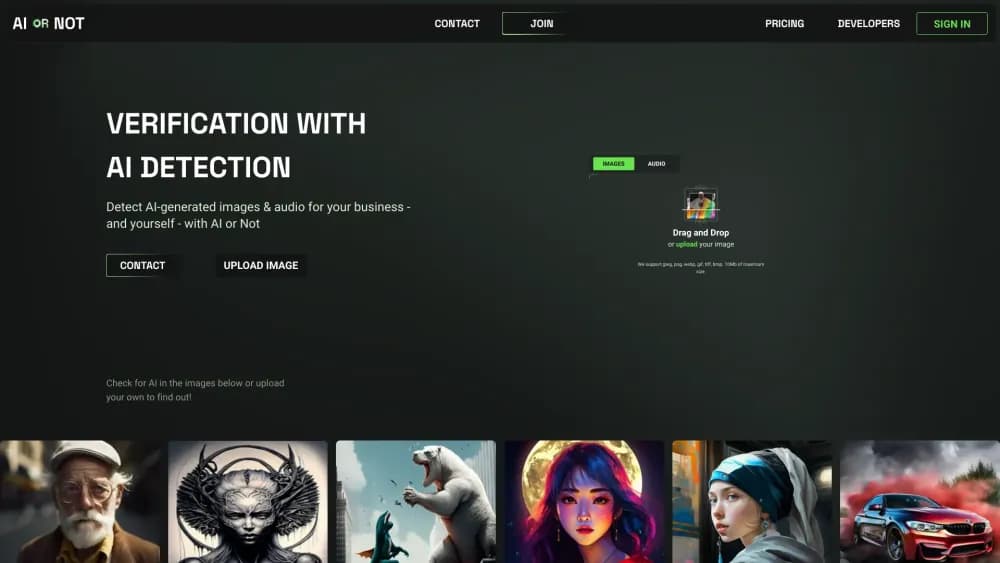
AI or Not is an AI content detector that checks images, text, video, and audio for AI generation and deepfakes, offering a free web tool plus an API and MCP server.
About AI or Not
What Is AI or Not
AI or Not is a detection platform that tells you whether a piece of content was made by AI or by a person. Upload an image, paste text, or drop a video or audio clip, and this AI image detector and text checker returns a verdict with a confidence score. The tool covers four content types in one place: pictures, written text, video, and voice or music.
The company behind it started in 2023 and built its name on image detection first. It says its models look at the pixels of an image rather than metadata, watermarks, or provenance tags. That matters because stripping a file's EXIF data or re-saving a screenshot normally erases those signals, and AI or Not claims to catch the image anyway.
The main limit is that detection is a probability call, not a proof. A confidence score near the middle of the range means the tool is unsure, and no detector gets every case right. Treat the result as one input in a decision, not as the final word.
Getting Started
- Create a free account with an email address, or start a check from the homepage without one.
- Upload your file or paste your text into the checker and pick the content type.
- Wait for the analysis to finish, usually a second or two, and read the verdict and confidence score.
- Sign in to the dashboard to pull an API key if you want to run checks in bulk.
Product Information
A quick look at AI or Not's pricing, supported platforms, and performance.
Best for
The users, tasks, and scenarios where this tool fits best.
Users
- Journalists and fact-checkers
- Content moderators
- Students and writers
- Insurance and identity teams
Tasks
- Detect AI-generated images
- Reviewing a written draft
- Screening video and audio
- Bulk content verification
Scenarios
- A newsroom wants to confirm a photo circulating online is real before it runs the story.
- A marketplace screens seller images for faked product shots before a listing goes live.
- A writer checks a client submission and needs a documented reason to push back.
- A claims team routes suspected fake damage photos to a human adjuster instead of paying out.
Key features
Multi-Type Detection
AI or Not checks images, text, video, and audio from one place, so you don't have to juggle separate tools for each format. The image checker is the most developed, but the platform treats text, video, and voice as first-class content types rather than add-ons.
Pixel-Level Image Analysis
This AI image detector reads the pixels themselves instead of relying on metadata, watermarks, or C2PA content credentials. That means a stripped file, a re-saved screenshot, or a cropped version still gets analyzed. It's the pitch that separates AI or Not from detectors that break the moment metadata disappears.
Per-Generator Breakdown
Rather than a single yes-or-no, the image API returns a per-generator breakdown alongside the overall verdict. It recognizes output from tools like Midjourney, DALL·E and GPT Image, Stable Diffusion, Flux, Ideogram, and Google's Nano Banana, among others, and the list gets refreshed as new models ship.
Deepfake Detection and Voice Signals
Video and audio checks look for deepfake detection signals and synthetic voice signs, not just AI generation. That covers face swaps, cloned voices, and fabricated clips, which is where the fraud and misinformation use cases live.
Detection API and MCP Server
The same detection that powers the web tool runs behind an API, with an MCP server for tools like Claude, Cursor, and Codex. Developers get pay-as-you-go credits from the first check and JSON responses with confidence scores and model-specific details.
Instant Data Deletion
Uploaded files are processed and then deleted right away, on every plan including the free tier. For teams handling customer photos or identity documents, that removes the storage and leakage risk that comes with keeping submitted media around.
Pros and cons
Pros
- Covers four content types in one product, so a single account handles images, text, video, and audio.
- Pixel-based image detection keeps working when metadata is stripped or a file is re-saved.
- Free tier lets you check content without paying, and pay-as-you-go credits scale from the first paid check.
- Returns confidence scores and per-generator detail instead of a flat yes or no.
- Strong third-party signal: NewsGuard's May 2026 audit gave it a perfect score on heavily altered images.
Cons
- Detection is probabilistic, so a confidence score near the middle means the result is genuinely uncertain and you still need a human call.
- The most developed coverage is images; text, video, and audio feel less mature if those are your main use.
- The Business plan starts at $100 per month, which is a lot for a solo user who only needs the occasional check.
- Custom models and private deployments sit behind a sales conversation, not self-serve checkout.
Frequently asked questions
Yes. There's a free tier that lets you run checks after creating an account, with higher limits once you sign up. Paid credit packs and the Business plan add volume and lower per-check costs.
Related content
Explore related tools, skills, and articles for AI or Not.
AI or Not Alternatives
Isgen AI
Isgen · AI DetectionIsgen AI is a web-based AI detector that scores text for machine authorship and shows you which sentences and phrases push the number up. It's built for teachers, editors, students, and writers. Their question is simple: did this draft come from ChatGPT, GPT-5, Claude, Gemini, DeepSeek, or another model? You paste or upload content, run a scan, and get a Human, AI, and Mixed breakdown in seconds. There's also a companion editor that scores text while you write it.
Humanizeai Tools
Humanizeai Tools · Writing · AI DetectionHumanizeai Tools is a web-based AI humanizer that rewrites machine-generated text so it sounds like a person wrote it, which is the whole point of the category it belongs to. Paste a draft from ChatGPT, Claude, or Gemini, run it through the tool, and it swaps out the phrases and sentence patterns that AI detectors flag. If your goal is to make AI text sound human before you publish it, this is the kind of tool built for exactly that. It suits students, bloggers, and marketers who need copy that reads naturally and clears tools like GPTZero, Copyleaks, and Winston AI after a single pass.

Hidemyai
Hidemyai · Writing · AI DetectionHidemyai is an AI content humanizer. It rewrites text from ChatGPT, Jasper, and similar tools so the result reads like a person wrote it. You paste your draft, pick a document type and tone, and the service returns a version meant to bypass AI detectors such as Originality.ai, Turnitin, and ZeroGPT. It targets writers, marketers, and students who lean on AI drafts but can't ship copy that sounds robotic. The promise is simple: make AI content undetectable.