

AI Parabellum
AI Parabellum (founded by Vinish Kapoor) · Other
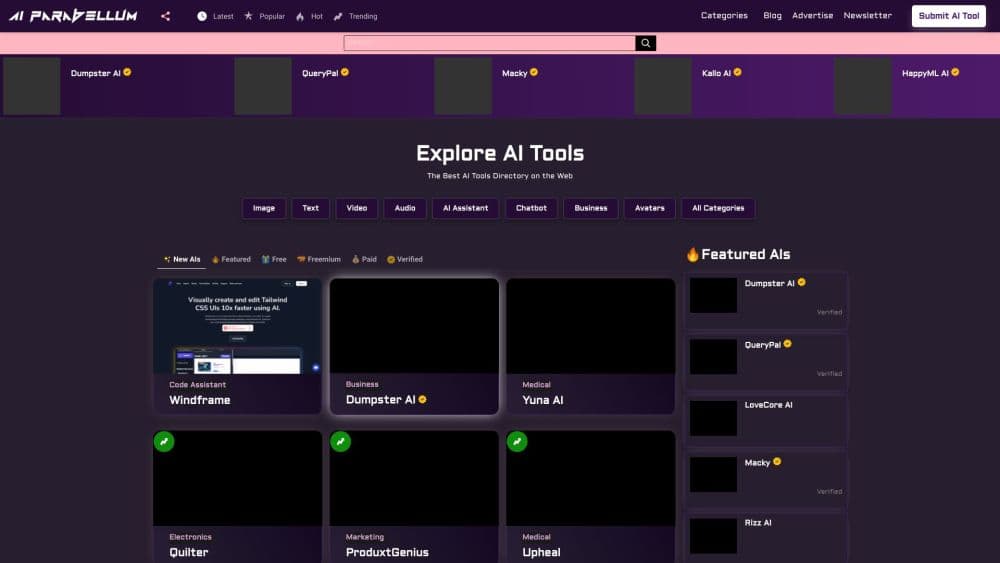
AI Parabellum is a hand-reviewed AI tools directory with about 1,000 listings. It works as a free AI tool finder: browse by task, category, or price, read the review, then click through to the tool.
About AI Parabellum
What Is AI Parabellum
AI Parabellum is a curated directory of AI tools rather than an AI product you use directly. You come with a job in mind, such as writing ad copy or turning photos into video, and the site points you to tools that do that job. Every listing gets a human review before it goes live, and the review page explains what the tool does, how it works, and what it costs.
The problem it solves is discovery. Search engines bury new AI tools under listicles, and many directories publish anything that fills out a form. AI Parabellum's filter is a person reading the submission, checking that the product works, and turning down anything that fails its content rules. That matters if you're buying a tool for work and don't want to spend an afternoon testing five dead links.
The limits are worth stating up front. It's a directory, so you don't build, run, or store anything inside it. Listings go stale when tools change pricing or shut down, and the free side leans on short editor summaries rather than lab testing. If you want benchmark scores across models, this isn't that site.
Getting Started
- Open aiparabellum.com and use the search box at the top. Type a tool name if you already know it, or a task like "video generation" if you're starting cold.
- Pick an entry point: the Featured row for editor picks, the Tasks page to browse by job, the A to Z index to scan everything, or the Free, Freemium, and Paid filters to match your budget.
- Open a review page. Each one covers key features, how the tool works, core benefits, pricing, and an editor's assessment, plus the tool's own domain and current update date.
- Click Visit to go to the tool's site and try it. Many listings point to products with a free tier, so you can test before paying.
- Come back to save tools with the heart icon. Likes stay in your browser, and signing in with Google keeps them across devices. The What's New feed shows recently added tools.
Product Information
A quick look at AI Parabellum's pricing, supported platforms, and performance.
Best for
The users, tasks, and scenarios where this tool fits best.
Users
- Freelancers who need a specific AI tool this week
- Small teams without a research budget
- AI tool makers looking for a listing
Tasks
- Choosing a tool for one job
- Checking whether a free option exists
- Scanning what's new in AI
- Building a shortlist for a client
Scenarios
- A designer needs a photo upscaler today
- A marketer is asked to price an AI stack
- A founder is launching a tool next month
Key features
Curated Listings With Editor Reviews
Every tool page includes a written review: key features, how the tool works, core benefits, pricing, and a short verdict on who it suits. The reviews name the vendor's domain and show an updated date, so you can tell whether the page reflects the current product. That editorial layer is the main difference from directories that only scrape names and links.
Task and Category Browsing
The directory splits into task pages, which list AI tools by category, and the category pages themselves. Tasks map to what you're trying to get done, while categories group tools by type, such as image generation, video generation, text generation, productivity, avatars, marketing, code assistants, and business. Both routes lead to the same review pages, so you can start from either the job or the product type.
Free, Freemium, and Paid Filters
Each listing carries a pricing label, and the site has dedicated views that separate free AI tools, freemium AI tools, and paid ones. That's the fastest way to answer a common question: can I use something for $0 this month? Mixing paid placements into those views is possible, which is why the label on each card matters more than the order.
A to Z Index and Search
The A to Z index lists every tool in the directory alphabetically, which helps when you half remember a name. Search runs across tools, blog posts, and AI news from the header, so a single query covers the review, the vendor, and any coverage the site has written about it. For a directory of this size, that's usually faster than paging through categories.
Save for Later
The heart icon saves a tool to a personal list. Without an account, likes live in your browser, and signing in with Google copies them so they follow you across devices. You can remove saved items at any time, and the site says it doesn't touch your Gmail or Drive. For research that spans a few days, the saved list beats a page of bookmarks.
AI News and Guides
Beyond listings, the site runs an AI news section and a blog with how-tos and comparisons. For a directory, that matters: you get context on why a tool matters alongside the listing itself. The blog also takes contributed articles on AI trends, ethics, and technical work, which is a second way in for people who want to be published rather than listed.
Pros and cons
Pros
- Human review before publishing means dead or off-topic tools are filtered out, which saves you the trial and error.
- Filtering by task, category, and pricing at once makes it quick to find a free option or a paid one with features you need.
- Review pages include pricing, features, and an updated date, so you can judge freshness before you click through.
- The A to Z index and site-wide search cover tools, articles, and news, so one query finds everything related.
- Saving tools with a heart and syncing through a Google login keeps a shortlist intact across devices.
Cons
- It's a directory, so there's no trial run, workspace, or usage data inside the site. You still judge quality by leaving for the vendor.
- Listings are paid submissions, so visibility partly reflects who paid. The Verified badge and Featured slots are commercial placements, not editorial rankings.
- Coverage skews toward tools with a marketing budget. Quiet open-source projects and niche tools often aren't listed at all.
- Reviews are short editor summaries, not hands-on lab testing. They're useful for a shortlist, not a final verdict.
Frequently asked questions
AI Parabellum is an AI tools directory. It lists AI products by task, category, and pricing model, with a review page for each tool. You use it to find and compare tools; you don't run them on the site itself. It was founded by Vinish Kapoor in 2023.
Related content
Explore related tools, skills, and articles for AI Parabellum.
AI Parabellum Alternatives

Odyssey 3
Odyssey · OtherOdyssey-3 is Odyssey's foundation world model. It simulates physics in real time, turns a prompt into an interactive environment, and adapts to robots, cars and games.

JarvisCore
Prescott Data · Coding · Productivity · OtherJarvisCore is an open source Python runtime where AI agents work as equal peers on an agent mesh, claim tasks from a shared ledger, and reach external services through a zero-trust broker.
Clef
Cloudflare · Business · OtherClef is Cloudflare's open-source decision model for Workers AI. It returns calibrated probabilities for typed questions, not generated text, so agents can classify, route, and act fast.