

AI Regex - Generate Regex Easily with AI
AI Regex (airegex.pro) · Coding
AI Regex is a browser based tool that turns a plain description of a pattern into a working regular expression you can copy into your code.
About AI Regex - Generate Regex Easily with AI
What Is AI Regex
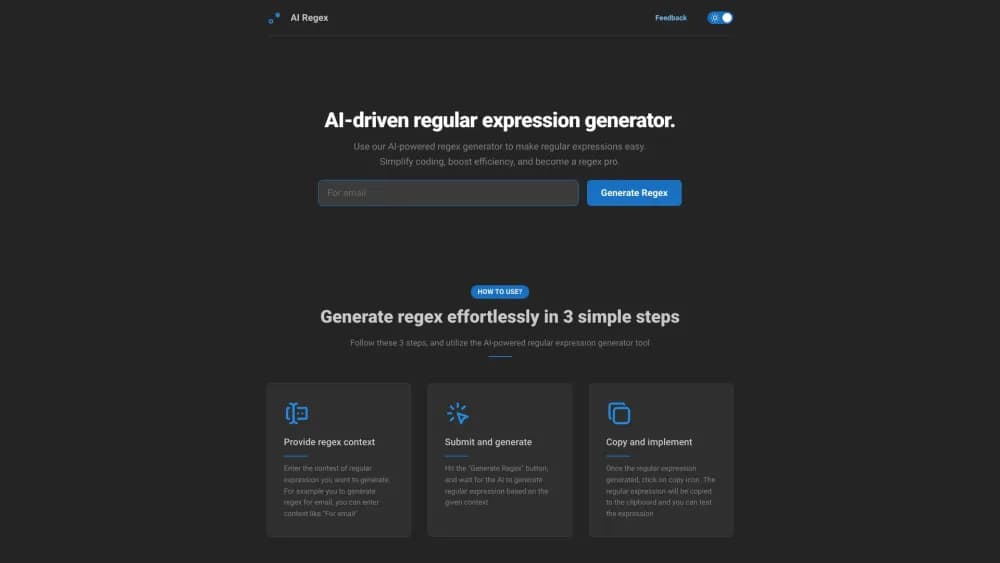
AI Regex is a web tool that writes regular expressions for you. You describe the pattern you need in everyday words, something like "an email address" or "a date in YYYY-MM-DD format," press Generate Regex, and a pattern built for that job appears on screen. No install, no syntax reference open in a second tab.
The appeal is speed. Regex syntax is dense, and most people touch it a few times a year: cleaning a CSV column, pulling order IDs out of a log file, validating one form field. An AI regex generator shortens that loop to a sentence and a click. Copy the result with the clipboard icon, paste it into your script or your usual tester, and move on.
Where it stops matters just as much. AI Regex hands you a candidate pattern, not a guarantee. The result only reflects what you typed, it doesn't ask which flavor you're targeting, and there's no test harness attached. Treat the first output as a draft and run it against real samples. The project is also small, with no public API and no documented team features, so it works as a quick helper rather than a platform you build a pipeline on.
Getting Started
- Open airegex.pro in any modern browser. The generator runs in the page, so there's nothing to install.
- Describe the context in the input box. Name both the data and the shape you expect, such as "US phone numbers with optional dashes."
- Press Generate Regex and wait for the pattern to render.
- Hit the copy icon, paste the pattern into your editor or a regex tester, and check it against a handful of real strings before you ship it.
Product Information
A quick look at AI Regex - Generate Regex Easily with AI's pricing, supported platforms, and performance.
Best for
The users, tasks, and scenarios where this tool fits best.
Users
- Developers who write regex a few times a year
- Data analysts cleaning exported files
- Students and career switchers
Tasks
- Validating a form field
- Pulling fields out of logs
- Search and replace in an editor
- Parsing dates and numbers
Scenarios
- One-off data cleanup
- Joining a codebase that's full of regex
- Teaching a teammate
Key features
Describe the Pattern in Plain English
The core of this text to regex tool is a single input box for context. You write what the pattern should match, in ordinary language, and the model translates that into regex syntax. There's no menu of tokens to assemble, which is the main reason the tool is usable by someone who has never written an anchor.
Instant Regex Output
Generation takes seconds rather than a session. You get a complete pattern back on the page, ready to read or copy, and you can immediately try a different phrasing if the first one looks off. That quick turnaround is what makes the tool practical for small jobs in the middle of other work.
One Click Copy
A copy icon sits next to the generated pattern and puts the whole expression on your clipboard. For a small utility, this detail carries a lot of the value: no selecting text by hand, no losing a backslash in the transfer, no retyping escapes from a screenshot.
Covers Common Data Types
Listings for this regular expression generator describe support for text, numbers, and dates, plus specialized formats such as emails. That range covers the majority of day to day matching work. Anything exotic, like nested HTML or a locale specific identifier, needs a more careful description and a round of testing.
Runs in the Browser
AI Regex is a web page, so it works on Windows, macOS, Linux, and Chromebooks without an extension or a desktop client. Nothing is stored locally that you have to manage, and there's no version to update. The tradeoff is that it needs a connection while you work.
Prompt Rewriting as the Main Control
There are no sliders or dialect settings to tune in this regex builder, so your wording is the control surface. Adding constraints to the description, such as optional whitespace or a fixed number of digits, usually improves the output more than generating again with the same prompt. Treat the input box like a spec, not a search bar.
Pros and cons
Pros
- Removes the syntax barrier for occasional regex users, which covers most people who need a pattern once a quarter.
- Returns a usable first draft in seconds, so you spend your time testing instead of typing brackets.
- Needs no install and no setup, and it runs the same on every desktop OS with a browser.
- Free to use, with no subscription tiers to weigh before you try it.
- Copy and paste output drops straight into an editor, a tester, or a code review comment.
Cons
- No flavor selector, so a pattern written for one engine may need edits before it runs in JavaScript or PCRE. You find out at test time.
- No built in tester, saved history, or shared library, which means you'll retype prompts and keep good patterns somewhere else.
- Output quality tracks your description. Vague requests produce loose patterns that match more than you intended.
- No API or integrations, so the tool stays manual and can't sit inside a build or a data pipeline.
Frequently asked questions
You can generate regex with AI from a written description of a match rule. Describe the target data, press Generate Regex, and the tool returns a pattern you can copy.
Related content
Explore related tools, skills, and articles for AI Regex - Generate Regex Easily with AI.
AI Regex - Generate Regex Easily with AI Alternatives

Base Code
Base44 (Wix) · Coding · ProductivityBase Code is a shared cloud development environment from Base44. Teammates describe changes to an existing GitHub codebase in chat, preview them live and send them back as pull requests.

Google EmbeddingGemma 2
Google DeepMind · Writing · Image · CodingGoogle EmbeddingGemma 2 is a 740M-parameter open model that turns text, code, images, audio, and video frames into vectors in one 768-dimension space, running on phones and laptops.

GitGlow
GitGlow · Coding · ProductivityGitGlow is a local-first desktop Git client that lets independent developers review their own code and their AI agents' changes in one place before shipping.