

AI Script Generator
AI Book Writer · Writing
AI Script Generator is a web app that turns a title and a short brief into a full script, chapter by chapter. Free daily credits, paid plans from $4.96 per month.
About AI Script Generator
What Is AI Script Generator
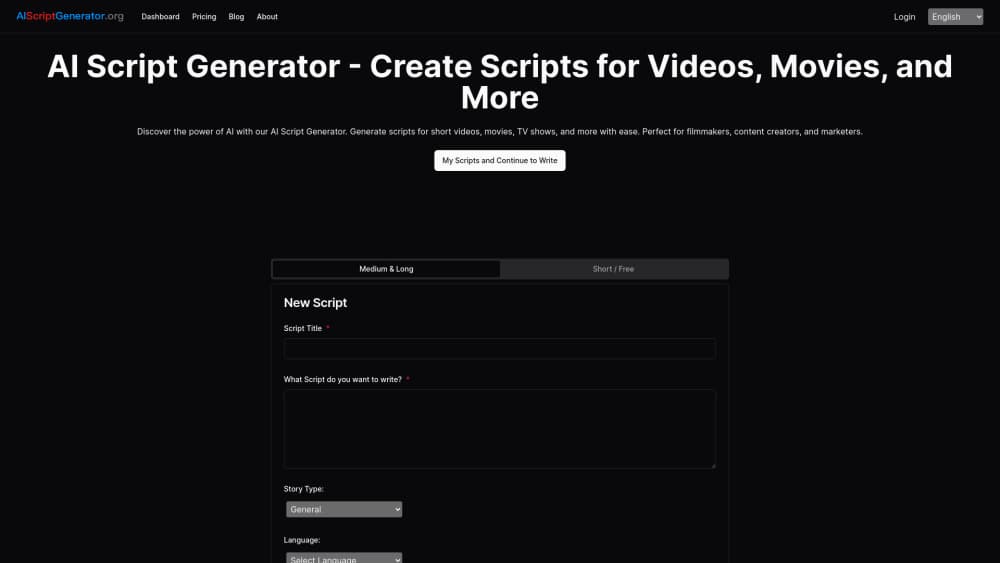
AI Script Generator is a browser based writing tool for screenplays and video scripts. You enter a title, a description, a story type, and a length, then it writes the opening chapter of your script. From there you describe what happens in the next beat and it keeps going, one chapter at a time, until the draft is finished.
The company behind it calls it an AI script writer for everyone from hobby writers to working professionals. The design choice that separates it from most rivals is that pacing. Most screenplay generator tools answer one giant prompt with a whole draft, while this one steers AI script generation in short passes, so you fix problems as they appear. The editing happens in the same window, so you aren't exporting to another app to make changes.
Two limits matter before you sign up. It's a text tool only, with no storyboard, no shot list, and no PDF or Final Draft export. And the site itself is thin: the About and Terms pages returned a 404 error when we checked, so pricing and the FAQ are the only written sources for what the tool does. Feature claims here come from the product's own pages.
Getting Started
- Create an account with an email address. New users get 10 credits to test the generator.
- Fill in the script form: title, description, story type from 11 genres, story length as Short, Medium, or Long, plus a prompt describing the scene or tone you want.
- Generate the first chapter, or ask for an outline first if you'd rather plan the beats before writing dialogue.
- Continue chapter by chapter. Each new pass takes your own summary of the next scene, so the plot follows your plan rather than the model's.
- Review in the built-in editor, then save to your private library or copy the text into Word, Google Docs, or screenwriting software.
Product Information
A quick look at AI Script Generator's pricing, supported platforms, and performance.
Best for
The users, tasks, and scenarios where this tool fits best.
Users
- YouTube and TikTok creators
- Indie filmmakers and film students
- Small marketing teams
Tasks
- Drafting a YouTube video script
- Outlining a short film
- Rewriting a scene in a new tone
- Producing social clips in bulk
Scenarios
- Deadline week with a blank page
- Testing a story idea before you commit
- Writing the same script for different audiences
Key features
Chapter by Chapter Generation
The generator builds a script in passes rather than in one shot. You write the brief, it produces the opening chapter, and then you feed it a summary or prompt for each following chapter. That structure keeps long projects on track, because every new section starts from your description of what should happen next. It also means you can stop, read, and change direction without throwing away the whole draft, which is what makes it usable as an AI screenwriting tool rather than a novelty.
Genre and Length Controls
The form offers 11 story types: romance, science fiction, mystery, horror, historical fiction, fantasy, fairy tale, drama, comedy, adventure, and poem. Length is a separate switch with Short, Medium, and Long. In practice, the genre sets the vocabulary and pacing conventions, while length sets how much plot one chapter covers. Changing either one is the fastest way to get a different take on the same premise.
Outline First Option
You don't have to start with dialogue. The tool can return an initial outline instead of a drafted chapter, which is the better entry point for anything longer than a few minutes. Plan the beats, reorder them in the editor, then expand each one. For feature scripts, that outline becomes the spine that keeps later chapters from drifting.
Built-in Editor
Everything happens in the browser. The editor sits next to the generated text, so you can cut lines, adjust stage directions, or rewrite dialogue without exporting anything. A copy button moves the script to Word, Google Docs, or dedicated screenwriting software when you need proper formatting. Paid plans add private saves, which keeps drafts out of any shared space.
Credits and Plans
Each generation costs one credit. The free plan gives daily free usage plus 10 credits for new users, and it's limited to personal use. Pro costs $4.96 per month for 509 credits, and Plus costs $15.96 per month for 1,699 credits. Both paid plans include private saves, commercial usage rights, email support, and cancellation at any time. One credit per chapter means the credit count is really a chapter budget.
Five Language Interface
The interface ships in English, French, Spanish, German, and Chinese, so the forms, buttons, and help text are readable without a translation layer. That matters for non-English teams who want to work inside one account. Script output follows the language of your prompt, which is the practical way to handle a bilingual project.
Pros and cons
Pros
- The chapter by chapter approach gives you control over plot in a way that single prompt generators don't.
- Free daily usage plus 10 starter credits is enough to judge output quality before paying.
- Pro at $4.96 per month undercuts most dedicated AI screenwriting subscriptions.
- Commercial rights and private saves are included on paid plans, which covers freelance and client work.
- The genre list is broad, from horror to poem, so the same tool covers a short film and a social clip.
Cons
- No export to PDF, Final Draft, or Fountain, so formatting a real screenplay is manual work.
- The free plan is personal use only, which rules out client projects without a subscription.
- There's no mobile app and no API documentation, so automated workflows aren't an option.
- First drafts lean on familiar phrasing, and the site's own pages are thin enough that support options are hard to check in advance.
Frequently asked questions
It writes scripts for video and film projects. You supply a title, a description, a genre, and a length, and it produces a draft chapter by chapter that you edit in the browser. Typical uses are YouTube videos, short films, TV scenes, and social media clips.
Related content
Explore related tools, skills, and articles for AI Script Generator.
AI Script Generator Alternatives

Google EmbeddingGemma 2
Google DeepMind · Writing · Image · CodingGoogle EmbeddingGemma 2 is a 740M-parameter open model that turns text, code, images, audio, and video frames into vectors in one 768-dimension space, running on phones and laptops.

MePersona
MePersona, Inc. · Writing · Productivity · MarketingMePersona is an AI unified inbox for creators. It learns your voice, drafts replies to fan messages from 12 platforms, and sends only what you approve.

Fluence
Yay Software (Yannick Huchard) · Writing · Voice & Language · ProductivityFluence is an Android app that reads PDFs, EPUBs, Word files and web articles aloud, follows each sentence as it speaks, and answers questions about the text on the phone itself.