

AI Sound Effect Generator
Independent team behind aisoundeffectgenerator.com · Voice & Language
AI Sound Effect Generator turns a written description into a downloadable sound effect, with adjustable length, saved history and commercial rights on paid plans.
About AI Sound Effect Generator
What Is AI Sound Effect Generator
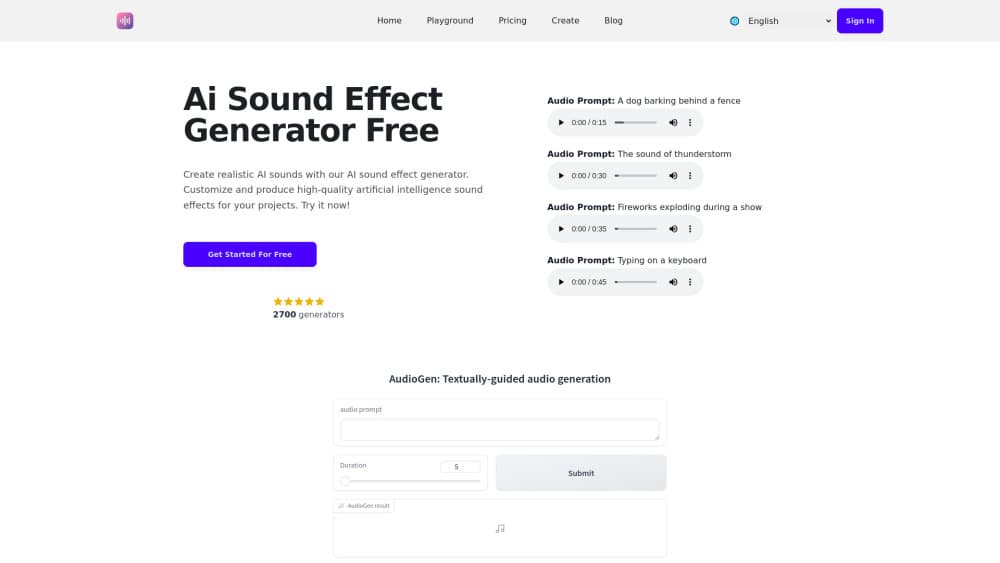
AI Sound Effect Generator is a sound effect generator online, and it builds audio from a text prompt in the browser. You type what you want to hear, set how many seconds it should run, and the model returns a clip you can preview and download. There's no sample library to dig through and no timeline to learn.
The appeal is speed for small, specific sounds. A door slam, a laser recharge, a crowd murmur under dialogue: these are the gaps where stock libraries feel clumsy, because you rarely find the exact version you pictured. Typing the description takes a few seconds and gets you something close enough to drop into a rough cut.
The limits matter too. Sound effects are generated one clip at a time, so a full scene still takes many runs. Output depends on how precisely you describe it, and vague prompts return generic results. There's no free tier either, so you pay before you hear anything beyond the sample clips on the site.
Getting Started
- Open aisoundeffectgenerator.com and pick a plan. The three tiers differ by credit count, not by features.
- Create an account so your generations get saved. The site keeps every result in your history for later download.
- Type a prompt in the text field. Concrete detail helps: material, distance, and action beat adjectives every time.
- Set the duration in seconds, then hit Run and wait for the clip to finish.
- Preview the take, regenerate with a tweaked prompt if it misses, then download the version you want to keep.
Product Information
A quick look at AI Sound Effect Generator's pricing, supported platforms, and performance.
Best for
The users, tasks, and scenarios where this tool fits best.
Users
- Short-form video editors
- Indie game developers
- Podcasters and audio hobbyists
Tasks
- Filling a gap in foley
- Building UI and game sound effects
- Making temp audio for a rough cut
Scenarios
- A YouTube or TikTok edit that needs one specific noise
- A game jam weekend
- An ad or product mockup for a client review
Key features
Prompt Field With Duration Control
The workspace is three controls: a prompt box, a duration setting in seconds and a Run button. That's the whole interface, which is why the first generation takes less than a minute to attempt. The duration field is the one worth attention, because a two second clip and an eight second clip need different wording to land.
Text to Sound Effect From Plain Language
You don't need audio vocabulary to use it. Writing "fireworks exploding during a show" or "typing on a keyboard" is enough to get AI sound effects back, and the site's own gallery uses prompts in that style. Adding distance, surface and intensity sharpens the output, so "heavy boots on wet gravel, close mic" beats "walking sound" every time.
Generations Saved to Your Account
Every run lands in your history instead of disappearing after the preview. That matters more than it sounds, since comparing four takes of the same effect is how you pick one. You can revisit an older version later and download it again without spending credits.
Credit Packs Sized by Output
The Start plan carries 60 credits, Premium 200 and Advanced 400, all billed monthly. Credits are the only difference between tiers, so there's no feature locked behind the top plan. Light users can stay on the smallest pack, and anyone scoring a full game should run the math on how many takes a usable effect actually costs.
Royalty-Free Commercial Use
Paid plans include commercial use and royalty-free sound effects, which covers client work, monetized video and shipped games. That removes the licensing spreadsheet problem that comes with library samples. Keep your own record of what you generated, since the terms live on the vendor's site and can change.
Browser Only, Nothing to Install
The tool runs in the browser on a desktop or laptop, with no plugin, no DAW integration and no local install. You can generate on a machine that isn't your editing rig and download the file later. It also means no offline work.
Pros and cons
Pros
- A prompt and a duration setting cover the whole workflow, so there's nothing to learn before the first result.
- Every generation is saved to your account, which makes comparing takes and re-downloading easy.
- Commercial use and royalty-free rights are included on all three paid plans, not just the expensive one.
- Credits, not features, separate the tiers, so the cheapest plan produces the same audio quality as the top one.
- Descriptions work for sounds that are hard to find in stock libraries, like a specific machine hum or an unusual impact.
Cons
- No free tier means you commit to a monthly charge before you hear a full length result from your own prompt.
- No API and no plugin support, so teams can't wire generation into a game engine or editing pipeline.
- One clip per run, which gets expensive in credits when a scene needs twenty distinct sounds.
- No editing tools inside the app, so trimming, layering and level matching happen in your DAW afterward.
Frequently asked questions
Short audio clips built from a text description, typically a few seconds long. You write what you want to hear, choose a duration, and the tool returns a sound effect you can preview, save and download.
Related content
Explore related tools, skills, and articles for AI Sound Effect Generator.
AI Sound Effect Generator Alternatives

Foley
Hanamori Labs, LLC · Voice & Language · Productivity · AI AssistantFoley is a voice to-do list that turns a spoken sentence into a filed task, complete with project, date and time, then helps you plan the day around what is already there.

HireKey
HireKey · Voice & Language · Productivity · LeaningHireKey is an AI job search copilot built by a former tech recruiter. It checks role fit, tailors resumes, runs interview practice and tracks every application.

Fluence
Yay Software (Yannick Huchard) · Writing · Voice & Language · ProductivityFluence is an Android app that reads PDFs, EPUBs, Word files and web articles aloud, follows each sentence as it speaks, and answers questions about the text on the phone itself.