
Subtitle Screenshot Generator
EasyAICaption · Writing · Image · Marketing
Subtitle Screenshot Generator is a free browser tool that puts your own text onto a video frame as a realistic looking subtitle image, ready for memes, social posts and slides.
About Subtitle Screenshot Generator
What Is Subtitle Screenshot Generator
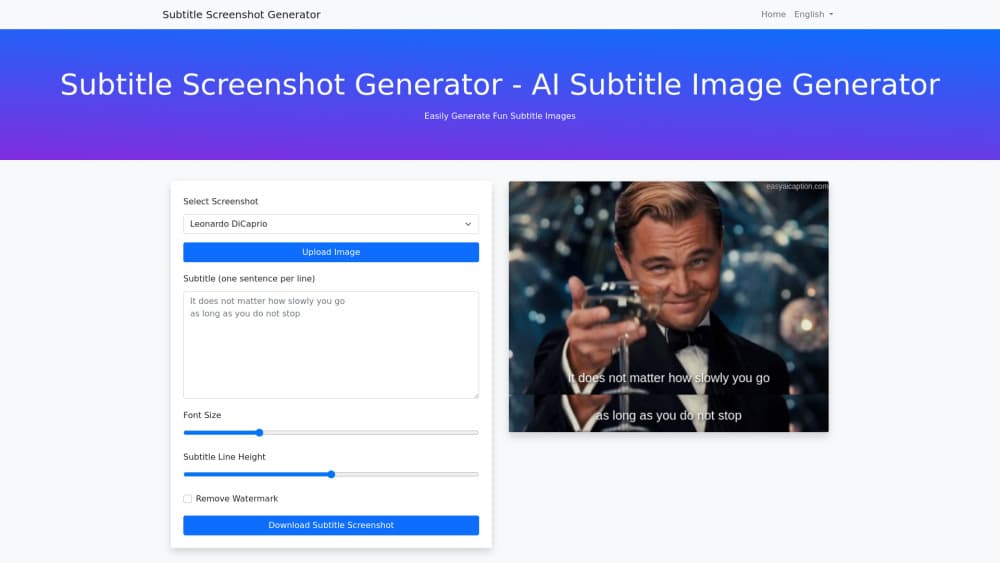
Subtitle Screenshot Generator is a single page web app with one job: it draws believable subtitles onto a still image. Think of it as a subtitle image maker, not a video editor. It also works as a lightweight AI subtitle image generator when you need a caption mockup rather than a full captioning pipeline. You bring the frame, either from the built in set or from your own upload, type the line you want people to read, and the tool renders it in the spot where a real caption would sit. That's the entire promise: add subtitles to an image and download it in seconds. Nothing else needs to happen. No video file, no timeline, no render queue.
The appeal is speed and control. Making a fake subtitle screenshot by hand means opening a photo editor, matching the font weight, guessing the drop shadow, and nudging the baseline until it stops looking pasted on. This tool removes those steps and leaves two dials that actually matter, font size and line height.
The limits are worth knowing before you start. It works on stills only, so you can't caption a moving clip, and the styling options stop at size and spacing. If you need custom fonts, colors or animated captions, a full editor still wins.
Getting Started
- Open the site and pick a frame. Choose one of the preset screenshots or switch to the upload tab and drop in the image you want to add subtitles to.
- Type your subtitle in the text box, one sentence per line. Each line becomes its own subtitle line, so the break you type is the break viewers see.
- Adjust font size and line height until the text sits comfortably inside the frame.
- Download the finished image and post it wherever you need it.
Product Information
A quick look at Subtitle Screenshot Generator's pricing, supported platforms, and performance.
Best for
The users, tasks, and scenarios where this tool fits best.
Users
- Meme makers
- Social media managers
- Teachers and presenters
- Localization testers
Tasks
- Turning a quote into a shareable image
- Mocking up a scene for a blog post or thumbnail
- Checking line length
Scenarios
- Posting a reaction image in a group chat and needing it to look like a real screenshot.
- Building a slide deck where each section opens with a captioned still.
- Drafting social content on a laptop in a browser tab, with no software installed.
Key features
Preset frames or your own upload
As a meme subtitle generator it leans on speed, and speed starts with the frame. The tool ships with a set of stock screenshots you can caption immediately, which covers the "I just want the meme" case. When the joke depends on a specific scene, the upload tab takes your own still instead. That flexibility is the difference between a generic reaction image and one that lands.
One sentence per line text entry
You type subtitles the way they read, line by line, and the tool keeps your breaks. Nothing gets reflowed or auto-wrapped into a paragraph. For anyone who has fought a text box that refuses to break where the pause is, this is the part that saves time.
Font size and line height controls
Two sliders cover most of what makes a caption look real or fake. Size handles how much of the frame the text eats. Line height sets the gap between stacked lines, and getting that gap right is usually what separates a convincing subtitle from an obvious paste job.
Instant in-browser rendering
There's no upload wait for a project file and no export queue. The image appears as you type, so you can iterate on wording and spacing in the same window. That loop matters when the joke only works with the right number of words.
Plain image download
As a subtitle screenshot maker the payoff is the file, not a project. The output is a normal image file you can drop into any app, scheduler or chat. No watermark policy is described on the tool's own page, and no account step sits between you and the file.
Pros and cons
Pros
- Free and browser based, so it runs on a Chromebook or a work laptop with locked down software.
- The workflow is three inputs deep, which makes it faster than any general photo editor for this one task.
- Line breaks behave the way you type them, so multi-line captions don't need fighting.
- Uploading your own frame means the subtitle can match a scene people recognize.
Cons
- Stills only. You can't caption a video clip or export a subtitle file, so it won't replace a captioning service.
- Styling stops at size and line height. Font family, color, outline and position are not exposed, which limits how closely you can match a specific show's look.
- No documented API, so anyone hoping to generate subtitle images at scale has to do it by hand.
Frequently asked questions
It creates images that look like a paused video with subtitles burned in. People use them for memes, quote cards, social posts, thumbnails and presentation slides.
Related content
Explore related tools, skills, and articles for Subtitle Screenshot Generator.
Subtitle Screenshot Generator Alternatives

Google EmbeddingGemma 2
Google DeepMind · Writing · Image · CodingGoogle EmbeddingGemma 2 is a 740M-parameter open model that turns text, code, images, audio, and video frames into vectors in one 768-dimension space, running on phones and laptops.

MePersona
MePersona, Inc. · Writing · Productivity · MarketingMePersona is an AI unified inbox for creators. It learns your voice, drafts replies to fan messages from 12 platforms, and sends only what you approve.

Fluence
Yay Software (Yannick Huchard) · Writing · Voice & Language · ProductivityFluence is an Android app that reads PDFs, EPUBs, Word files and web articles aloud, follows each sentence as it speaks, and answers questions about the text on the phone itself.