

AI TOP HUB
AI TOP HUB · Other
AI TOP HUB is a free AI tools directory that catalogs 12,000+ tools, SaaS apps, and GPTs across 100+ categories, with ratings and traffic data to help you choose.
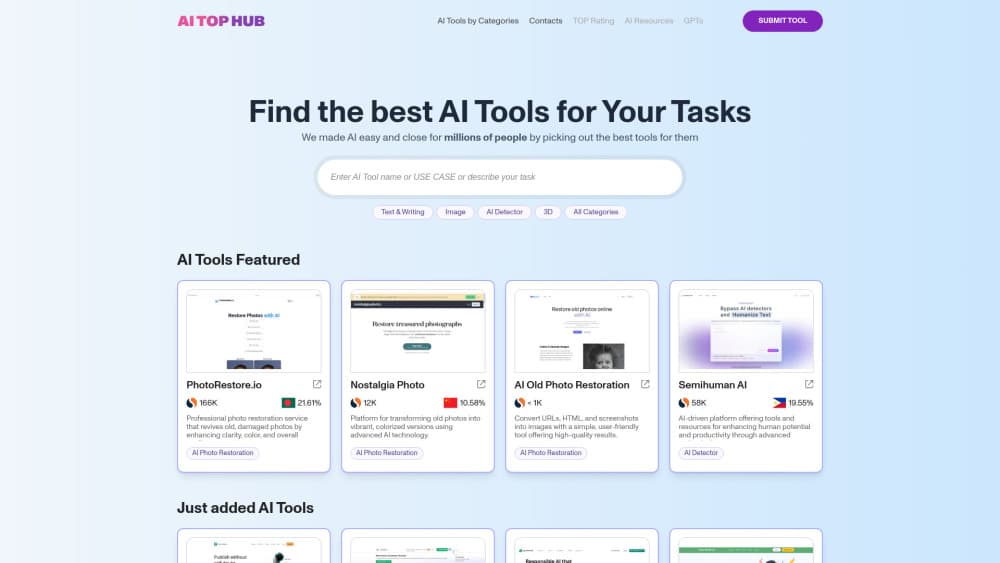
About AI TOP HUB
What Is AI TOP HUB
AI TOP HUB is a web catalog of AI products. It lists tools, SaaS platforms, apps, and custom GPTs, sorts them into categories like Text & Writing, Image, Video, Code & IT, and Marketing, and puts a rating on each category and each listing. You browse, compare, and click through to the product's own site. Nothing is installed or run inside AI TOP HUB itself.
The problem it solves is discovery. There are thousands of AI products now, most of them with near-identical landing pages, and searching for one usually returns a wall of sponsored listicles. A directory gives you a single place to scan names, one-line descriptions, category placement, and rough traffic numbers before you commit time to a trial.
The limitation is the same as any directory: the listing is not a hands-on review. Descriptions come from the makers, traffic figures are estimates, and a high rating mostly reflects popularity rather than fit for your job. Treat AI TOP HUB as a shortlisting tool. It's a fast way to find AI tools that match a description, not a substitute for testing them. The real evaluation still happens on the product's own site.
Getting Started
- Open aitophub.com. The homepage search box accepts a tool name, a use case, or a plain sentence describing your task.
- Narrow the results with the category filters, or start from the category grid if you'd rather browse. Counts next to each category show how crowded it is.
- Sort the list by rating, recency, or popularity, then open the listings that look relevant. Each one gives a short description plus an estimated monthly visit count.
- Follow the outbound link to the product and check its own pricing page before you sign up. AI TOP HUB does not process subscriptions.
- If you make an AI tool, use the Submit Tool link in the header to add it to the AI SaaS directory. Listings are reviewed before they appear.
Product Information
A quick look at AI TOP HUB's pricing, supported platforms, and performance.
Best for
The users, tasks, and scenarios where this tool fits best.
Users
- People starting from zero
- Small teams comparing options
- Makers and indie developers
Tasks
- Finding a tool for a specific job
- Sizing up a crowded niche
- Researching the market as an investor or analyst
- Checking what's new
Scenarios
- A freelancer needs a transcription tool by Friday
- A founder is validating an idea
- A marketer is building a stack on a tight budget
Key features
Task-Based Search
The search field takes more than product names. You can type a use case or describe what you're trying to do, and the results page maps that to matching tools. This matters when you know the outcome you want but not the product category, which is the usual situation for someone new to AI software.
Category Catalog With Counts
More than 100 categories organize the listings, from broad groups like Text & Writing and Marketing down to narrower ones like Prompt and 3D. Each category shows how many tools it contains, so you can see at a glance whether a niche is thin or overcrowded. It's a fast way to learn the shape of the market.
Ratings On Listings And Categories
AI TOP HUB assigns a rating to individual tools and to whole categories. The AI tool ratings give you a rough ordering when a category returns hundreds of results and you don't want to read every description. They reflect signals the site collects, not lab testing, so use them as a first filter rather than a verdict.
Traffic And Engagement Estimates
Each listing carries an estimated monthly visit count, and many show a bounce rate figure as well. For a buyer, that's a proxy for whether a tool has real users or launched last month and stalled. For a maker, it's a rough benchmark against competitors in the same category.
GPTs And Resource Sections
Beyond standard SaaS products, the site keeps a separate GPTs section for custom builds on top of ChatGPT, plus an AI Resources area with guides and reference material. That separation helps because GPTs behave differently from standalone apps: no install, no standalone pricing page, and a much shorter lifespan on average.
Free Tool Submission
Developers can submit an AI tool through the header link. A submission adds the product to the AI SaaS directory after review, which puts it in front of visitors who are already browsing for tools rather than scrolling social feeds. There's no charge to list.
Pros and cons
Pros
- Free to browse with no account, which makes it easy to check a category and leave.
- Task-based search handles plain-language descriptions, so you don't need to know product names in advance.
- Category counts and traffic estimates add context that a plain list of links doesn't give you.
- Separate sections for GPTs and AI resources keep the main catalog focused on shippable products.
Cons
- Descriptions come from the makers, so claims about features are unverified until you visit the product.
- Traffic figures are estimates and can lag behind a tool's actual growth or decline, which matters if you're judging momentum.
- There's no hands-on testing or editorial review, so ratings are a popularity signal, not a quality guarantee.
- Listings for very new tools often have thin data, leaving you to evaluate them without the traffic context that older entries have.
Frequently asked questions
Yes. Browsing the catalog, searching, and reading listings costs nothing and doesn't require an account. The site makes money from visibility for listed products rather than from visitors.
Related content
Explore related tools, skills, and articles for AI TOP HUB.
AI TOP HUB Alternatives

JarvisCore
Prescott Data · Coding · Productivity · OtherJarvisCore is an open source Python runtime where AI agents work as equal peers on an agent mesh, claim tasks from a shared ledger, and reach external services through a zero-trust broker.
Clef
Cloudflare · Business · OtherClef is Cloudflare's open-source decision model for Workers AI. It returns calibrated probabilities for typed questions, not generated text, so agents can classify, route, and act fast.

iFixAi
iFixAi · Business · OtheriFixAi is an open-source auditor for AI agents. It runs your agent through a simulation of your business, grades every reply, and returns an A to F scorecard backed by evidence.