

AI VisionBoard
Shefa · Other
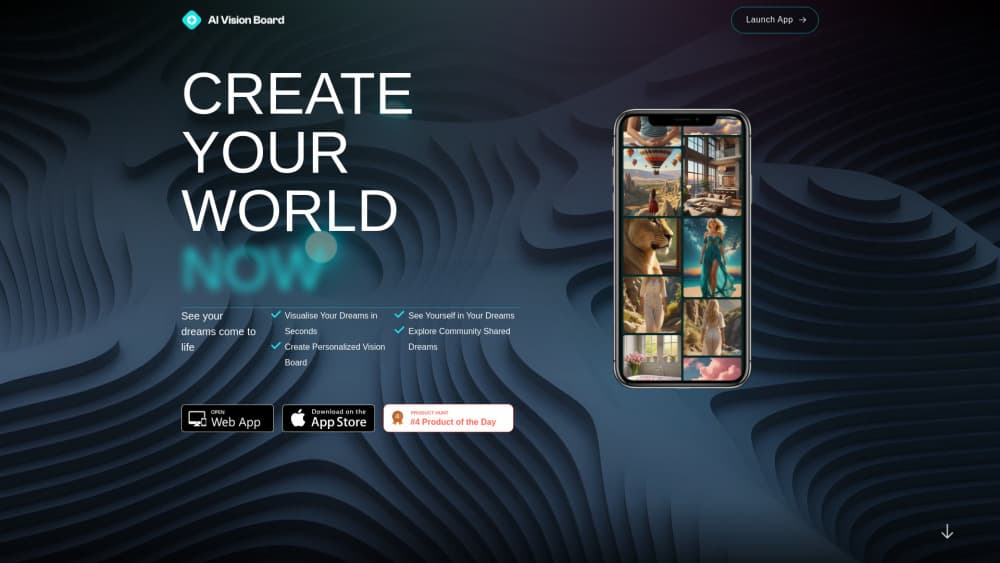
AI VisionBoard is a vision board generator that turns a typed dream into an image in seconds, places your own photo in the scene, and pairs the results with a community feed and an AI life coach.
About AI VisionBoard
What Is AI VisionBoard
AI VisionBoard is a web and mobile app for people who want to see their goals instead of writing them down. You describe a scene, such as standing on a stage with a sold-out crowd, and the app returns a generated image of it. The site promises the picture in about 3 seconds, which puts it closer to a search box than to a design tool. For a dream visualization app, that short loop is the whole selling point.
The twist is the personal layer. Upload a photo of your face once, then type "I am a chef in Lisbon" and the model puts you in the frame. The app calls this DreamMe, and it's the reason a finished image here feels more like a future memory than a stock photo of somebody else's life.
The developer behind it is Shefa, an independent maker whose image model runs on Replicate. The home page claims more than 2,000,000 dreamers, so the shared feed has real volume. Two limits matter before you sign up. The web app is still labeled alpha, meaning the interface and the credit rules can move without notice. Creations saved to a public vision board are also visible to every user in the Community tab, and the app states that plainly inside its settings.
Getting Started
- Open the site or install the mobile app, then create an account. Alpha access on the web costs nothing to start.
- Type a dream in plain words. Try "me on a sailboat in Greece" or "my own bakery at sunrise". If you draw a blank, tap one of the 1,000+ random prompt ideas.
- Add a selfie in the DreamMe settings if you want to appear in the image. Type "I am ..." or "Me, ..." to trigger that mode.
- Generate, then keep the results you like on a board. Share a creation to the community feed or post it on Instagram with the @ai_visionboard tag, which the app rewards with extra credits.
Product Information
A quick look at AI VisionBoard's pricing, supported platforms, and performance.
Best for
The users, tasks, and scenarios where this tool fits best.
Users
- Goal setters who respond to images more than lists
- People who already keep a paper vision board
- Creators who like a public feed
Tasks
- Visualizing a specific ambition
- Seeing yourself in the outcome
- Breaking a motivation slump
- Gathering new directions
Scenarios
- Sunday planning for the week ahead
- Starting a new year or a new job
- Sharing with friends or a partner
Key features
Dream to Image in Seconds
The core loop is a text field. Describe a scene, hit generate, and an image appears within a few seconds. Prompts work best when they name a place, a role, and a mood, since the model fills in the rest. That speed matters if you think in bursts, because you can throw five ideas at it and keep the one that clicks.
DreamMe Photo Mode
This is the feature that separates AI VisionBoard from a plain vision board generator, and it's what makes the app more than an AI vision board maker. You upload one clear photo of your face, then write prompts in the first person. Results place you inside the scene, whether that's a boardroom, a mountain trail, or a kitchen you don't own yet. Results vary with photo quality, so a sharp selfie in soft light beats a blurry group shot.
1,000+ Prompt Ideas
A blank prompt box stops a lot of people. The app includes more than 1,000 random ideas you can tap when nothing comes to mind, which covers travel, career, home, fitness, and quieter personal goals. It's a browsable list rather than a search engine, so the payoff comes from tapping through a few and editing whatever is closest.
Community Feed
Every shared creation lands in a public feed sorted by popular or latest. That turns the app into something closer to a social product than a private journal. You can see how strangers visualize the same ambitions, and the app notes that posts saved to public boards are visible to all users, which is worth knowing before you upload a personal photo.
AI Life Coach Chat
The coach is a chat window, not a planner. You can talk through a goal, ask for a next step, or vent about a stalled week, and the app pitches it as a companion available at any hour. It won't schedule anything or track streaks, so treat it as a thinking partner and keep your own calendar.
Credit Based Generation
Each creation spends credits. New accounts and web alpha users start with an allowance, you can buy more through the in app store, and the app hands out extra credits when you share a creation on Instagram. When the balance hits zero, generation stops with a "Not enough credits" notice, so heavy users will feel the meter.
Pros and cons
Pros
- Fast output. A usable image in seconds means you can iterate on the wording without burning a whole evening.
- The photo mode is genuinely different. Seeing your own face in the scene lands harder than a generic stock image of the goal.
- Free to try. Web alpha access costs nothing, so you can judge the image quality before spending on credits.
- The community feed solves the blank page problem, since other people's boards give you language for goals you couldn't name.
- The AI life coach adds a text channel for planning, so the app isn't only pictures.
Cons
- Credit walls interrupt the flow. Once the balance runs out, the app stops generating until you buy a pack or post to Instagram.
- The web app is in alpha, so expect interface changes and the occasional rough edge.
- Public by default for shared work. Creations saved to a public vision board are visible to every user, which rules out private goals unless you keep them off the community tab.
- No API and no export options are documented, so there's no clean way to pull boards into another tool or your own project.
Frequently asked questions
It turns a written dream into an AI generated image, and it can place your own photo inside that scene. Boards collect the results, and a community feed shows what other users are visualizing.
Related content
Explore related tools, skills, and articles for AI VisionBoard.
AI VisionBoard Alternatives

JarvisCore
Prescott Data · Coding · Productivity · OtherJarvisCore is an open source Python runtime where AI agents work as equal peers on an agent mesh, claim tasks from a shared ledger, and reach external services through a zero-trust broker.
Clef
Cloudflare · Business · OtherClef is Cloudflare's open-source decision model for Workers AI. It returns calibrated probabilities for typed questions, not generated text, so agents can classify, route, and act fast.

iFixAi
iFixAi · Business · OtheriFixAi is an open-source auditor for AI agents. It runs your agent through a simulation of your business, grades every reply, and returns an A to F scorecard backed by evidence.