

aiworkflow.tools
aiworkflow.tools · Coding · Productivity · Other
aiworkflow.tools is a free directory of AI workflow automation tools. It curates no-code and AI agent platforms, compares features and pricing, and publishes guides on business process automation.
About aiworkflow.tools
What Is aiworkflow.tools
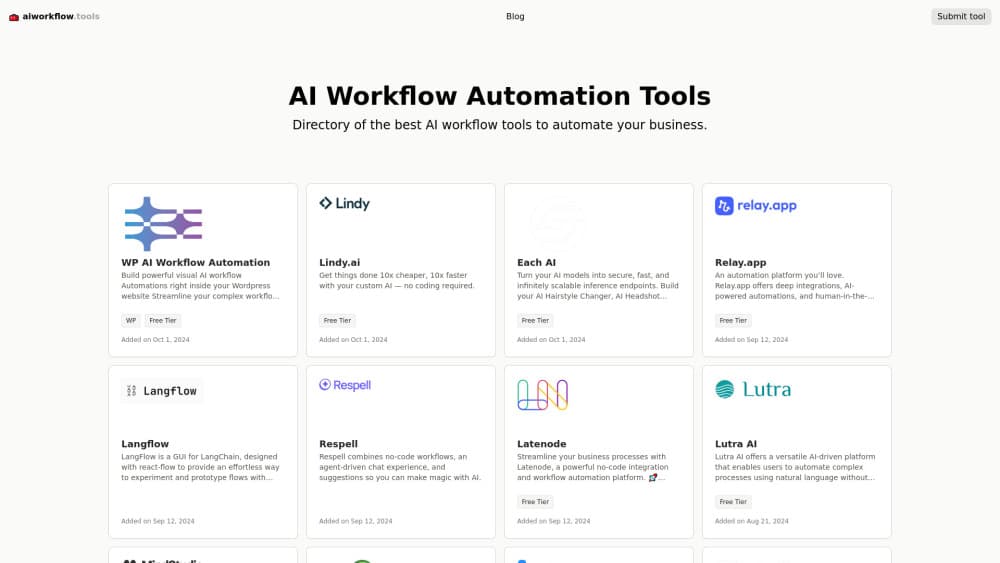
aiworkflow.tools is a directory site for AI workflow automation tools. Instead of building automations itself, it collects the products that do, writes a plain-language profile for each one, and tags the listing so you can tell at a glance what a tool covers. Every entry links straight to the vendor, so the site works as a starting point rather than a place you stay.
The reason to use it is comparison. Someone searching for a workflow automation directory usually has a task in mind and no idea which of the dozens of platforms fits. Listings summarize what each tool does, which integrations it supports and whether it has a free tier, which cuts the research from a dozen pricing pages down to a shortlist.
Two limits are worth knowing before you dig in. The directory only covers AI-related automation products, so general-purpose task managers sit outside its scope. And the listings are editorial summaries drawn from vendor pages, not hands-on test results, so treat pricing and feature claims as a lead to verify on the official site rather than a final answer.
Getting Started
- Open aiworkflow.tools in a browser, no account or download needed
- Scan the tool list or open the blog if you want background on a workflow topic first
- Read the profile for each candidate, checking features, integrations and whether a free tier exists
- Follow the "Visit" link on a listing to reach the vendor and confirm current pricing on their page
- Submit a tool you know through the Submit form if it is missing from the directory
Product Information
A quick look at aiworkflow.tools's pricing, supported platforms, and performance.
Best for
The users, tasks, and scenarios where this tool fits best.
Users
- Small business owners
- Operations managers
- Developers evaluating platforms
- Content and marketing teams
- People new to automation
Tasks
- Building a shortlist
- Comparing free tiers
- Finding integration coverage
- Learning the basics
- Staying current on the market
- Researching business process automation
Scenarios
- A solo founder needs to automate onboarding emails
- An ops lead is told to cut manual data entry
- A developer weighs a hosted platform against a self-hosted option
- A team wants to automate spreadsheet-to-CRM handoffs
- Someone building a case for automation
Key features
A Curated List of AI Workflow Tools
The core of the site is the tool list, and it stays focused on automation rather than every AI product on the market. Each entry names the tool, describes what it automates in a sentence or two, and carries tags like "Free Tier" so you can scan the list fast. Because listings are picked rather than scraped in bulk, the directory reads more like a short edit than an endless feed.
Detailed Tool Profiles
Every listing opens into a profile with a fuller description, a features section grouped by capability and a pricing summary drawn from the vendor's plans. A profile for a platform like n8n breaks its features into areas such as AI integration, development flexibility and enterprise support, then lists plan names and prices underneath. The "Visit" button sits at the top, so you can jump to the official site to confirm the details.
Filtering by Free Tier and Tags
Tags do the sorting work. A "Free Tier" badge flags tools you can try without a card, which helps when you are comparing no-code automation tools on a tight budget. The tags sit next to each listing, so scanning for free options takes seconds rather than opening each profile in turn.
Workflow Automation Blog
The blog covers the concepts behind the tools, not just the tools themselves. Posts walk through process mining, low-code platforms, AI-assisted workflow design and securing automated workflows. If you are new to business process automation, reading two or three posts gives you the vocabulary to compare tools on more than price.
Tool Submission and Review
If a tool is missing, the Submit page takes a URL and your email, and the site reviews it before adding it to the directory. That keeps the list editor-vetted rather than open to anyone with a link. It also means new tools appear only after a review pass.
Vendor-Neutral Comparison
Profiles describe each tool on its own terms instead of ranking one over another, so side-by-side reading tells you what fits your task rather than which product the site prefers. Pricing and feature lists come from the vendor, which keeps the comparison grounded in published facts.
Pros and cons
Pros
- Free to browse with no signup, no account wall and no gated listings
- Tool profiles summarize features, integrations and pricing in one place, so you skip opening a dozen vendor sites
- A "Free Tier" tag makes it quick to spot tools you can test without paying
- The blog explains workflow automation concepts, which helps beginners compare tools on more than price
- Listings link straight to the vendor, so verifying current pricing takes one click
- Covers a wide spread of the market, from no-code builders to enterprise process platforms, so it works as a Zapier alternative shortlist and a deep-search engine for heavier platforms
Cons
- Profiles are editorial summaries from vendor pages, not hands-on test results, so feature and pricing claims need checking on the official site
- Some entries carry older "added on" dates, so a listed tool's pricing or free tier may have changed since it was posted
- The directory only covers AI-related automation, so general task managers and non-AI workflow tools are left out
- No search filters beyond tags, so finding a tool by a specific integration means opening profiles one at a time
Frequently asked questions
aiworkflow.tools is a free online directory of AI workflow automation tools. It lists products that automate business processes, writes a profile for each with features and pricing, and publishes blog posts on automation topics. You browse the list, then follow a link to the vendor when a tool looks like a fit.
Related content
Explore related tools, skills, and articles for aiworkflow.tools.
aiworkflow.tools Alternatives

Base Code
Base44 (Wix) · Coding · ProductivityBase Code is a shared cloud development environment from Base44. Teammates describe changes to an existing GitHub codebase in chat, preview them live and send them back as pull requests.

Google EmbeddingGemma 2
Google DeepMind · Writing · Image · CodingGoogle EmbeddingGemma 2 is a 740M-parameter open model that turns text, code, images, audio, and video frames into vectors in one 768-dimension space, running on phones and laptops.

GitGlow
GitGlow · Coding · ProductivityGitGlow is a local-first desktop Git client that lets independent developers review their own code and their AI agents' changes in one place before shipping.