

AI Music Generator
aimusic.one · Voice & Language
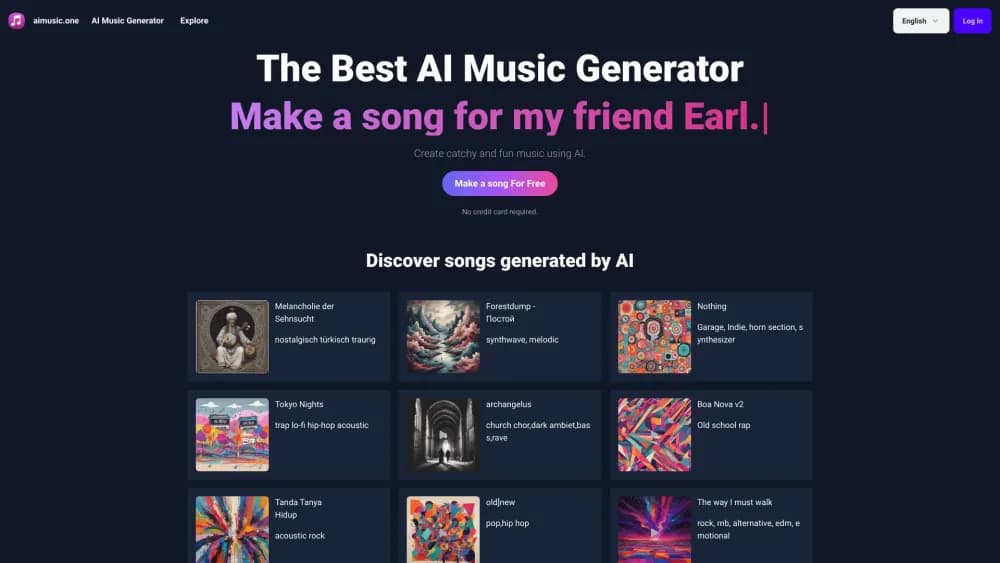
AI Music Generator is a browser based text to music tool from aimusic.one. Describe a mood, genre, or scene, and it builds a full song or a lyric free instrumental you can download and share.
About AI Music Generator
What Is AI Music Generator
AI Music Generator is the main product on aimusic.one, a small web platform built around one job: turning a written description into finished music. You log in, type what you want to hear, and the system returns a track with arrangement, instruments, and a title. No piano roll, no sample library, no mixing desk.
The appeal is speed and price. A hobbyist who needs background audio for a video can get something usable in a few minutes, and a songwriter can test a mood before booking studio time. The free tier hands out a small batch of generations so you can judge the output before paying anything.
The limits are worth knowing up front. There's no mobile app, no stem export, and no proper timeline editor. Credits come in one-time packs that expire after a month, and the platform doesn't publish a detailed commercial license page, so anyone planning to monetize a track should read the terms first.
Getting Started
- Open aimusic.one and sign in with a Google account.
- Go to the create page and write a short brief, such as "warm lo fi beat for a rainy study session" or "cinematic strings with a slow build".
- Pick style tags if you want tighter control over genre, mood, or instruments.
- Run the generation and listen to the results, then pick a take you like.
- Download the track, or make the result private if you're on a paid pack.
Product Information
A quick look at AI Music Generator's pricing, supported platforms, and performance.
Best for
The users, tasks, and scenarios where this tool fits best.
Users
- Video creators who need background music
- Songwriters sketching ideas
- Hobby musicians exploring styles
- Social media managers on a tight budget
Tasks
- Generating a lyric free instrumental
- Writing lyrics before the song
- Producing a themed track for an event
- Testing a genre direction
Scenarios
- Filling a gap in a video edit
- Building a small catalog for a new channel
- Classroom or workshop demos
Key features
Text to Music Generation
The core loop is plain language in, audio out. You describe genre, mood, tempo, and instruments in a sentence or two, and the model returns a complete arrangement rather than a loop. Longer, more specific prompts tend to land closer to the target, so a line about the scene beats a single word like "happy".
Instrumental Mode
The instrumental music generator mode removes vocals from the output. That makes the tool usable under narration, in a shop playlist, or behind a product demo where singing would fight the voice track. It's the mode most video editors reach for first.
AI Lyrics Generator
aimusic.one runs a separate lyrics tool alongside the song maker. You give it a topic and a style, and it drafts verses, a chorus, and a hook you can edit by hand. The two tools aren't fully joined, so expect a copy and paste step between writing words and generating the track.
Style Tags and Genre Presets
Instead of typing every descriptor, you can attach AI music tags that describe genre, mood, era, and instrumentation. The public tag pages also work as a browsing surface: pick a tag, listen to what other users made with it, and borrow the wording for your own prompt.
Sharing and Watermarking
Finished tracks get a shareable page, and the platform says it embeds an inaudible watermark so a generated file can be traced back. For a creator posting to social platforms, that combination covers the basic need: a link to send and a record of origin if a track shows up somewhere unexpected.
Credit Packs with Private Results
AI music pricing here runs on one-time packs rather than a subscription. The free plan gives you 6 songs across 3 generations for a month. Basic costs $9.9 for 600 songs, 300 generations, and 1000 downloads. Premium costs $29.9 for 3000 songs, 1500 generations, and unlimited downloads. Both paid packs let you mark results private.
Pros and cons
Pros
- One-time pricing removes the monthly bill that most AI music services charge.
- The free plan is generous enough to judge output quality before spending anything.
- Instrumental mode and style tags cover the two things video creators ask for most.
- A separate lyrics generator saves a step when you want words with the track.
Cons
- Credits expire after one month, so unused generations are lost rather than banked.
- There's no mobile app and no offline mode, which rules out quick edits on a phone.
- No stem separation or MIDI export means you can't take a track into a DAW and rebuild it.
- The license terms are thin on detail, so commercial use needs a careful read before you rely on it.
Frequently asked questions
It turns a written description into a finished music track. People use it for background audio in videos, quick song sketches, podcast intros, and casual experimenting with genres.
Related content
Explore related tools, skills, and articles for AI Music Generator.
AI Music Generator Alternatives

Off the Record
Weird Machines · Voice & Language · ProductivityOff the Record is a macOS app from Weird Machines that reshapes your voice in real time to block AI transcription, so people hear you normally and notetakers get nothing usable.
Cekura Bench
Cekura · Voice & Language · BusinessCekura Bench is a public benchmark that runs speech-to-speech models and deployed voice agents through 82 simulated phone calls, three times each, then publishes pass rates, latency and cost.
Griffin by Tavus
Tavus · Voice & Language · Video · ChatbotGriffin by Tavus is the first Human Interaction Model: a full-duplex, video-to-video system that watches, listens, and answers during a live video call in real time.