

AIPhone.AI
Second Phone Number Inc · Writing · Voice & Language
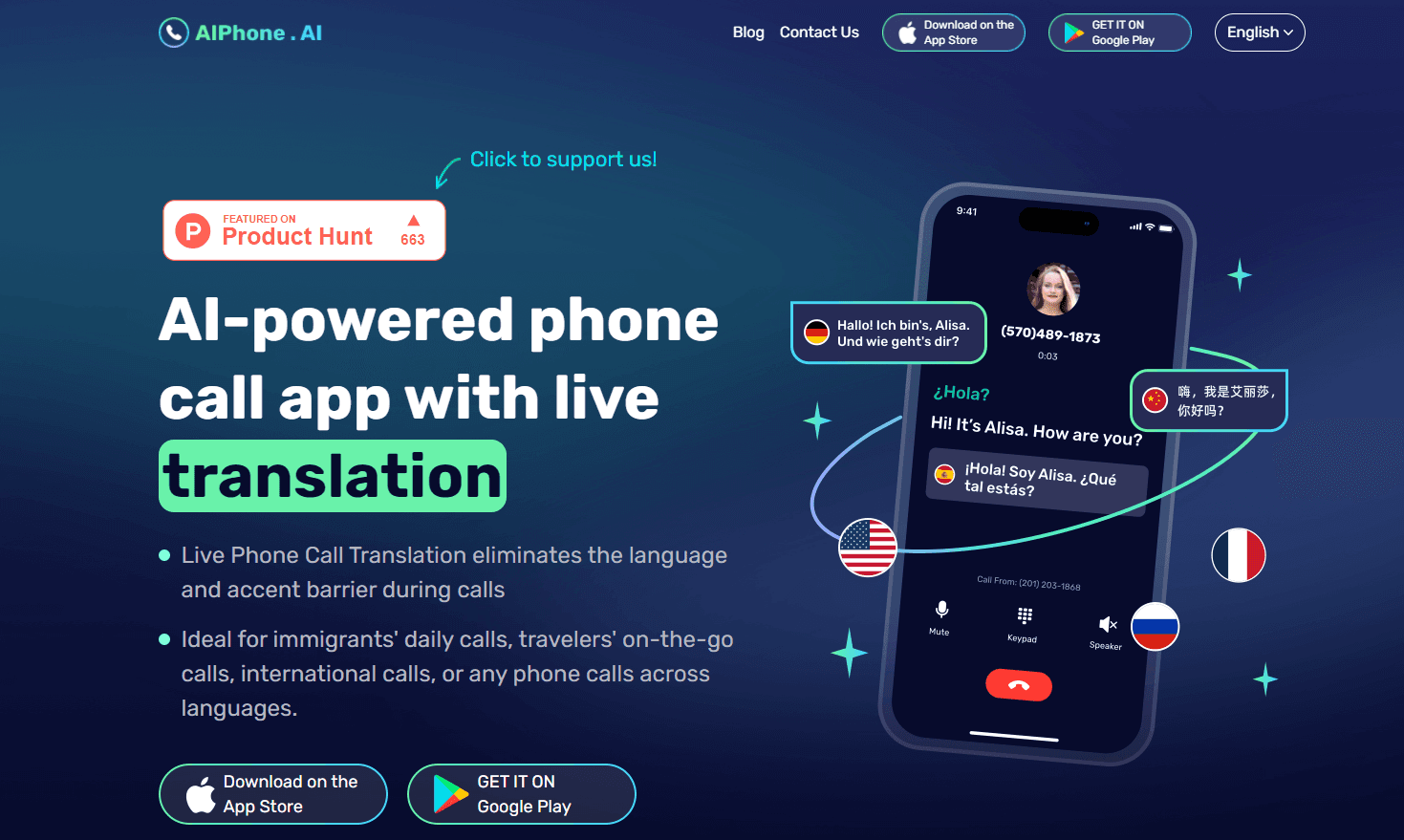
AIPhone.AI is an AI phone call translator that turns live voice calls and chat apps into two-way conversations across 100+ languages, aimed at travelers, immigrants and global teams.
About AIPhone.AI
What Is AIPhone.AI
AIPhone.AI is a calling app that listens to a live phone call and translates each side into the other person's language while you talk. You speak normally, and the person on the other end hears their own language a moment later. It was built by Second Phone Number Inc, the team behind the AI Phone translator line that has been covered by outlets like Business Insider and Yahoo Finance.
The app isn't only for direct phone calls. It also hooks into popular chat apps such as WhatsApp, WeChat, Telegram and LINE, so voice and video calls inside those apps get the same two-way translation and bilingual subtitles. Face-to-face mode covers the in-person case, which matters when you're standing at a market stall or a clinic desk.
The main limit to know up front is that translation quality depends on a steady connection. On a weak signal or a thick regional accent, the captions can lag behind the speech. That's the trade-off. The free tier also caps how much you can translate before the paid plans take over.
Getting Started
- Download AIPhone.AI and create an account with your phone number or email.
- Pick your language and the language you want to translate the other person into.
- Start a call from inside the app, or share a link so the other person can join without installing anything.
- Talk at a normal pace and read the live bilingual captions as they appear on screen.
- After the call ends, open the saved transcript and summary if you need the details in writing.
Product Information
A quick look at AIPhone.AI's pricing, supported platforms, and performance.
Best for
The users, tasks, and scenarios where this tool fits best.
Users
- Immigrants
- Travelers
- Sales and support teams
Tasks
- Live call translation
- Call transcription
- Message translation
Scenarios
- Cold-calling a supplier in another country
- Calling a family member who only speaks their mother tongue
- Booking a doctor's appointment abroad
Key features
Live Call Translation
The core of the app is real-time voice translation during a phone call. You speak in your own language, and the system plays the translated speech to the other person, who can answer in theirs. Think of it as an AI interpreter for phone calls that never takes a break. It works on regular cellular calls and on voice or video calls inside apps like WhatsApp and Telegram. If the connection holds, the back-and-forth feels close to a normal conversation.
Bilingual Subtitles on Screen
Every call shows captions for both languages at once. That's handy in noisy places where you can't rely on the audio, or on a quiet train where you'd rather read than listen. The subtitles update as each person speaks, so you can catch a name, a number or a street even if you miss the spoken version. Is that a big deal? For anyone who's ever misheard a phone number on a call, yes. It also makes the app usable for people who are hard of hearing.
Call Summaries and Transcripts
Once a call ends, this call transcription app can generate a short summary of what was discussed and keep the full transcript. You can search past calls and share a transcript with a colleague. This is the part that saves time for anyone juggling several client calls a day. You stop scribbling notes mid-sentence and read the summary afterward.
Text-to-Speech Replies
When a word is hard to pronounce, you can type or paste it and have the app speak it in the other person's language. That covers addresses, email spellings and account numbers, which are exactly the details that get mangled on a translated call. Small feature. Big payoff on a real call. The app also highlights key items in the transcript, such as phone numbers and emails, so you can copy them out cleanly.
Face-to-Face and Listening Modes
Away from the phone, a speak mode turns the app into a two-way interpreter for in-person talks, the kind you need at a shop counter or a hotel desk. A listening mode transcribes and translates one-way speech, which suits a lecture or a meeting where you mostly need to follow along. Both reuse the same language pair you set for calls.
Pros and cons
Pros
- Translates live calls in both directions, not just typed text.
- Works inside WhatsApp, Telegram, LINE and WeChat, not only carrier calls.
- Bilingual subtitles help when audio quality is poor.
- Call summaries and transcripts cut down on manual note-taking.
- The other person can join a chat call through a link without installing the app.
Cons
- Translation lags on weak connections, so fast talkers may lose the thread.
- Heavy accents and overlapping speech lower caption accuracy.
- The free tier limits usage, pushing frequent callers toward a paid plan.
Frequently asked questions
It translates phone calls live in both directions, so two people who don't share a language can talk normally and each hears their own language. It also shows subtitles and saves a transcript. That's the whole point of a dedicated AI phone call translator.
Related content
Explore related tools, skills, and articles for AIPhone.AI.
AIPhone.AI Alternatives

Google EmbeddingGemma 2
Google DeepMind · Writing · Image · CodingGoogle EmbeddingGemma 2 is a 740M-parameter open model that turns text, code, images, audio, and video frames into vectors in one 768-dimension space, running on phones and laptops.

MePersona
MePersona, Inc. · Writing · Productivity · MarketingMePersona is an AI unified inbox for creators. It learns your voice, drafts replies to fan messages from 12 platforms, and sends only what you approve.

Fluence
Yay Software (Yannick Huchard) · Writing · Voice & Language · ProductivityFluence is an Android app that reads PDFs, EPUBs, Word files and web articles aloud, follows each sentence as it speaks, and answers questions about the text on the phone itself.