

Airmusic
AirMusic · Other
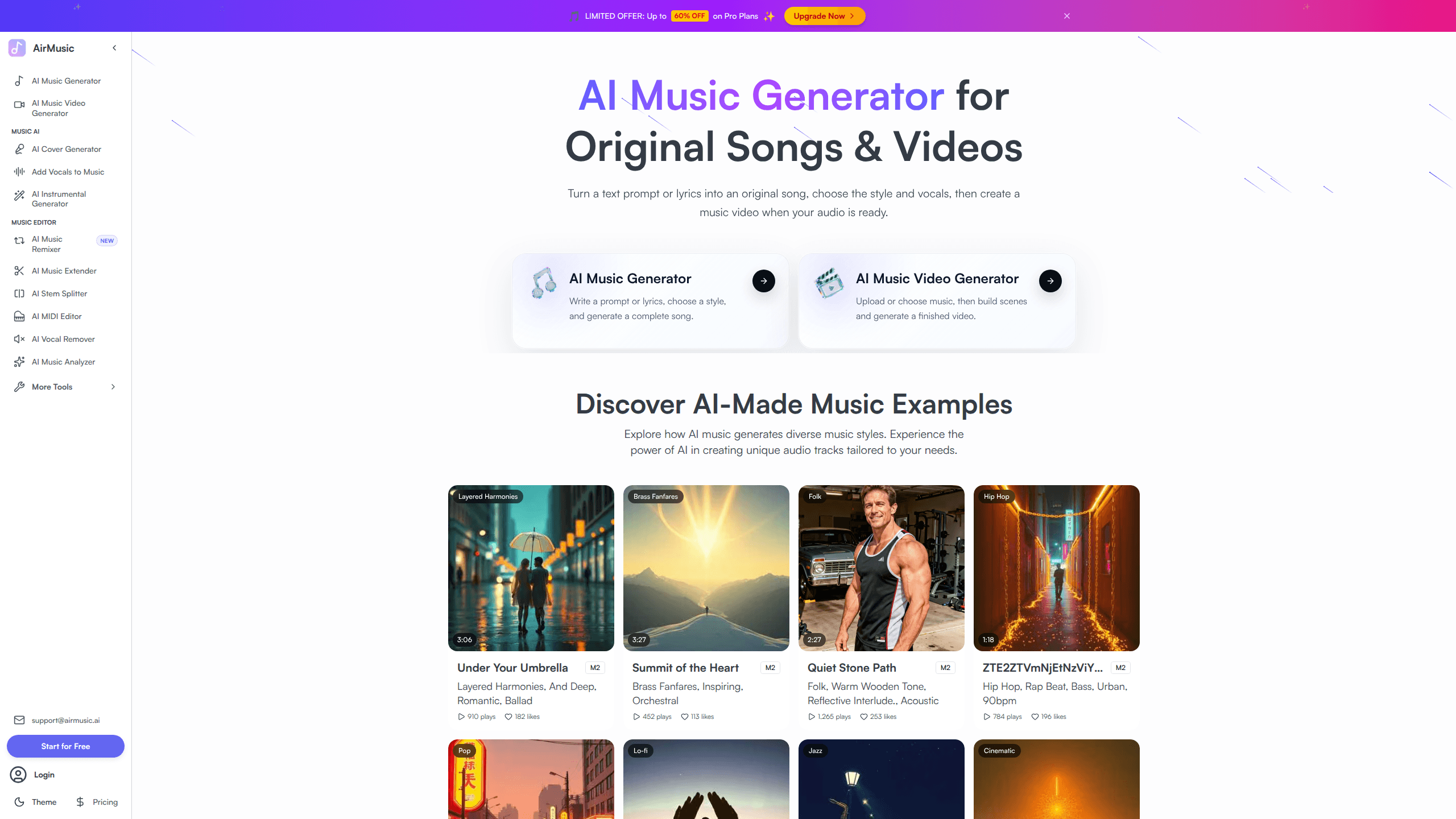
AirMusic is a browser-based AI song maker that turns a text prompt or your own lyrics into a finished song, complete with vocals and instruments. You pick a style, add optional lyrics, choose a model, then preview and download the result as MP3 or WAV. It's built for people who want usable audio fast rather than musicians working inside a DAW.
About Airmusic
What Is AirMusic
AirMusic is a web app for making original music with AI. Type a description like "dark trap about city nights," or paste your own lyrics, and the AI composes a track around it. There's no install and no plugin. You sign in, generate, and download the file.
Beyond simple generation, AirMusic bundles a set of one-purpose tools under the same account. The vocal remover and stem splitter break a song into up to 12 or 13 separate parts, so you can pull out the vocals, drums, or bass for remixing. An AI cover tool reshapes an existing song with a different voice, while Add Vocals turns a bare instrumental into a full track with sung lyrics in multiple languages. These extras matter because most people don't stop at one generated song. They want to tweak it, sing over it, or turn it into a video.
The big limit is credits. Every action, from a song to a music video scene, spends credits, and the free tier only hands out a handful. Storage is another catch. On the free plan your files vanish after 7 days. That's fine for experimenting, annoying if you're building a library. And it's web only. There's no desktop or mobile app to fall back on.
Getting Started
- Go to airmusic.ai and sign in with an email, Google, or GitHub account.
- Open the AI music generator and describe the track you want, or switch to lyrics mode and paste your own words.
- Choose a style, vocal type, and model, then start generation and wait for the preview.
- Play back the result, regenerate if it misses, and download the MP3 or WAV once you're happy.
- Optionally push the track further with the extender, cover, or music video tools.
Product Information
A quick look at Airmusic's pricing, supported platforms, and performance.
Best for
The users, tasks, and scenarios where this tool fits best.
Users
- Content creators who need a background track for a video, podcast, or short clip without licensing headaches
- Hobbyist songwriters who have lyrics or a mood in mind but no instruments or production skills
- Video editors hunting for short, original audio they can loop or extend in a few clicks
Tasks
- Turning a written prompt or a set of lyrics into a full song with vocals and backing instruments
- Extending an existing track by 30 seconds or more while keeping the style and mood steady
- Separating a song into stems so you can remix, sample, or isolate the parts you need
- Generating a royalty-free instrumental for a presentation, ad, or stream intro
Scenarios
- Building a viral clip for TikTok or YouTube Shorts and needing matching music plus a quick video
- Turning a favorite photo into a soundtrack by letting the AI read its mood and colors
- Making a personalized birthday or greeting song by cloning a voice and adding lyrics
Key features
Text and Lyrics to Music
This is the core of AirMusic. You describe a vibe, a genre, or a story, and the generator writes the melody, arrangement, and vocals around it. If you already have words, lyrics mode puts your text at the center and builds the track to fit. It's the fastest path from a blank page to a finished song.
AI Vocal Generator and Voice Cloning
AirMusic sings for you. Give it a beat and some lyrics, and the AI adds vocals in a range of styles and languages. Voice cloning goes further, training a voice model from just a few seconds of audio so the result carries a specific tone. This is what makes covers and personalized tracks possible without a recording booth.
Stem Separation and Vocal Remover
The stem splitter pulls a song apart into separate tracks, covering vocals, drums, bass, guitar, and more. The vocal remover does the same job with one click when all you want is the instrumental. Both are handy for karaoke, sampling, or rebuilding a mix from parts you actually own.
AI Music Extender and Cover
The extender adds 30 seconds or more to any track while holding onto its style, mood, and quality. The cover tool takes an existing song and reworks it with a different vocal or a celebrity-like voice. Together they let you push a short idea into something longer, or give a familiar track a fresh spin.
AI Music Video Generator
Upload or pick a track, then build scenes and render a finished video. Director Mode handles it in one click; Custom Mode gives you control over the storyboard and keyframes. Scenes start around $0.50 each, which adds up if you want a longer video, but for a quick clip it's a fast way to get audio and visuals in one place.
AI Lyrics Generator
Stuck on words? The lyrics generator drafts verses and hooks for just about any genre, ballads and pop included. It works on its own when you just need text, or as a starting point you refine before feeding it back into the song generator.
Image to Music
Upload a photo and AirMusic reads its mood, colors, and atmosphere, then writes a matching soundtrack. It's a gimmick on the surface, but it's genuinely useful when a visual already sets the tone and you want audio that fits it without describing the vibe yourself.
Pros and cons
Pros
- Wide toolset under one login, so you can generate, extend, cover, split, and make a video without hopping between apps
- Free tier lets you try the core generator and most tools before paying
- Voice cloning needs only a few seconds of audio, which keeps setup light
- Downloads come as MP3 or WAV, making the output easy to drop into editing software
- Commercial license is included on paid plans
Cons
- Free plan only gives 10 credits and wipes your files after 7 days, so you can't really stockpile work without paying
- No mobile or desktop app, which means everything depends on the browser
- Heavy video use burns through credits fast, since each scene costs money on top of your plan
- No public API, so you can't wire AirMusic into an existing production pipeline
Frequently asked questions
The free plan gives you 10 credits and unlocks most tools, including text to music, lyrics generation, and the vocal remover. The catch is storage. Free files disappear after 7 days, so download anything you want to keep.
Related content
Explore related tools, skills, and articles for Airmusic.
Airmusic Alternatives

Odyssey 3
Odyssey · OtherOdyssey-3 is Odyssey's foundation world model. It simulates physics in real time, turns a prompt into an interactive environment, and adapts to robots, cars and games.

JarvisCore
Prescott Data · Coding · Productivity · OtherJarvisCore is an open source Python runtime where AI agents work as equal peers on an agent mesh, claim tasks from a shared ledger, and reach external services through a zero-trust broker.
Clef
Cloudflare · Business · OtherClef is Cloudflare's open-source decision model for Workers AI. It returns calibrated probabilities for typed questions, not generated text, so agents can classify, route, and act fast.