
AISong.ai
AISong · Voice & Language
AISong.ai is a browser-based AI music generator that turns a prompt or your own lyrics into a full song with vocals. It has a small free tier, two paid plans, and a public track feed.
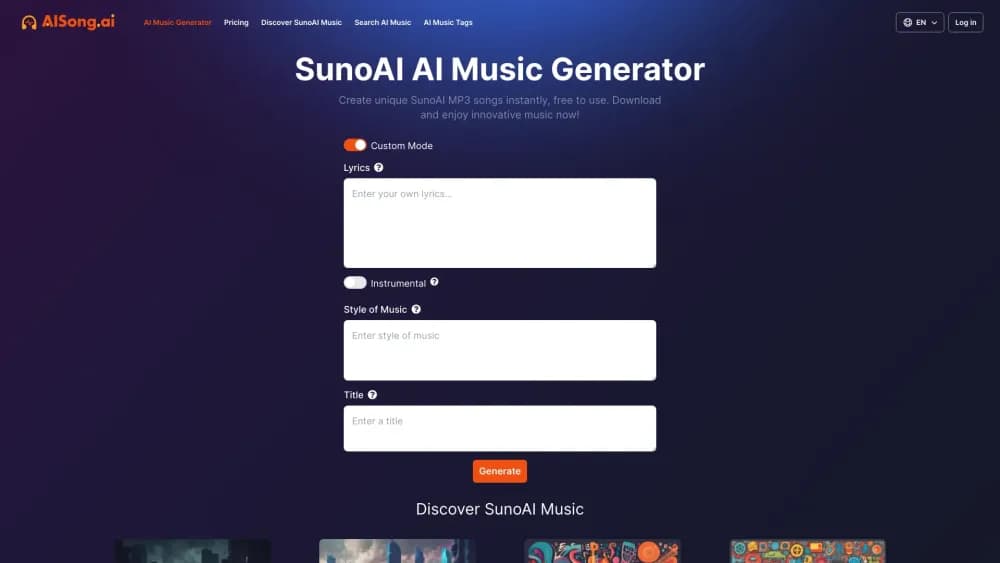
About AISong.ai
What Is AISong.ai
AISong.ai is a web app for making songs from words. You either describe the track you want or paste lyrics you already wrote, then the AI song generator produces a finished recording with singing, melody, and backing instruments. There's nothing to install, and the whole flow runs in a browser tab.
The tool targets people who don't play an instrument or own a studio. A student who needs a 30 second theme for a class video, a parent who wants a birthday song with the kid's name in it, a writer with a verse but no melody: all three can get something listenable in a few minutes. That's the real promise here, speed, not studio polish.
Two limits matter before you pay. First, editing after generation is thin. The site doesn't list a timeline, stem separation, or a way to fix one line of a verse, so a bad take usually means another run. Second, this is a third party front end. The site says outright that it isn't the official Suno website, and its terms of service still describe the engine as Suno V3. Treat the model version as unconfirmed and judge the output by ear.
Getting Started
- Open aisong.ai and sign in with your Google account. The free generations unlock after login.
- Switch on Custom Mode if you want control over the words. It splits the page into separate fields for lyrics, style of music, and title.
- Paste lyrics into the box (the field caps around 3,000 characters), or flip the Instrumental switch if you want music without a voice.
- Type a style, add a title, then press Generate and wait for the queue.
- Play the result, then download the file or leave the public display option on if you want it listed in the discover feed.
Product Information
A quick look at AISong.ai's pricing, supported platforms, and performance.
Best for
The users, tasks, and scenarios where this tool fits best.
Users
- Lyricists who hear a melody in their head
- Content creators on a tight budget
- Hobbyists making personal gifts
- Curious listeners
Tasks
- Turning a written lyric into a vocal track
- Building instrumental AI music for a voiceover
- Sketching jingle ideas fast
Scenarios
- A gift due tomorrow
- A school or portfolio project with no music budget
- Testing whether a genre suits your voice or your brand
Key features
Two Ways In: Prompt or Lyrics
The generator accepts a plain description of the song you want, or the actual words you want sung. Prompt mode is the text to song path, best for people who know the mood and the genre but not the lines. Pasted words take the lyrics to song route, which suits writers who already have a chorus and need a voice on it. Keeping both on one screen removes the usual back and forth between a writing tool and a music tool.
Custom Mode Controls
Turn Custom Mode on and the page breaks into lyrics, style of music, and title fields. That split is what makes the AI song generator usable for repeat work: you can keep a lyric sheet fixed and only swap the style, which is how most people hunt for the right arrangement. The style box takes genre, mood, and instrument words in plain English.
Instrumental Mode
One switch drops the vocals and returns music only. This is the setting for background beds under narration, game clips, or a podcast intro, where a singer would fight the voice track. Instrumental output also sidesteps the language question, since there are no words to get wrong.
Private Results and Downloads
Every generation can be kept private with a toggle, and that option appears on the free plan too, not just the paid ones. Downloads are unlimited on both paid tiers. The terms of service say the music belongs to the person who made it, which is the clause to read closely if you plan to publish.
Priority Generation Queue
Paid plans move your jobs ahead of free users in the queue. On a busy evening the difference is minutes rather than seconds, and it matters most when you're iterating on a chorus and need five or six runs back to back. Free accounts share a queue with everyone else.
Discover Feed
A public gallery shows tracks other people made, each tagged with the creator's name and a link into the same generator. It doubles as a genre sample library: search a tag, hear what the AI music maker does with it, then start your own version. Public display is optional per track.
Interface in Fourteen Languages
The site ships localized pages in English, Spanish, Portuguese, French, German, Japanese, Korean, Traditional Chinese, and several others, and the generator follows the same switch. That helps non-English writers. The lyrics themselves can be in any language regardless of the interface setting.
Pros and cons
Pros
- The free trial needs no card, so you can hear the output quality before committing.
- Plan math is unusually clear: the $9.9 tier lists 3,600 generations and 7,200 songs a year.
- Private results are available on the free plan, which is rare among low cost generators.
- No install and no plugin, which makes it workable on a borrowed laptop or a school computer.
- The discover feed gives real examples instead of demo reels.
Cons
- Generation counts renew rather than roll over, so unused runs are lost at the end of the billing year.
- The site lists no stem export or timeline editor, so fixing one weak line means regenerating the whole song.
- Free users sit in a shared queue, and waits stretch when the service is busy.
- Model details are thin: the terms still name Suno V3, and the site doesn't publish a version list, so you can't tell which engine you're getting.
Frequently asked questions
Yes, there's a free plan. It unlocks after you sign in with Google and includes 6 songs and 3 generation times, a shared queue, private results, and downloads. Past that you buy a subscription.
Related content
Explore related tools, skills, and articles for AISong.ai.
AISong.ai Alternatives

Off the Record
Weird Machines · Voice & Language · ProductivityOff the Record is a macOS app from Weird Machines that reshapes your voice in real time to block AI transcription, so people hear you normally and notetakers get nothing usable.
Cekura Bench
Cekura · Voice & Language · BusinessCekura Bench is a public benchmark that runs speech-to-speech models and deployed voice agents through 82 simulated phone calls, three times each, then publishes pass rates, latency and cost.
Griffin by Tavus
Tavus · Voice & Language · Video · ChatbotGriffin by Tavus is the first Human Interaction Model: a full-duplex, video-to-video system that watches, listens, and answers during a live video call in real time.