

Aiter
Aiter.io · Marketing
Aiter is an AI marketing agent that reads your website, writes a marketing brief, then builds ad copy, banners, emails, articles, keywords and short video ads from it.
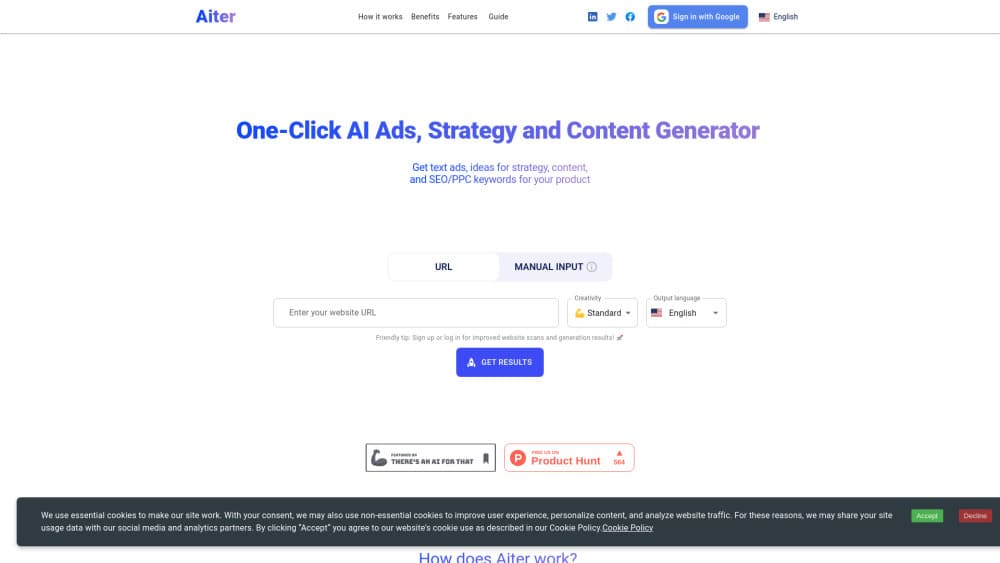
About Aiter
What Is Aiter
Aiter is a web-based AI marketing tool built around one idea: a model can't write for your business until it has read your business. You paste a URL, and the agent scans the site for copy, images, colors, positioning and competitors before it produces anything. That scan becomes a marketing brief, and every asset it generates afterwards argues from that brief instead of from a blank prompt.
The product covers the whole campaign rather than one piece of it. You get Google, Meta, LinkedIn and TikTok ad copy, display banners, social posts, email sequences, blog drafts, keyword tables with search volumes, and a rendered video ad. According to Aiter, the library holds more than 45 marketing tasks, and the pricing page lists 75 or more across all channels.
The limits are worth knowing up front. Credit consumption is uneven: most runs cost one credit, while a finished video ad costs 28 to 122 credits depending on length and resolution. Output quality tracks the quality of your site. A thin one-page site gives the agent little to read, and the brief comes back generic. Agencies that need strict brand governance or multi-user approval flows won't find them here.
Getting Started
- Open aiter.io and paste your website address, or type a sentence about what you sell if you don't have a site yet. You get 5 credits before signing up and 10 more after you create an account.
- Wait for the scan. Aiter reads the page copy, the imagery, the brand colors and the competitor set, then writes a marketing brief with sections for audience, positioning, tone of voice and visual references.
- Edit the brief. Change any line you disagree with, since the brief drives everything downstream and a wrong audience segment shows up in every asset.
- Pick the assets you need from the campaign view, then regenerate individual pieces or export the set as a branded PDF.
Product Information
A quick look at Aiter's pricing, supported platforms, and performance.
Best for
The users, tasks, and scenarios where this tool fits best.
Users
- Founders without a marketing hire
- Small marketing teams
- Agencies
- Solo ecommerce sellers
Tasks
- Building a marketing brief
- Producing paid ad variants
- Making display banners
- Writing SEO pages
Scenarios
- Launch week with no agency
- Taking on a new client
- Refreshing a seasonal campaign
Key features
Website Scan and Marketing Brief
The scan is the part most AI writing tools skip. Aiter pulls the copy, the images, the color palette and the competitor set from your URL, then writes a nine-section brief covering product summary, competitive advantages, audience segments, core message, tone of voice and brand vocabulary. You can correct any line, and corrections carry into every asset generated afterwards. The practical effect is that outputs read like your company rather than like a generic brand.
Campaign Generation Across Paid and Organic Channels
One brief drives the whole set: Google, Meta, LinkedIn and TikTok ads, social posts for five channels, email sequences, YouTube scripts, articles and PR angles. The marketing campaign generator also enforces platform limits before you see the output, so a headline that would be truncated in an ad slot comes back already shortened. That saves the copy-paste-check loop most teams run by hand.
Display Banners in Your Brand Colors
The AI banner maker produces 1.91:1 display creative using the colors and visual references it read from your site, and the sample gallery on the site shows what it does with recognizable retail brands. Banners arrive as finished images rather than layered files, so expect to regenerate instead of nudging a headline two pixels. For seasonal refreshes and test variants, that trade is usually fine.
Video Studio
The AI video ad generator in Video Studio renders a complete ad in 4 to 30 second cuts, with a script, a keyframe per scene, voiceover, music and the final edit. It's the one place where the credit cost climbs fast: a 15-second 1080p ad runs 122 credits, which is more than half the monthly allowance on the Advance plan. Billing happens in stages, and the render charge only lands when you press the button.
SEO and GEO Output
Beyond keyword tables, Aiter writes pages aimed at generative engine optimization, meaning content structured so AI assistants can quote it in answers. You get meta titles, meta descriptions, difficulty scores and long-tail keyword groups. Search volumes come from the tool's own data, so treat them as directional and cross-check anything you plan to bid real money on.
Credit Pricing With No Seat Limits
Every plan unlocks all tasks and all channels. What changes is volume: 10 one-time credits on Free, 40 a month on Begin, 200 on Advance and 1000 on Conquer, plus daily bonus credits that reach 310 a month at the top end. There are no per-seat fees, which suits small teams. Failed generations are refunded, so a broken run doesn't eat your allowance.
Pros and cons
Pros
- The site scan produces a usable brief in minutes, which fixes the generic tone that plagues prompt-only tools.
- Asset coverage runs from banner to video ad in one place, so you don't stitch four subscriptions together.
- Character and platform limits are enforced before output, cutting manual trimming.
- Free tier gives 10 credits with no card, enough to judge one full campaign.
- No seat limits on any plan, and failed generations are refunded.
Cons
- Video ads are expensive in credits, and a single 1080p render can consume a large share of a monthly plan.
- Banners and video come out as flat files, so color or copy tweaks mean regenerating rather than editing layers.
- Output quality depends on how much your site says. Brochure sites with little copy produce vague briefs.
Frequently asked questions
It reads your website, turns what it finds into a marketing brief, and generates campaign assets from that brief. The asset list covers ads, banners, social posts, emails, blog drafts, keywords and short video ads.
Related content
Explore related tools, skills, and articles for Aiter.
Aiter Alternatives

ngram 2.0
ngram · Video · Marketingngram 2.0 is an AI video generator for teams. It turns a prompt, a screen recording, or a product URL into a narrated explainer, product demo, or AI avatar video, and every scene stays editable.

shippedit.me
Krawlup · Marketing · Businessshippedit.me now redirects to Krawlup, a web platform that audits SEO, AEO and page speed every week, then hands the fixes to AI coding agents over MCP.

MePersona
MePersona, Inc. · Writing · Productivity · MarketingMePersona is an AI unified inbox for creators. It learns your voice, drafts replies to fan messages from 12 platforms, and sends only what you approve.