
Anakin.ai
Anakin Labs, Inc. · Coding · Other
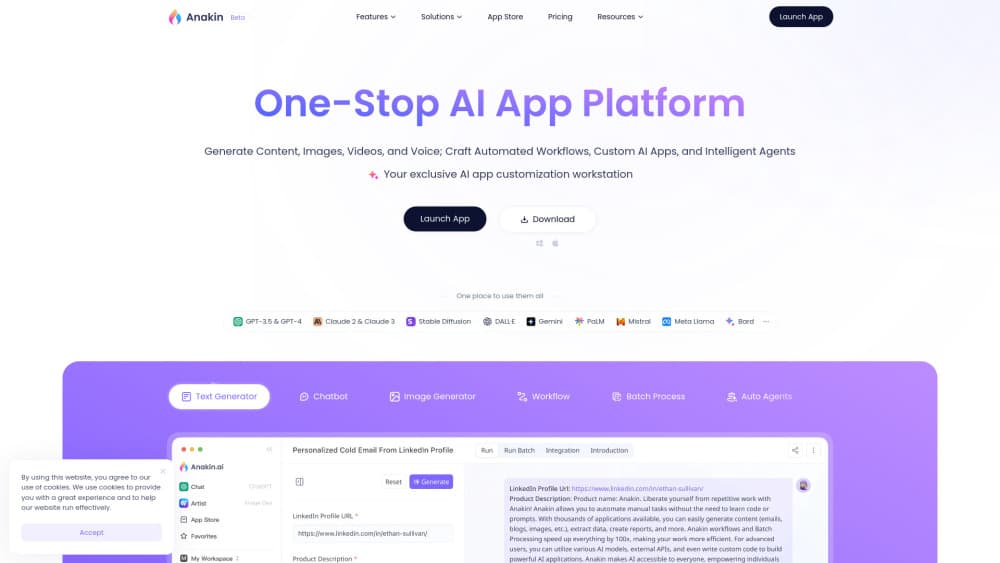
Anakin.ai is a no-code AI app platform that bundles 1000+ prebuilt apps, a visual AI workflow automation builder and batch processing, all running on models like GPT-4, Claude and Gemini.
About Anakin.ai
What Is Anakin.ai
Anakin.ai is a no-code platform for building and running AI apps in a browser. Instead of juggling separate subscriptions to ChatGPT, Claude or an image generator, you work from one workspace that connects text, image, voice and video models. Over 1000 prebuilt apps cover writing, Q&A, document search and data processing, and you can clone any of them to tweak the prompt for your own use.
The writing is on the wall for repetitive tasks. Generate a month of blog drafts, crawl product pages into a spreadsheet, or classify a few thousand support tickets without touching code. Batch processing reads a table as its data source and runs an app across every row at once. Workflows go further: drag nodes onto a canvas, connect them in order, and the same chain runs the same way every time. Anyone can build a simple text generator in minutes, and developers can drop in custom code or external APIs for heavier jobs.
Two things shape how far you can take it. The platform runs on credits, so heavy AI content generation costs more, and the free tier carries just 30 credits a day with a single image per generation. It is also a browser tool first: there is no mobile app, and the site itself tells you to open it on a computer. A few headline features, including the AI chatbot builder and Auto Agents, are still marked as coming soon.
Getting Started
- Sign up for a free account on the Anakin.ai website. No credit card is needed, and the free plan starts you with 30 credits a day.
- Open the App Store and search for what you want to do, then run any prebuilt app as-is or clone it to change the prompt.
- Switch to the builder if you need more control. Drag nodes onto the canvas, link them in order and set the prompt parameters for each step.
- Connect a table in the batch view to process hundreds or thousands of rows at once instead of running one item at a time.
- Publish your app to share it, or connect an API key and call models directly when you want to automate further.
Product Information
A quick look at Anakin.ai's pricing, supported platforms, and performance.
Best for
The users, tasks, and scenarios where this tool fits best.
Users
- Content marketers and writers
- Solo founders and small teams
- Operations and support teams
- Developers and power users
Tasks
- Generating content at scale
- Building a chatbot on your own data
- Automating a repeated workflow
- Translating and rewriting text
- Scraping and extracting data
Scenarios
- A content calendar backlog
- A support inbox overload
- A product data cleanup
- A research digest
Key features
1000+ prebuilt AI apps
The App Store holds over 1000 ready-to-run apps spanning text generation, chatbots, image generation, translation and data work. You can use any app as-is or clone it and edit the prompt to fit your case. That range means most people find a starting point without building anything from scratch.
Visual workflow builder
The builder is a drag-and-drop canvas. You place nodes, connect them in order, and set the prompt parameters at each step to form a chain. Once a workflow is set, it runs the same way every time, which suits handing the same job off to someone else or running it on a schedule.
Batch processing
Batch mode treats a spreadsheet as its data source and runs a chosen app across hundreds or thousands of rows in one go. You can generate content, classify or label records and pull out structured information without writing a loop or running items one by one.
Multi-model access
Anakin.ai connects to a wide set of models, including GPT-4, GPT-3.5, Claude, Gemini, Mistral and Meta Llama, plus image tools like Stable Diffusion and DALL·E. You pick the model that fits the task and the budget instead of being locked into one provider.
Custom app building
The no-code builder lets you design custom AI apps with their own layout and settings. You choose what it generates, publish it for a team or a public link, and adjust the interface without touching code. It is the step between running a prebuilt app and writing your own from scratch.
Chatbots and Auto Agents
Anakin.ai lists trainable chatbots and Auto Agents as features in development. The chatbot uploads your documents and links so answers come from your own material, while Auto Agents are framed as assistants that carry out tasks using tools you provide. Confirm availability on the site before you plan around either one.
API and integrations
Paid plans add API integration and third-party connections, so an app built in the workspace can be called from other software. Teams can move generated content into the tools they already use instead of copying text by hand between browser tabs.
Pros and cons
Pros
- Wide model choice: text, image and video models from several providers sit under one subscription instead of separate bills.
- Prebuilt library saves setup time: 1000+ apps mean most common jobs have a working starting point on day one.
- Batch runs handle volume: one connected table processes thousands of rows without manual repetition.
- Low code barrier: the visual builder produces a working app in minutes for people who do not write code.
- Credits scale with usage: the free tier and metered credits let you test before committing to a paid plan.
Cons
- Credit limits bite fast: the free plan gives 30 credits a day and one image per generation, which runs out quickly on real projects.
- Browser only: there is no mobile app, and Anakin.ai asks users to open the platform on a computer, so on-the-go work is not an option.
- Some features are unfinished: trainable chatbots and Auto Agents are still marked coming soon, so they cannot anchor a workflow yet.
- Batch caps on the free tier: free accounts only process the first 10 rows per batch run, which limits any real dataset.
Frequently asked questions
Anakin.ai is a no-code platform for building and running AI apps. You use prebuilt apps or build your own to generate content, answer questions from your documents, automate workflows and process large batches of data, all from one browser workspace.
Related content
Explore related tools, skills, and articles for Anakin.ai.
Anakin.ai Alternatives

Base Code
Base44 (Wix) · Coding · ProductivityBase Code is a shared cloud development environment from Base44. Teammates describe changes to an existing GitHub codebase in chat, preview them live and send them back as pull requests.

Google EmbeddingGemma 2
Google DeepMind · Writing · Image · CodingGoogle EmbeddingGemma 2 is a 740M-parameter open model that turns text, code, images, audio, and video frames into vectors in one 768-dimension space, running on phones and laptops.

GitGlow
GitGlow · Coding · ProductivityGitGlow is a local-first desktop Git client that lets independent developers review their own code and their AI agents' changes in one place before shipping.