

AnalyzeSphere
AnalyzeSphere · Coding · Marketing
AnalyzeSphere is an AI browser extension that gives you instant competitive analysis and business insights for any website you visit.
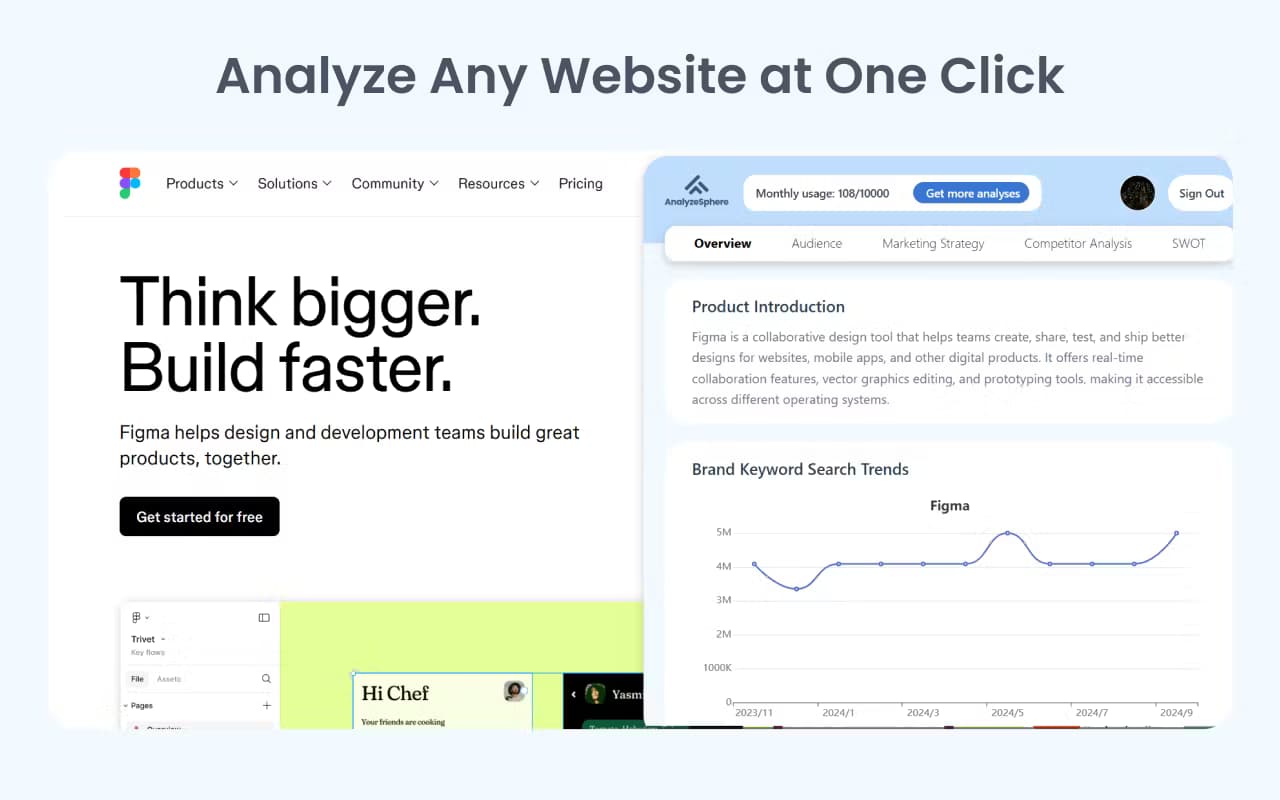
About AnalyzeSphere
What Is AnalyzeSphere
AnalyzeSphere is a browser extension built around a simple promise: you land on a website, you click once, and you get a read on the business behind it. That covers a competitor's pricing page, a new startup's landing page, or a site you ran into while researching a market. Instead of opening a dozen tabs and taking notes by hand, you let the tool summarize what the page is doing.
The problem it targets is familiar to anyone who does market research. Gathering competitive intel usually means jumping between similar tools and stitching the results together yourself. AnalyzeSphere compresses that into a single pass over the page you're already looking at. That's the appeal.
Time to be upfront about the limits. AnalyzeSphere is a browser extension. It works on sites you can open in a browser, and its output is only as good as what the page exposes. If you're hunting for data behind a login or an offline dataset, this isn't the tool for that. Pricing and the full feature set are thin right now. Treat its public site as the place to confirm specifics before you commit.
Getting Started
- Install the AnalyzeSphere extension from your browser's extension store.
- Pin the extension so it stays visible in your toolbar.
- Open the website you want to analyze.
- Click the AnalyzeSphere icon to run the one-click analysis.
- Review the on-page report and save or export the insights for later.
Product Information
A quick look at AnalyzeSphere's pricing, supported platforms, and performance.
Best for
The users, tasks, and scenarios where this tool fits best.
Users
- Market researchers
- Startup founders
- Sales teams
Tasks
- Competitor research
- Website profiling
- Market scanning
Scenarios
- Preparing for a sales call
- Early market research
- Casual browsing
Key features
One-Click Website Analysis
The extension runs its analysis from a single click while you're on a page. You don't upload anything. You don't paste a URL into a separate dashboard. For people who look at a lot of sites, that low friction matters more than a long feature list.
Competitive Analysis Reports
AnalyzeSphere frames its output as competitive analysis, meaning it tries to surface how a site positions itself and what it offers. It's aimed at the kind of question you'd ask when comparing players: what is this business, and how does it present itself to a visitor who lands on its page for the first time. Treat the report as a starting point for your own read rather than a finished verdict.
Business Insights on the Page
Beyond a straight summary, the tool pitches business insight, the practical read on what a site is doing. That's handy when you're scanning several sites and want to know quickly which ones deserve a closer look before you invest real time in any single one. The value depends on how much the page reveals.
Browser-Based Workflow
Because it lives in your browser, AnalyzeSphere fits into whatever you're already doing. No new app to keep open, and no tab-switching to a separate dashboard when you want a quick read on something. If you live in your browser for research, that's the whole point, and it keeps the tool out of your way when you don't need it.
Pros and cons
Pros
- Runs from a single click, so there's almost no setup between you and the insight.
- Lives in your browser and folds into your existing research flow.
- Frames output as competitive analysis and business insight rather than a raw page dump.
- Works on any site you can open, which covers most public competitor pages.
Cons
- Only sees what a page exposes, so it can't pull data from behind a login or an offline source.
- Pricing and full feature details aren't clearly published, which makes it hard to judge fit before installing.
- As a browser extension, it's tied to the browsers and stores that carry it, not every environment.
- Little independent coverage exists, so there's no outside track record to lean on yet.
Frequently asked questions
It's a browser extension that analyzes the website you're currently viewing and returns competitive analysis and business insights in one click. Think of it as a research shortcut for sites you're already looking at, not a full data platform.
Related content
Explore related tools, skills, and articles for AnalyzeSphere.
AnalyzeSphere Alternatives

Base Code
Base44 (Wix) · Coding · ProductivityBase Code is a shared cloud development environment from Base44. Teammates describe changes to an existing GitHub codebase in chat, preview them live and send them back as pull requests.

Google EmbeddingGemma 2
Google DeepMind · Writing · Image · CodingGoogle EmbeddingGemma 2 is a 740M-parameter open model that turns text, code, images, audio, and video frames into vectors in one 768-dimension space, running on phones and laptops.

GitGlow
GitGlow · Coding · ProductivityGitGlow is a local-first desktop Git client that lets independent developers review their own code and their AI agents' changes in one place before shipping.