

Anam
Anam · Voice & Language · Video
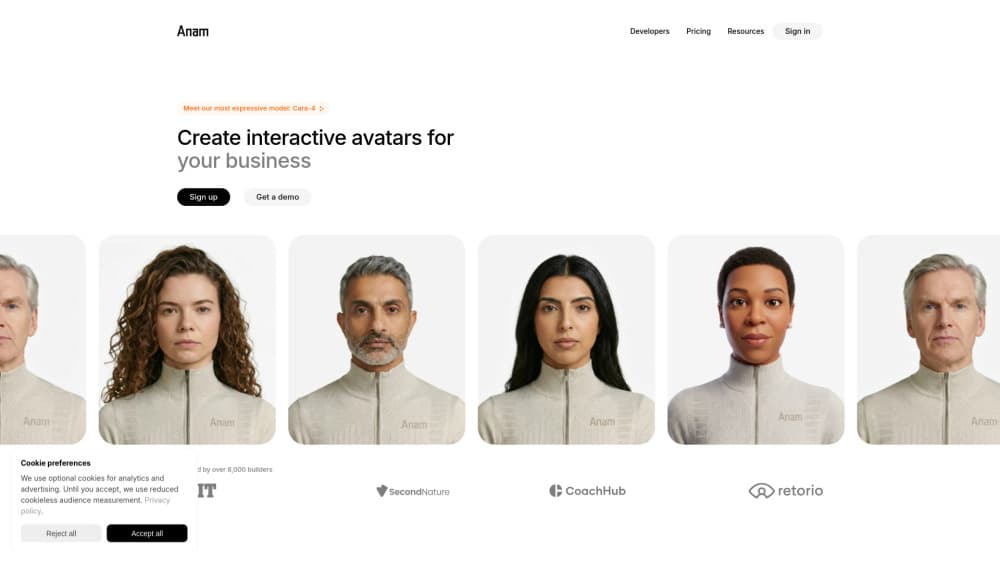
Anam is a real-time AI avatar API that adds a photorealistic face to conversational AI. You plug your own language model into its Personas, and its CARA models render a talking, emoting avatar with lip sync good enough to keep people in the conversation. It's built for teams shipping customer support, sales, tutoring, or training agents that need a human face at video speed. The product sits in the growing market for conversational video AI, where a talking face replaces the plain chat window. Interactive avatars are the whole point here: the agent speaks, listens, and reacts on screen instead of just printing text. That's a different job from generating a one-off video clip.
About Anam
What Is Anam
Anam makes AI agents visible. The company's pitch is simple: text and voice chatbots feel like tools, but a face makes a conversation feel like a conversation. It sells that as an API, so developers can drop an interactive avatar into an existing product instead of building video AI from scratch.
The core is a set of real-time avatar models. CARA controls every pixel through a diffusion model rather than stitching clips together. That's how Anam gets natural micro-expressions and tight lip sync instead of the stiff, cut-together look older avatar tools produced. According to Anam, its own benchmark puts CARA-4 first across overall experience, lip sync, visual quality, and naturalness.
The limits matter as much as the strengths. Anam provides the face, not the brain. You bring the LLM and the voice, so the quality of the final conversation depends heavily on what you plug in. Latency also scales with your setup, and avatar API pricing rises quickly once you move past small experiments.
Getting Started
- Create an account at Anam's Lab and pick a plan, starting with the free tier if you just want to test.
- Choose a stock avatar or upload an image to build a custom one, then select or upload a voice.
- Connect your language model and define a Persona, adjusting its personality and settings as needed.
- Embed the avatar through the no-code widget or wire it up with the JavaScript or Python SDK.
- Run a test session, check lip sync and response timing, then push it into production.
Product Information
A quick look at Anam's pricing, supported platforms, and performance.
Best for
The users, tasks, and scenarios where this tool fits best.
Users
- Product teams at SaaS and support companies
- Solo developers and small teams testing avatar agents
- Training and onboarding builders
Tasks
- Customer support agents
- Sales and lead qualification
- Language tutoring
Scenarios
- Launching a multilingual support agent before you hire speakers for every region.
- Turning an internal knowledge base into a face-to-face onboarding assistant that answers questions in real time.
- Piloting an interactive avatar demo for a client or investor without a full engineering sprint.
Key features
Real-time avatar rendering with CARA
Anam's CARA models generate the avatar frame by frame at 25fps and 720x480. Every pixel is controlled, not replayed from pre-recorded clips. That's what lets expressions shift mid-sentence rather than snapping between poses. The trade-off is resolution. It's built for live conversation, not cinematic output.
Low latency built for conversation
Anam reports a 180ms median server-side response time. It claims that's about 33% faster than the next-best competitor. In practice, that's the difference between a conversation that flows and one where people talk over the avatar. Actual numbers still depend on your network and how fast your own LLM responds.
Bring your own LLM and voice
You aren't locked into Anam's models for the thinking or the speaking. Plug in any LLM, and choose from 70+ voices or upload a custom one. This flexibility is the main draw for teams that already have a tuned pipeline. It also means Anam supplies the face only, so a weak underlying model shows up on screen.
Custom and stock avatars
Create a custom avatar from a single uploaded image, or start with one of 20 stock avatars. Those cover photorealistic, 3D, anime, and comic book looks. The image-to-avatar path is quick enough for a same-day prototype. Heavier realism work still benefits from testing a few source images first.
Tool calling and knowledge retrieval
Personas can call external tools and pull from a knowledge base during a session, so the avatar can look things up and act instead of just chatting. For support and sales use cases, that's what separates a talking head from a working agent. Setup work sits on your side, since you define the tools and data sources.
Multilingual conversations
Anam supports over 70 languages with native accents and dialects, which covers roughly 95% of the world's speakers by the company's count. A single Persona setup can serve international users without rebuilding per region. Voice quality and accent accuracy are worth spot-checking in your target languages before launch.
No-code Lab and SDK options
Anam's Lab lets you configure personalities, test voices, and validate a use case without writing code. When you're ready, the JavaScript and Python SDKs and REST API support every modern web framework. Teams can prototype in the Lab and move to code when the concept holds up.
Pros and cons
Pros
- Real-time rendering with low latency, which keeps back-and-forth conversation natural
- Bring-your-own LLM and voice means it fits existing pipelines instead of replacing them
- Image-to-avatar and a stock library cover both fast prototypes and custom branding
- Support for 70+ languages and native accents suits global products
- Free tier and a $12 Starter plan make early testing cheap
Cons
- You supply the LLM and voice, so the final quality depends on your stack, not just Anam
- Output is capped at 720x480 resolution, which won't satisfy cinematic needs
- Conversation length limits on lower tiers (3 to 10 minutes) block long-form use until you pay for Growth
- Costs climb fast at scale, from $299/mo for Growth to $999/mo for Professional
Frequently asked questions
It adds a photorealistic, real-time face to an AI agent through an API. You connect your own language model and voice, and Anam renders the avatar so it talks, listens, and emotes during a live video conversation.
Related content
Explore related tools, skills, and articles for Anam.
Anam Alternatives

Foley
Hanamori Labs, LLC · Voice & Language · Productivity · AI AssistantFoley is a voice to-do list that turns a spoken sentence into a filed task, complete with project, date and time, then helps you plan the day around what is already there.

HireKey
HireKey · Voice & Language · Productivity · LeaningHireKey is an AI job search copilot built by a former tech recruiter. It checks role fit, tailors resumes, runs interview practice and tracks every application.

Fluence
Yay Software (Yannick Huchard) · Writing · Voice & Language · ProductivityFluence is an Android app that reads PDFs, EPUBs, Word files and web articles aloud, follows each sentence as it speaks, and answers questions about the text on the phone itself.