
Answer.AI - Your AI tutor
Answer.AI Lab Inc · Writing · Leaning
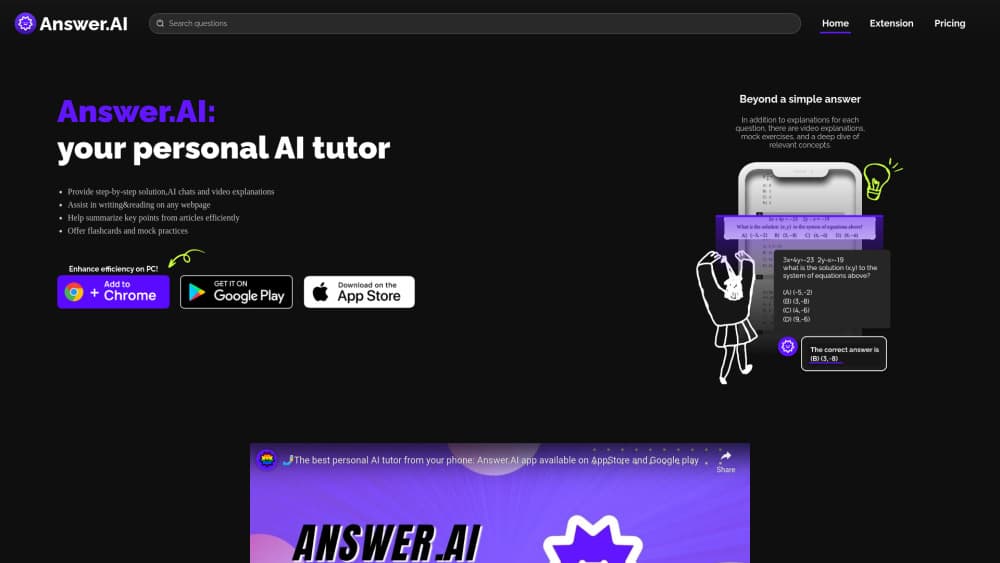
Answer.AI is an AI tutor app for students that explains homework step by step, builds flashcards and quizzes, and helps with college prep and counseling.
About Answer.AI - Your AI tutor
What Is Answer.AI
Answer.AI is a study app built around one job: getting a student unstuck at any hour. You photograph or type a question, and the tutor works through it line by line instead of dropping a bare answer at the bottom. The company is Answer.AI Lab Inc, the app launched in March 2023, and its store listing reports more than 6 million learners. It runs on iOS and Android, with a Chrome extension for homework on a laptop. Most people arrive looking for an AI homework helper and stay for the study tools.
The second half of the product has little to do with worksheets. A student can turn a solved problem into a flashcard, generate a quiz from a chapter, join a study group, or ask for help with the Common App essay, scholarship searches and financial aid forms. The app also offers counseling style support for stress and social anxiety, which is unusual for a homework tool.
The limits matter. Free access runs on credits the app calls lightning bolts, and a heavy session eats through them fast. Refill packs and the Pro subscription take over from there. Answers are generated by AI models, so a wrong step can slip into an otherwise clean explanation, and the company publishes no API.
Getting Started
- Install Answer.AI from the App Store or Google Play, or add the Chrome extension, then sign in with an email or school account.
- Type a question, or tap the camera and scan the page you're stuck on. Handwritten work is accepted.
- Read the breakdown one step at a time. Follow up on the step that doesn't make sense yet.
- Save the result as a flashcard or turn the topic into a quiz, then share the set with a study group if you're revising together.
- Check the progress view before a test, and move to Pro if the credit limit keeps interrupting you.
Product Information
A quick look at Answer.AI - Your AI tutor's pricing, supported platforms, and performance.
Best for
The users, tasks, and scenarios where this tool fits best.
Users
- High school students
- College students
- Parents
Tasks
- Working through a problem you got wrong
- Building a flashcard set before a test
- Getting a second read on a college essay
Scenarios
- Cramming at midnight before an exam
- Stuck on one concept in class
- Studying with friends
Key features
Step by Step Answers Instead of Raw Results
The core of the AI tutor is the breakdown. Ask a quadratic equation or a chemistry stoichiometry problem and you get the working, with each line labeled. That matters for homework you have to show work on, and it makes the app useful for learning rather than copying. Follow up questions keep the thread, so a student can push on the one line that lost them.
Photo and Handwriting Input
Point the camera at a textbook page or a page of your own handwriting and the app reads it. This is the feature most students open first, because typing a full equation is slow on a phone. Printed diagrams and word problems come through reliably in our checks. Very messy handwriting and faint pencil still need a retake.
Flashcards and Custom Quizzes
Solved problems and scanned chapters can be turned into flashcards or a quiz. As a flashcard app for students, the draw is speed: scan a chapter and half the deck is already built. The AI study companion angle shows here: you pick the topic, the app drafts the cards, and you edit anything that reads wrong. Progress tracking runs across both formats, which makes the week before a test less of a guess.
Study Groups and Shared Sessions
Study groups let classmates share decks, notes and questions in one space. It's the part that separates this from a solo chatbot, and it works well for a group revising the same unit. Groups need an invite from whoever sets them up, and shared material follows the same account limits as personal use.
College and Scholarship Guidance
The app reaches past coursework into admissions. Students can get feedback on a Common App essay, browse scholarships, and ask about financial aid steps. Treat this as a college prep app for direction and drafting, not as a replacement for a school counselor who knows your transcript.
Chrome Extension for Laptop Homework
The extension brings the same tutor into a browser tab, which helps on essay research and web based assignments. It logs into the same account, so saved cards and history carry over. Desktop support stops at the extension, since there's no full desktop app.
Pros and cons
Pros
- Explanations arrive as ordered steps, which suits homework that has to be shown.
- The camera handles printed problems and handwriting, so a phone is enough to get started.
- One account covers tutoring, flashcards, quizzes and college planning, which cuts down on app switching.
- Study groups and progress tracking give it a term long use, not a one off rescue.
Cons
- The free tier runs on credits that drain quickly, so regular users end up paying or waiting.
- AI answers can be wrong on multi step problems, and a confident tone makes errors easy to miss.
- No API and no full desktop app, which rules it out for developers and for schools that want integration.
- Subscription billing goes through the app stores, so refunds are hard to get.
Frequently asked questions
Yes, the app is free to download and use with a credit allowance. Once the credits run out, you either wait, buy a refill pack, or subscribe to Pro for unlimited usage and faster answers.
Related content
Explore related tools, skills, and articles for Answer.AI - Your AI tutor.
Answer.AI - Your AI tutor Alternatives

Google EmbeddingGemma 2
Google DeepMind · Writing · Image · CodingGoogle EmbeddingGemma 2 is a 740M-parameter open model that turns text, code, images, audio, and video frames into vectors in one 768-dimension space, running on phones and laptops.

MePersona
MePersona, Inc. · Writing · Productivity · MarketingMePersona is an AI unified inbox for creators. It learns your voice, drafts replies to fan messages from 12 platforms, and sends only what you approve.

Fluence
Yay Software (Yannick Huchard) · Writing · Voice & Language · ProductivityFluence is an Android app that reads PDFs, EPUBs, Word files and web articles aloud, follows each sentence as it speaks, and answers questions about the text on the phone itself.