

AnyoneCanAI by Parallelhq
Parallel (Parallelhq) · Business · Other
AnyoneCanAI is Parallel's AI product design toolkit: a card deck, FigJam template, worksheets, case stories, and guided design sprints for teams turning AI ideas into testable concepts.
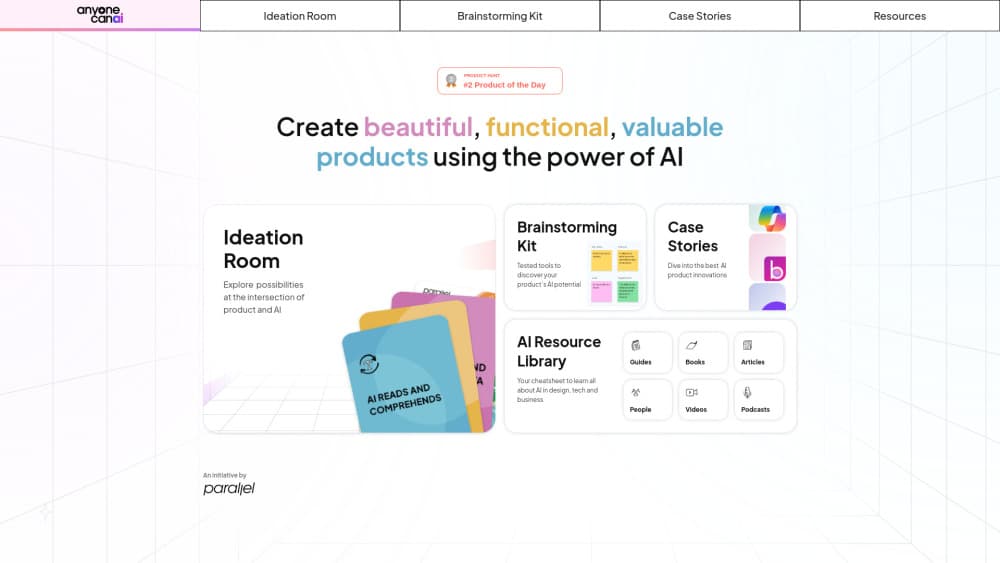
About AnyoneCanAI by Parallelhq
What Is AnyoneCanAI
AnyoneCanAI is a set of physical and digital materials for planning AI products. Parallel, a design studio that works with AI startups and SaaS teams, built it around one problem: most teams jump straight to a chatbot before they work out which user problem AI should solve.
The kit has four parts. A deck of AI Ideation Cards prompts questions about users, tasks, data, and trust. A second deck of Ethical AI Cards forces a check on harm, bias, and disclosure. The Brainstorming Kit adds a FigJam template, a PDF worksheet, and a step-by-step guide for running a session. The AI Design Sprint wraps all of it into a four-stage workshop: problem framing, concept development, solution shaping, and an ethics check.
There's also a library of case stories, with write-ups on how Figma, Vercel's v0, Miro, Notion, Perplexity, Canva, and Grammarly GO handled AI in their products. Read them as design references, not benchmarks. Nothing here generates a prototype for you, and the sprint still needs somebody to run the room.
Getting Started
- Start with the free downloads. Open the Brainstorming Kit page and grab the AI ideation worksheet and the step-by-step guide as PDFs.
- Clone the FigJam template into your own workspace. It carries the session structure and prompts, so remote and in-room teams follow the same flow.
- Pick a real product problem before the meeting. A vague topic such as "add AI" produces vague cards, while a specific job such as "help new sellers write a first listing" gives the deck something to work on.
- Order the card deck if you want a physical session. The set costs ₹999 plus shipping and currently ships only inside India.
- Book an AI Design Sprint when the idea needs validation. Parallel runs the workshop with your team and follows it with an engineering debrief on data sources, feasibility, and budget.
Product Information
A quick look at AnyoneCanAI by Parallelhq's pricing, supported platforms, and performance.
Best for
The users, tasks, and scenarios where this tool fits best.
Users
- Product managers exploring AI features
- Designers who need to explain AI tradeoffs
- Founders and small teams without a research department
- Workshop leads, teachers, and community organizers
Tasks
- Deciding where AI belongs in a product
- Running an AI ideation jam
- Stress-testing a concept for risk
- Building a concept brief
- Studying real AI product patterns
Scenarios
- A kickoff workshop with mixed technical and business attendees
- Solo prep before a planning meeting
- A classroom or meetup session on AI literacy
Key features
AI Ideation Card Deck
The core object is a printed deck of AI ideation cards, split into prompts that push a team through users, jobs, data, interaction, and value. Each card asks a question rather than naming a feature, which is the point. A team that argues about the answer learns more than a team that picks from a menu. The deck ships with an ideation worksheet and a printed guide, and it works without power or wifi, which matters for offsite sessions.
Ethical AI Cards
A second deck covers the parts of AI product design that get skipped under deadline pressure. Cards raise consent, data provenance, bias, transparency, and what happens when the model is wrong. The sprint uses them as a formal stage, so the check happens on the calendar instead of at the end. For teams shipping to regulated markets, having those questions written down makes the review easier to document.
Brainstorming Kit and FigJam Template
The Brainstorming Kit is the digital half of the product. It includes a FigJam template with step-by-step instructions, a PDF worksheet, and a guide for running an AI ideation session. Clone the template and your board is ready, with sections for the problem, user needs, idea clusters, and the ethics pass. The PDFs are free, so a remote team can start without buying anything.
AI Design Sprint
Parallel runs a facilitated AI design sprint built on Google Design Sprint principles. It moves through four stages: problem framing, concept development, solution shaping, and an ethics check. The output is a concept the team can defend, not a finished prototype. A debrief with engineers follows, covering data owners, data quality, technical feasibility, and budget, which is where many AI ideas quietly die.
Case Stories Library
The site documents more than twenty AI product experiences, from Figma's automation work and Vercel's v0 to Notion, Perplexity, Canva, and Stark's accessibility sidekick. Each story describes a design decision and why it worked for users. The collection is useful for pattern hunting before a workshop. Treat the write-ups as editorials, since the site is published by a design studio rather than an independent research group.
Resources for Continued Reading
Beyond the kit, the resources section collects guides, books, articles, people to follow, podcasts, and videos about AI product design. The book list leans on human-centered design titles, including work by Don Norman and Carol Smith. It's a reading list, not a course, so expect to assemble your own curriculum from it.
Pros and cons
Pros
- The digital kit, including the worksheet and FigJam template, costs nothing and covers a full session.
- Cards force questions about users, data, and harm before a team commits to a feature.
- The ethics deck gives a structured slot for risk review instead of a last-minute checklist.
- Case stories document real shipped AI experiences with the design reasoning attached.
- The format works for mixed teams, including people with no technical background.
Cons
- The physical deck ships only inside India, so international teams are limited to the PDFs and FigJam board.
- There's no app, API, or generated output, which means the quality of a session depends on the facilitator.
- Case stories are studio editorials, not measured benchmarks, so don't read them as performance data.
- Pricing is a one-time ₹999 for the deck with no subscription tier, and the sprint is quoted per engagement, so costs are not published.
Frequently asked questions
AnyoneCanAI is a toolkit from Parallel for designing AI products. It combines a printed AI ideation card deck, ethical AI cards, a free FigJam template and worksheet, a case story library, and a facilitated AI design sprint.
Related content
Explore related tools, skills, and articles for AnyoneCanAI by Parallelhq.
AnyoneCanAI by Parallelhq Alternatives

Knocket
Knocket (Tencent RTC team) · Productivity · Business · ChatbotKnocket is a free live chat and contact page tool that lets visitors message you from your website, app, or a shareable link, with every reply handled from Telegram or one inbox.

shippedit.me
Krawlup · Marketing · Businessshippedit.me now redirects to Krawlup, a web platform that audits SEO, AEO and page speed every week, then hands the fixes to AI coding agents over MCP.

Ayven
Alknoma · Productivity · BusinessAyven is an AI control centre by Alknoma that turns a plain-language goal into a dated plan, hands the work to your people and AI agents, and asks for your approval only when the call is yours.