

Knocket
Knocket (Tencent RTC team) · Productivity · Business · Chatbot
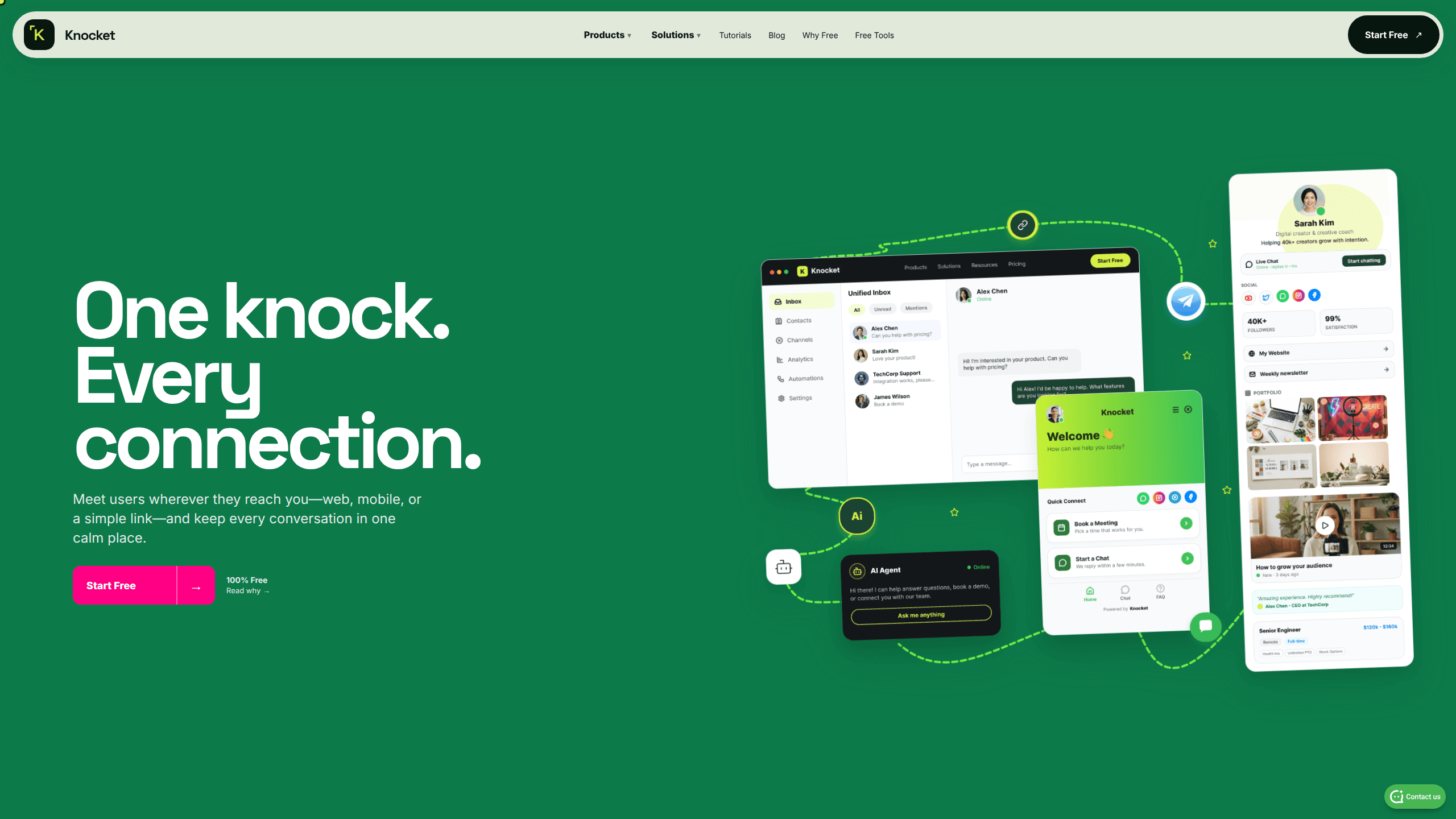
Knocket is a free live chat and contact page tool that lets visitors message you from your website, app, or a shareable link, with every reply handled from Telegram or one inbox.
About Knocket
What Is Knocket
Knocket is a customer contact layer for people who ship products alone or in small teams. It puts a chat bubble on your website, a talkable page behind a single shareable link, and an in-app chat window inside mobile apps. All three feed one inbox, so a question from a Shopify store and a question from an iOS app land in the same thread list.
The product comes from the Tencent RTC team and runs on that company's real-time messaging infrastructure. It launched in October 2026 and is free, including the AI agent. There's no card on file and no message cap.
The tradeoff is scope. Knocket has no assignment queues, no SLAs, and no multi-workspace billing. Custom paths like knocket.ai/yourname work, but full custom domains don't. If you already run a support org with routing rules, this isn't a replacement for a helpdesk.
Getting Started
- Create a free account at knocket.trtc.io and claim your handle, which becomes your contact page address.
- Pick a surface: paste the web widget script before the closing body tag, publish the contact page, or load the chat URL in a WebView for iOS and Android.
- Adjust colors, welcome text, online status, and offline form fields from the console. Changes apply live without a redeploy.
- Connect Telegram so new messages reach your phone, then upload docs and FAQs if you want the AI agent to answer routine questions.
- Go live and reply from the Knocket inbox or straight from Telegram. The visitor sees the answer in the same thread.
Product Information
A quick look at Knocket's pricing, supported platforms, and performance.
Best for
The users, tasks, and scenarios where this tool fits best.
Users
- Solo founders
- Creators and freelancers
- Small support teams
- Developers and open source maintainers
Tasks
- Answering pre-sale questions on a landing page
- Collecting bug reports inside a mobile app
- Replacing a mailto link on a portfolio or booking page
Scenarios
- A Shopify or WordPress store during a launch week
- An indie SaaS trial
- A creator taking coaching inquiries
Key features
One-Line Web Widget
Paste one script tag before the closing body tag and a free live chat widget appears on the page. It loads async, so it doesn't block rendering. The snippet carries your account identifier, and the same code works on WordPress, Shopify, Webflow, Next.js, Astro, React, Vue, Wix, Squarespace, or plain HTML. No plugin dependency and no backend to run.
Shareable Contact Page with Pinned Chat
Every account gets a public page at knocket.ai/your-handle with a cover, avatar, bio, social icons, links, and a chat button that stays pinned. There are 18 block types, including booking, FAQ, portfolio, menu, hours, and QR details. You can build it by hand or generate a first draft from a one-sentence prompt, then edit the copy and theme.
Reply from Telegram
When a visitor sends a message, it pings your Telegram within about a second. You quote-reply on your phone and the answer appears in the visitor's chat window. That's Telegram live chat doing the work of a support console. It removes the need for a separate support app, and it's the reason a one-person team can stay responsive during a workday. Images, videos, and files move in both directions.
One Unified Inbox
Web widget, contact page, mobile widget, and email all land in the same conversation list. A visitor who writes from your site on Monday and from your app on Wednesday shows up under one identity if you pass a user ID, email, or tag. Read receipts work both ways, and either side can recall a message before it's read.
AI Agent on Your Own Model Key
Upload docs and FAQs, and the AI customer support agent answers routine questions across all three surfaces. It runs on a model key you supply from OpenAI, Anthropic, Google, or another provider, so Knocket charges nothing for the AI itself. You pay your model provider directly. The agent hands the thread to a human when the question falls outside your uploaded material, and you can keep handoff on all the time.
Mobile In-App Chat via WebView SDK
The in-app chat SDK is a WebView wrapper rather than a native chat framework. Load the Knocket chat URL in WKWebView on iOS, WebView on Android, react-native-webview, or webview_flutter, and register a close channel so the page can dismiss itself. One integration covers four platforms, and the conversation history matches what you see in the browser.
Visitor Identity and Offline Capture
Add a data-user-id attribute or pass a user ID in the URL, and messages from the same person group together across sessions and devices. When you're away, the bubble swaps to a lead form that collects an email or phone number. The thread resumes when you're back, so a late reply still reaches the person who asked.
Pros and cons
Pros
- The whole core product is free, including the AI agent, with no message caps or per-seat pricing, which makes it a practical free live chat alternative to per-seat tools.
- Setup takes one script tag or one link, so you can test live chat on a real site the same afternoon.
- Telegram replies keep you responsive without installing another support app or watching a second inbox.
- The same thread follows a visitor across web, contact page, and mobile app when you pass an identity.
- No custom domain needed to start, and the contact page doubles as a link in bio with chat.
Cons
- No assignment queues, SLAs, or multi-workspace billing, so support teams above a handful of people will outgrow it fast.
- Custom domains aren't supported. You share a knocket.ai path, which looks less branded on a business card.
- The AI agent is only as good as the docs you upload, and you have to manage your own model key and provider billing.
- Public reviews are thin because the product launched in October 2026, so you're relying on the official docs and your own trial.
Frequently asked questions
Knocket gives visitors a way to message you from your website, your app, or a shareable contact link, and gives you one place to answer. It suits founders and small teams who want live chat without a helpdesk contract.
Related content
Explore related tools, skills, and articles for Knocket.
Knocket Alternatives

Base Code
Base44 (Wix) · Coding · ProductivityBase Code is a shared cloud development environment from Base44. Teammates describe changes to an existing GitHub codebase in chat, preview them live and send them back as pull requests.

FloorGen
Vinit Kumar (FloorGen) · Productivity · China AIFloorGen is a browser-based floor plan maker that turns a sentence or a sketch into an editable 2D plan and a 3D walkthrough. Export to PDF, DXF or video, and draw without an account.
Agibot
Agibot · Productivity · AI Assistant · ChatbotAgibot is a personal AI agent for Mac that keeps running after you close the window, runs routines on a schedule, and works from Telegram or Slack with your own API keys.