

Apparent for Gmail
Apparent · Writing · Marketing
Apparent for Gmail is a free Chrome extension that puts the newest reply on top, shows every message in a thread, hides Gemini summaries, and trims visual clutter. It runs locally in your browser.
About Apparent for Gmail
What Is Apparent for Gmail
Apparent for Gmail fixes the small parts of Gmail that get in the way of reading email. It's a Chrome extension, not a mail client, so your messages stay in Google's servers and the extension only changes how the page looks and behaves on your device. Four switches do most of the work: thread order, message visibility, AI overviews, and interface clutter.
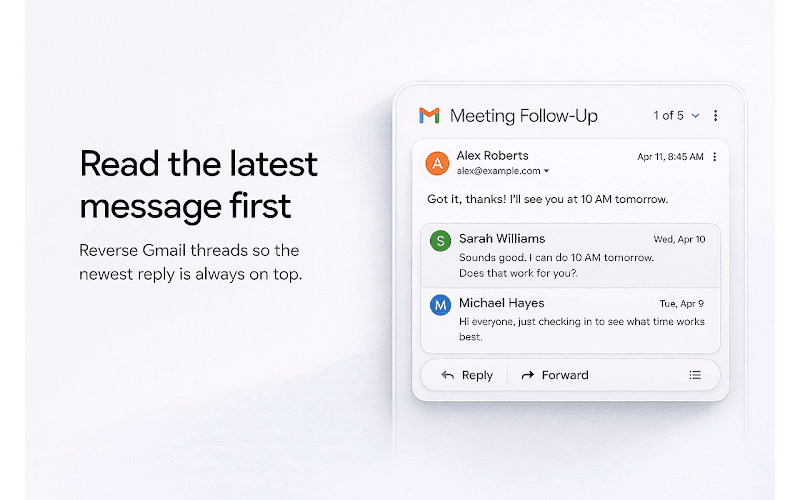
The appeal is narrow and practical. If you read long threads, you probably scroll past replies you've already seen to reach the one that arrived this morning. Apparent flips that order so the latest message sits at the top. If Gmail collapses earlier messages in a conversation, the extension opens them. If a Gemini summary takes up the first screen of an email, you can switch it off.
The limits matter as much as the features. It only works on Gmail in a desktop Chrome browser, it needs Gmail's conversation view for the reversed order to make sense, and it can't reorder quoted text inside a message. Hiding AI overviews covers the summary block at the top of a thread, not every Gemini control across Gmail. Gmail interface changes can also break a feature until the developer ships an update, which is why the extension has shipped several reliability releases since March.
Getting Started
- Open the Apparent for Gmail listing on the Chrome Web Store and select Add to Chrome.
- Confirm the permission prompt. The extension asks for storage, the active tab, and access to mail.google.com.
- Open Gmail in a tab and click the Apparent icon in the toolbar.
- Run Auto Setup or switch features on one at a time, then reload the Gmail tab if the page was already open.
- Adjust any setting later from the same popup, and turn a feature off if a Gmail update changes how it behaves.
Product Information
A quick look at Apparent for Gmail's pricing, supported platforms, and performance.
Best for
The users, tasks, and scenarios where this tool fits best.
Users
- People who live in their Gmail inbox
- Users who don't want Gemini summaries
- Privacy-conscious users
Tasks
- Reading a 30-message project thread
- Catching up on a collapsed conversation
- Cleaning up the Gmail interface
Scenarios
- Job hunting
- Customer support work
- Long-term email accounts
Key features
Newest message first
The extension can reverse Gmail conversations, so the latest reply appears at the top and older messages follow below. It works on supported threads in conversation view and changes only the display order on your screen. The email itself stays untouched in Gmail, which means your phone and other clients still show the original order.
Every message expanded
Gmail hides older messages behind a collapsed summary in long threads. Apparent opens them so you can read the whole conversation without clicking through each block. Quoted text inside a single message still can't be reordered, and the feature follows whatever Gmail renders in the browser, so a Gmail redesign can affect it.
Hide Gmail AI overviews
Gemini summaries sit at the top of many threads now, and they push the actual message down the page. This setting hides those overview blocks in supported positions. It doesn't remove every Gemini button or AI surface in Gmail, so expect the Gemini icon elsewhere in the interface to stay where it is.
Declutter the interface
Apparent can minimize the search and top bar, shrink the left sidebar, and hide selected buttons such as the Gmail logo, the support icon, the Gemini button, the Google One upgrade prompt, and the Studio button. Each item depends on what Gmail shows in your account, so the list varies between personal and Workspace accounts. The result is a page closer to a plain reading view.
Per-feature toggles and Auto Setup
The popup lists each feature with its own switch, and Auto Setup applies a sensible starting set in one pass. You can turn features off one at a time if something feels wrong, which is useful when Gmail changes its layout. Settings and reminder state live in Chrome extension storage, and some preferences can sync through Chrome's own sync.
Local processing with no account
There's no sign-up, no dashboard, and no email forwarding. The extension runs content scripts on mail.google.com and stores only display preferences and onboarding state. The Chrome Web Store disclosure states the developer doesn't collect or use your data, and the privacy policy says the extension can't send Gmail content to Apparent's servers.
Pros and cons
Pros
- Reverses thread order instantly, which saves real scrolling on long conversations.
- Four independent toggles, so you can keep the parts you want and ignore the rest.
- No account and no remote email processing, which keeps the trust question simple.
- Free, small download, and quick to remove if a Gmail update breaks a feature.
Cons
- Chrome on desktop only, and the features need Gmail's standard web interface.
- A Gmail redesign can quietly disable a setting until the next extension update.
- AI hiding covers the overview block, not every Gemini element in the mailbox.
- Reversed order is display-only, so other devices and apps still show oldest first.
Frequently asked questions
Yes. It installs from the Chrome Web Store at no cost, and there's no paid tier, trial, or account to create.
Related content
Explore related tools, skills, and articles for Apparent for Gmail.
Apparent for Gmail Alternatives

Google EmbeddingGemma 2
Google DeepMind · Writing · Image · CodingGoogle EmbeddingGemma 2 is a 740M-parameter open model that turns text, code, images, audio, and video frames into vectors in one 768-dimension space, running on phones and laptops.

MePersona
MePersona, Inc. · Writing · Productivity · MarketingMePersona is an AI unified inbox for creators. It learns your voice, drafts replies to fan messages from 12 platforms, and sends only what you approve.

Fluence
Yay Software (Yannick Huchard) · Writing · Voice & Language · ProductivityFluence is an Android app that reads PDFs, EPUBs, Word files and web articles aloud, follows each sentence as it speaks, and answers questions about the text on the phone itself.